Web Console & CLI
Interactive command-line interface accessible from browser, SSH, or serial console. Run diagnostics, configure infrastructure, and troubleshoot without leaving the appliance.
Multiple Ways to Connect
Access TR7 CLI through the method that fits your workflow
Web UI Console
Access CLI directly from your browser. No installation, no SSH client required. Results appear on the same screen.
SSH Access
Secure shell access for remote management. Ideal for scripting, automation, and secure remote administration.
Serial / TTY
Out-of-band console access via serial port. Essential for recovery scenarios when network is unavailable.
VGA / Console
Direct console access for physical appliances and virtual machines. Works with hypervisor consoles.
sys-cmd Diagnostic Tools
Powerful diagnostic tools for network troubleshooting, traffic analysis, and system monitoring
Network Tools
pingSend ICMP echo requestsping6Send IPv6 ICMP echo requeststracerouteShow packet path to destinationdigSend DNS queriesnslookupDNS lookup queriesfpingFast ping multiple hostsHTTP Tools
curlHTTP/HTTPS clientwgetFile download clienth1loadHTTP/1 load testingwrkHTTP load testingDiagnostic Tools
tcpdumpPacket capture (pcap output)ssldumpSSL/TLS protocol analysissslscanSSL/TLS scannernetstatNetwork connections and statsssSocket statistics (modern netstat)iftopReal-time bandwidth usagehtopInteractive process viewernmapNetwork scanningSystem Tools
arpARP table managementarpingSend ARP requests to hostsipShow IP and interface infoipcalcIP calculatorroute-tableRoute table managementfileTemporary file managementncftpFTP clienttelnetTELNET protocol clientextend-data-diskExtend data disk wizarddebugToggle debug modeInvestigation Ready
Run targeted diagnostics from the appliance. Capture traffic, test connectivity, analyze SSL handshakes — all without SSH. Results can be saved to files for download.
sys-cmd tcpdump -i eth0 -c 100 | to-file capture.pcapsys-cmd curl -I http://backend:8080/healthsys-cmd netstat -an | grep ESTABLISHED | wcFilter & Transform Output
Chain up to 8 pipe commands to filter, sort, and save command output
grepFilter lines by patternwcCount lines/words/charssortSort linesheadShow first N linestailShow last N linesuniqRemove duplicate linescutExtract columnsto-fileWrite to fileExample: Capture HTTP traffic and save to file
sys-cmd tcpdump -c 100 | grep "HTTP" | to-file capture.txtCommand Reference
Search and explore 400+ CLI commands for configuration and management
Select a command to view details
Web Console Interface
See the CLI in action — diagnostic commands from your browser
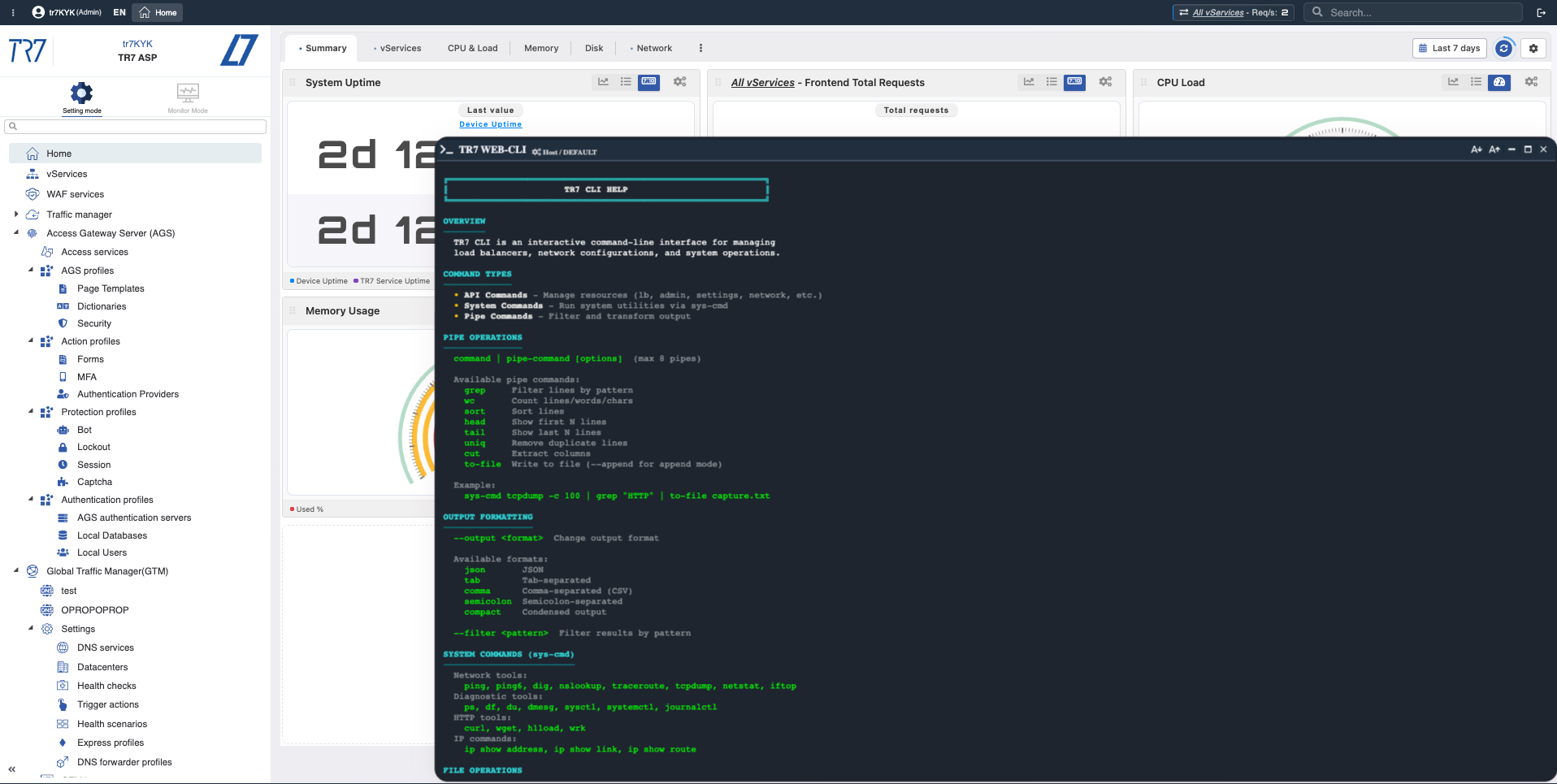
Interactive CLI
Run diagnostic commands directly from the web interface. Tab completion, command history, and instant results.
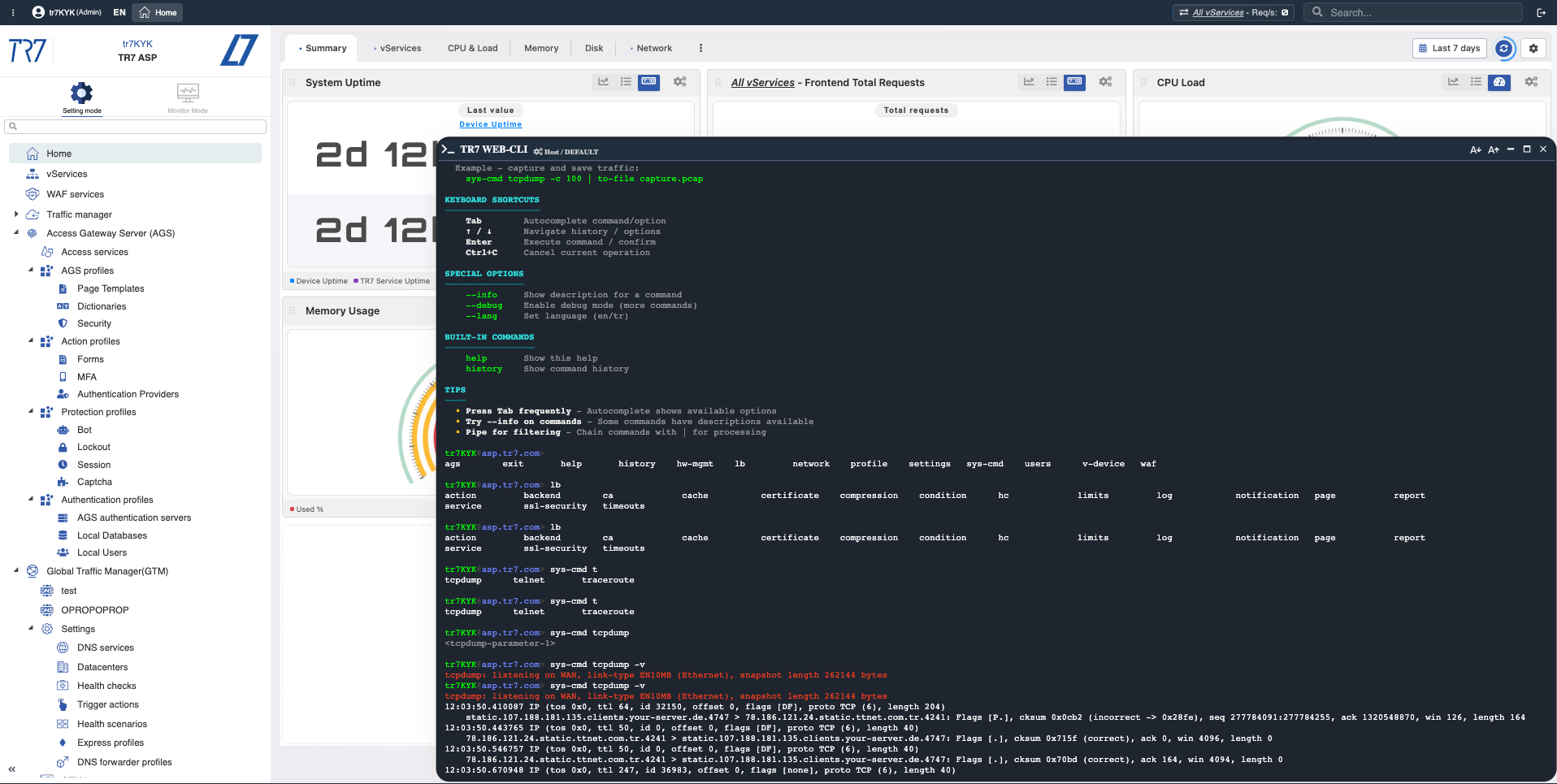
Command Output
Results displayed instantly. Save output to files for download or pipe through filters for analysis.
Experience the CLI
See how TR7 Web Console accelerates troubleshooting and configuration management
TR7 CLI Commands Reference
Complete list of 444 CLI commands for TR7 Web Console and command-line interface.
network fw-rule add ?
Description: Creates a new firewall rule (a security policy that controls inbound and outbound network traffic based on source/destination IPs, ports, and protocols, providing granular access control and network segmentation within route tables) instance with the provided configuration. You must supply all required fields in the request body. The system will generate a unique identifier for the new instance. The response includes the complete configuration of the newly created instance, including any auto-generated fields. This operation adds a new entry to the collection without affecting existing instances.
REST API Endpoint: POST /network/[zoneId]/fwRules
Category: network / fwRules
View Documentationnetwork fw-rule set ?
Description: Performs a complete replacement of a specific firewall rule (a security policy that controls inbound and outbound network traffic based on source/destination IPs, ports, and protocols, providing granular access control and network segmentation within route tables) instance identified by its ID. This is a full update operation where all required fields must be provided in the request body. Any fields not included will be reset to their default values. The instance ID cannot be changed. Use this when you want to ensure the instance has a specific, known configuration, replacing all previous settings. The response contains the updated instance as it was saved.
REST API Endpoint: PUT /network/[zoneId]/fwRules/[id]
Category: network / fwRules
View Documentationnetwork fw-rule update ?
Description: Performs a selective update of a specific firewall rule (a security policy that controls inbound and outbound network traffic based on source/destination IPs, ports, and protocols, providing granular access control and network segmentation within route tables) instance identified by its ID. This operation uses shallow merging at the first level - only the fields you include in the request body will be modified, while all other fields retain their current values. This is the recommended and most efficient approach when you want to change specific settings of an instance without affecting the rest of its configuration. The instance ID cannot be changed. The response contains the complete updated configuration after the merge operation.
REST API Endpoint: PATCH /network/[zoneId]/fwRules/[id]
Category: network / fwRules
View Documentationnetwork namespace add ?
Description: Creates a new route table (a per-tenant routing domain that isolates interfaces, IPs, routes, and policies for clarity and operational safety) instance with the provided configuration. You must supply all required fields in the request body. The system will generate a unique identifier for the new instance. The response includes the complete configuration of the newly created instance, including any auto-generated fields. This operation adds a new entry to the collection without affecting existing instances.
REST API Endpoint: POST /network/[zoneId]/namespaces
Category: network / namespaces
View Documentationnetwork namespace set ?
Description: Performs a complete replacement of a specific route table (a per-tenant routing domain that isolates interfaces, IPs, routes, and policies for clarity and operational safety) instance identified by its ID. This is a full update operation where all required fields must be provided in the request body. Any fields not included will be reset to their default values. The instance ID cannot be changed. Use this when you want to ensure the instance has a specific, known configuration, replacing all previous settings. The response contains the updated instance as it was saved.
REST API Endpoint: PUT /network/[zoneId]/namespaces/[id]
Category: network / namespaces
View Documentationnetwork namespace update ?
Description: Performs a selective update of a specific route table (a per-tenant routing domain that isolates interfaces, IPs, routes, and policies for clarity and operational safety) instance identified by its ID. This operation uses shallow merging at the first level - only the fields you include in the request body will be modified, while all other fields retain their current values. This is the recommended and most efficient approach when you want to change specific settings of an instance without affecting the rest of its configuration. The instance ID cannot be changed. The response contains the complete updated configuration after the merge operation.
REST API Endpoint: PATCH /network/[zoneId]/namespaces/[id]
Category: network / namespaces
View Documentationnetwork interface set ?
Description: Performs a complete replacement of a specific physical ethernet interface (a physical ethernet network card interface on the server; allows configuration of IP address, netmask, gateway, MTU, flow control, and other L2/L3 parameters; includes link status, speed/duplex settings, promiscuous mode, and NIC statistics monitoring features; used for direct physical network connectivity) instance identified by its ID. This is a full update operation where all required fields must be provided in the request body. Any fields not included will be reset to their default values. The instance ID cannot be changed. Use this when you want to ensure the instance has a specific, known configuration, replacing all previous settings. The response contains the updated instance as it was saved.
REST API Endpoint: PUT /network/[zoneId]/interfaces/[id]
Category: network / interfaces
View Documentationnetwork interface update ?
Description: Performs a selective update of a specific physical ethernet interface (a physical ethernet network card interface on the server; allows configuration of IP address, netmask, gateway, MTU, flow control, and other L2/L3 parameters; includes link status, speed/duplex settings, promiscuous mode, and NIC statistics monitoring features; used for direct physical network connectivity) instance identified by its ID. This operation uses shallow merging at the first level - only the fields you include in the request body will be modified, while all other fields retain their current values. This is the recommended and most efficient approach when you want to change specific settings of an instance without affecting the rest of its configuration. The instance ID cannot be changed. The response contains the complete updated configuration after the merge operation.
REST API Endpoint: PATCH /network/[zoneId]/interfaces/[id]
Category: network / interfaces
View Documentationnetwork interface add ?
Description: Creates a new VLAN virtual interface (a virtual network interface created via VLAN tagging on a physical ethernet interface according to IEEE 802.1Q standard; sends and receives tagged traffic with specified VLAN ID; used for network segmentation, traffic isolation, and multi-L3 network configuration; requires parent physical interface and VLAN ID specification) instance with the provided configuration. You must supply all required fields in the request body. The system will generate a unique identifier for the new instance. The response includes the complete configuration of the newly created instance, including any auto-generated fields. This operation adds a new entry to the collection without affecting existing instances.
REST API Endpoint: POST /network/[zoneId]/interfaces
Category: network / interfaces
View Documentationnetwork interface set ?
Description: Performs a complete replacement of a specific VLAN virtual interface (a virtual network interface created via VLAN tagging on a physical ethernet interface according to IEEE 802.1Q standard; sends and receives tagged traffic with specified VLAN ID; used for network segmentation, traffic isolation, and multi-L3 network configuration; requires parent physical interface and VLAN ID specification) instance identified by its ID. This is a full update operation where all required fields must be provided in the request body. Any fields not included will be reset to their default values. The instance ID cannot be changed. Use this when you want to ensure the instance has a specific, known configuration, replacing all previous settings. The response contains the updated instance as it was saved.
REST API Endpoint: PUT /network/[zoneId]/interfaces/[id]
Category: network / interfaces
View Documentationnetwork interface update ?
Description: Performs a selective update of a specific VLAN virtual interface (a virtual network interface created via VLAN tagging on a physical ethernet interface according to IEEE 802.1Q standard; sends and receives tagged traffic with specified VLAN ID; used for network segmentation, traffic isolation, and multi-L3 network configuration; requires parent physical interface and VLAN ID specification) instance identified by its ID. This operation uses shallow merging at the first level - only the fields you include in the request body will be modified, while all other fields retain their current values. This is the recommended and most efficient approach when you want to change specific settings of an instance without affecting the rest of its configuration. The instance ID cannot be changed. The response contains the complete updated configuration after the merge operation.
REST API Endpoint: PATCH /network/[zoneId]/interfaces/[id]
Category: network / interfaces
View Documentationnetwork interface add ?
Description: Creates a new macvtap virtual interface (a virtual interface that provides network connectivity using macvtap driver which creates MAC address-based virtual interfaces on physical interfaces; supports bridge/vepa/private/passthrough modes; provides high-performance direct MAC-level access for virtual machine and container network connectivity; requires parent physical interface and mode selection) instance with the provided configuration. You must supply all required fields in the request body. The system will generate a unique identifier for the new instance. The response includes the complete configuration of the newly created instance, including any auto-generated fields. This operation adds a new entry to the collection without affecting existing instances.
REST API Endpoint: POST /network/[zoneId]/interfaces
Category: network / interfaces
View Documentationnetwork interface set ?
Description: Performs a complete replacement of a specific macvtap virtual interface (a virtual interface that provides network connectivity using macvtap driver which creates MAC address-based virtual interfaces on physical interfaces; supports bridge/vepa/private/passthrough modes; provides high-performance direct MAC-level access for virtual machine and container network connectivity; requires parent physical interface and mode selection) instance identified by its ID. This is a full update operation where all required fields must be provided in the request body. Any fields not included will be reset to their default values. The instance ID cannot be changed. Use this when you want to ensure the instance has a specific, known configuration, replacing all previous settings. The response contains the updated instance as it was saved.
REST API Endpoint: PUT /network/[zoneId]/interfaces/[id]
Category: network / interfaces
View Documentationnetwork interface update ?
Description: Performs a selective update of a specific macvtap virtual interface (a virtual interface that provides network connectivity using macvtap driver which creates MAC address-based virtual interfaces on physical interfaces; supports bridge/vepa/private/passthrough modes; provides high-performance direct MAC-level access for virtual machine and container network connectivity; requires parent physical interface and mode selection) instance identified by its ID. This operation uses shallow merging at the first level - only the fields you include in the request body will be modified, while all other fields retain their current values. This is the recommended and most efficient approach when you want to change specific settings of an instance without affecting the rest of its configuration. The instance ID cannot be changed. The response contains the complete updated configuration after the merge operation.
REST API Endpoint: PATCH /network/[zoneId]/interfaces/[id]
Category: network / interfaces
View Documentationnetwork interface add ?
Description: Creates a new veth peer virtual interface (a veth (virtual ethernet) interface that works like a virtual ethernet cable pair with two ends connected to each other; packets sent from one end are received at the other end; used to establish point-to-point connections between network namespaces and containers, enabling traffic flow between bridges and routing tables; peer interface name must be specified) instance with the provided configuration. You must supply all required fields in the request body. The system will generate a unique identifier for the new instance. The response includes the complete configuration of the newly created instance, including any auto-generated fields. This operation adds a new entry to the collection without affecting existing instances.
REST API Endpoint: POST /network/[zoneId]/interfaces
Category: network / interfaces
View Documentationnetwork interface set ?
Description: Performs a complete replacement of a specific veth peer virtual interface (a veth (virtual ethernet) interface that works like a virtual ethernet cable pair with two ends connected to each other; packets sent from one end are received at the other end; used to establish point-to-point connections between network namespaces and containers, enabling traffic flow between bridges and routing tables; peer interface name must be specified) instance identified by its ID. This is a full update operation where all required fields must be provided in the request body. Any fields not included will be reset to their default values. The instance ID cannot be changed. Use this when you want to ensure the instance has a specific, known configuration, replacing all previous settings. The response contains the updated instance as it was saved.
REST API Endpoint: PUT /network/[zoneId]/interfaces/[id]
Category: network / interfaces
View Documentationnetwork interface update ?
Description: Performs a selective update of a specific veth peer virtual interface (a veth (virtual ethernet) interface that works like a virtual ethernet cable pair with two ends connected to each other; packets sent from one end are received at the other end; used to establish point-to-point connections between network namespaces and containers, enabling traffic flow between bridges and routing tables; peer interface name must be specified) instance identified by its ID. This operation uses shallow merging at the first level - only the fields you include in the request body will be modified, while all other fields retain their current values. This is the recommended and most efficient approach when you want to change specific settings of an instance without affecting the rest of its configuration. The instance ID cannot be changed. The response contains the complete updated configuration after the merge operation.
REST API Endpoint: PATCH /network/[zoneId]/interfaces/[id]
Category: network / interfaces
View Documentationnetwork interface add ?
Description: Creates a new bond aggregate interface (an aggregate interface that combines multiple physical ethernet interfaces into a single logical interface; supports bonding modes like balance-rr, active-backup, balance-xor, broadcast, 802.3ad; provides network bandwidth increase, load balancing, and redundancy; slave interfaces, primary interface, and bonding options are configurable) instance with the provided configuration. You must supply all required fields in the request body. The system will generate a unique identifier for the new instance. The response includes the complete configuration of the newly created instance, including any auto-generated fields. This operation adds a new entry to the collection without affecting existing instances.
REST API Endpoint: POST /network/[zoneId]/interfaces
Category: network / interfaces
View Documentationnetwork interface set ?
Description: Performs a complete replacement of a specific bond aggregate interface (an aggregate interface that combines multiple physical ethernet interfaces into a single logical interface; supports bonding modes like balance-rr, active-backup, balance-xor, broadcast, 802.3ad; provides network bandwidth increase, load balancing, and redundancy; slave interfaces, primary interface, and bonding options are configurable) instance identified by its ID. This is a full update operation where all required fields must be provided in the request body. Any fields not included will be reset to their default values. The instance ID cannot be changed. Use this when you want to ensure the instance has a specific, known configuration, replacing all previous settings. The response contains the updated instance as it was saved.
REST API Endpoint: PUT /network/[zoneId]/interfaces/[id]
Category: network / interfaces
View Documentationnetwork interface update ?
Description: Performs a selective update of a specific bond aggregate interface (an aggregate interface that combines multiple physical ethernet interfaces into a single logical interface; supports bonding modes like balance-rr, active-backup, balance-xor, broadcast, 802.3ad; provides network bandwidth increase, load balancing, and redundancy; slave interfaces, primary interface, and bonding options are configurable) instance identified by its ID. This operation uses shallow merging at the first level - only the fields you include in the request body will be modified, while all other fields retain their current values. This is the recommended and most efficient approach when you want to change specific settings of an instance without affecting the rest of its configuration. The instance ID cannot be changed. The response contains the complete updated configuration after the merge operation.
REST API Endpoint: PATCH /network/[zoneId]/interfaces/[id]
Category: network / interfaces
View Documentationnetwork interface add ?
Description: Creates a new LACP aggregate interface (an advanced aggregate interface that dynamically combines multiple physical ethernet interfaces using IEEE 802.3ad Link Aggregation Control Protocol; automatically forms link aggregation group with peer device via LACP PDUs; provides high bandwidth, automatic failover, load balancing, and standards-compliant multi-link connectivity; LACP system priority, port priority, and aggregation key are configurable) instance with the provided configuration. You must supply all required fields in the request body. The system will generate a unique identifier for the new instance. The response includes the complete configuration of the newly created instance, including any auto-generated fields. This operation adds a new entry to the collection without affecting existing instances.
REST API Endpoint: POST /network/[zoneId]/interfaces
Category: network / interfaces
View Documentationnetwork interface set ?
Description: Performs a complete replacement of a specific LACP aggregate interface (an advanced aggregate interface that dynamically combines multiple physical ethernet interfaces using IEEE 802.3ad Link Aggregation Control Protocol; automatically forms link aggregation group with peer device via LACP PDUs; provides high bandwidth, automatic failover, load balancing, and standards-compliant multi-link connectivity; LACP system priority, port priority, and aggregation key are configurable) instance identified by its ID. This is a full update operation where all required fields must be provided in the request body. Any fields not included will be reset to their default values. The instance ID cannot be changed. Use this when you want to ensure the instance has a specific, known configuration, replacing all previous settings. The response contains the updated instance as it was saved.
REST API Endpoint: PUT /network/[zoneId]/interfaces/[id]
Category: network / interfaces
View Documentationnetwork interface update ?
Description: Performs a selective update of a specific LACP aggregate interface (an advanced aggregate interface that dynamically combines multiple physical ethernet interfaces using IEEE 802.3ad Link Aggregation Control Protocol; automatically forms link aggregation group with peer device via LACP PDUs; provides high bandwidth, automatic failover, load balancing, and standards-compliant multi-link connectivity; LACP system priority, port priority, and aggregation key are configurable) instance identified by its ID. This operation uses shallow merging at the first level - only the fields you include in the request body will be modified, while all other fields retain their current values. This is the recommended and most efficient approach when you want to change specific settings of an instance without affecting the rest of its configuration. The instance ID cannot be changed. The response contains the complete updated configuration after the merge operation.
REST API Endpoint: PATCH /network/[zoneId]/interfaces/[id]
Category: network / interfaces
View Documentationnetwork interface add ?
Description: Creates a new bridge virtual interface (a software bridge interface that combines multiple network interfaces at L2 level to form a single broadcast domain; provides MAC address learning, forwarding table management, and STP (Spanning Tree Protocol) support; used for network switching for virtual machines and containers, VLAN-aware bridge configuration, and L2 communication between network segments) instance with the provided configuration. You must supply all required fields in the request body. The system will generate a unique identifier for the new instance. The response includes the complete configuration of the newly created instance, including any auto-generated fields. This operation adds a new entry to the collection without affecting existing instances.
REST API Endpoint: POST /network/[zoneId]/interfaces
Category: network / interfaces
View Documentationnetwork interface set ?
Description: Performs a complete replacement of a specific bridge virtual interface (a software bridge interface that combines multiple network interfaces at L2 level to form a single broadcast domain; provides MAC address learning, forwarding table management, and STP (Spanning Tree Protocol) support; used for network switching for virtual machines and containers, VLAN-aware bridge configuration, and L2 communication between network segments) instance identified by its ID. This is a full update operation where all required fields must be provided in the request body. Any fields not included will be reset to their default values. The instance ID cannot be changed. Use this when you want to ensure the instance has a specific, known configuration, replacing all previous settings. The response contains the updated instance as it was saved.
REST API Endpoint: PUT /network/[zoneId]/interfaces/[id]
Category: network / interfaces
View Documentationnetwork interface update ?
Description: Performs a selective update of a specific bridge virtual interface (a software bridge interface that combines multiple network interfaces at L2 level to form a single broadcast domain; provides MAC address learning, forwarding table management, and STP (Spanning Tree Protocol) support; used for network switching for virtual machines and containers, VLAN-aware bridge configuration, and L2 communication between network segments) instance identified by its ID. This operation uses shallow merging at the first level - only the fields you include in the request body will be modified, while all other fields retain their current values. This is the recommended and most efficient approach when you want to change specific settings of an instance without affecting the rest of its configuration. The instance ID cannot be changed. The response contains the complete updated configuration after the merge operation.
REST API Endpoint: PATCH /network/[zoneId]/interfaces/[id]
Category: network / interfaces
View Documentationnetwork ip add ?
Description: Creates a new IP address (a unique network identifier assigned to an interface that enables the device to communicate on IP networks, supporting both IPv4 and IPv6 with CIDR notation for flexible subnetting) instance with the provided configuration. You must supply all required fields in the request body. The system will generate a unique identifier for the new instance. The response includes the complete configuration of the newly created instance, including any auto-generated fields. This operation adds a new entry to the collection without affecting existing instances.
REST API Endpoint: POST /network/[zoneId]/ips
Category: network / ips
View Documentationnetwork ip set ?
Description: Performs a complete replacement of a specific IP address (a unique network identifier assigned to an interface that enables the device to communicate on IP networks, supporting both IPv4 and IPv6 with CIDR notation for flexible subnetting) instance identified by its ID. This is a full update operation where all required fields must be provided in the request body. Any fields not included will be reset to their default values. The instance ID cannot be changed. Use this when you want to ensure the instance has a specific, known configuration, replacing all previous settings. The response contains the updated instance as it was saved.
REST API Endpoint: PUT /network/[zoneId]/ips/[id]
Category: network / ips
View Documentationnetwork ip update ?
Description: Performs a selective update of a specific IP address (a unique network identifier assigned to an interface that enables the device to communicate on IP networks, supporting both IPv4 and IPv6 with CIDR notation for flexible subnetting) instance identified by its ID. This operation uses shallow merging at the first level - only the fields you include in the request body will be modified, while all other fields retain their current values. This is the recommended and most efficient approach when you want to change specific settings of an instance without affecting the rest of its configuration. The instance ID cannot be changed. The response contains the complete updated configuration after the merge operation.
REST API Endpoint: PATCH /network/[zoneId]/ips/[id]
Category: network / ips
View Documentationnetwork route add ?
Description: Creates a new static route (a manually configured routing entry that directs network traffic to specific destinations through designated gateways, essential for multi-subnet environments and custom traffic steering) instance with the provided configuration. You must supply all required fields in the request body. The system will generate a unique identifier for the new instance. The response includes the complete configuration of the newly created instance, including any auto-generated fields. This operation adds a new entry to the collection without affecting existing instances.
REST API Endpoint: POST /network/[zoneId]/routes
Category: network / routes
View Documentationnetwork route set ?
Description: Performs a complete replacement of a specific static route (a manually configured routing entry that directs network traffic to specific destinations through designated gateways, essential for multi-subnet environments and custom traffic steering) instance identified by its ID. This is a full update operation where all required fields must be provided in the request body. Any fields not included will be reset to their default values. The instance ID cannot be changed. Use this when you want to ensure the instance has a specific, known configuration, replacing all previous settings. The response contains the updated instance as it was saved.
REST API Endpoint: PUT /network/[zoneId]/routes/[id]
Category: network / routes
View Documentationnetwork route update ?
Description: Performs a selective update of a specific static route (a manually configured routing entry that directs network traffic to specific destinations through designated gateways, essential for multi-subnet environments and custom traffic steering) instance identified by its ID. This operation uses shallow merging at the first level - only the fields you include in the request body will be modified, while all other fields retain their current values. This is the recommended and most efficient approach when you want to change specific settings of an instance without affecting the rest of its configuration. The instance ID cannot be changed. The response contains the complete updated configuration after the merge operation.
REST API Endpoint: PATCH /network/[zoneId]/routes/[id]
Category: network / routes
View Documentationwaf options show ?
Description: Retrieves the complete current configuration of WAF configuration (global Web Application Firewall settings managing OWASP protection levels, structure and argument validation, blacklist IP protection, custom blocking pages, body processing limits, behavioral collective learning from traffic patterns, trusted source teaching mode, and analysis capabilities with scheduled email reporting). This is a singleton resource, meaning there is only one instance in the system. The response includes all configuration fields with their current values. This operation is read-only and does not modify any data.
REST API Endpoint: GET /waf/[poolId]/options
Category: waf / options
View Documentationwaf options update ?
Description: Performs a selective update of WAF configuration (global Web Application Firewall settings managing OWASP protection levels, structure and argument validation, blacklist IP protection, custom blocking pages, body processing limits, behavioral collective learning from traffic patterns, trusted source teaching mode, and analysis capabilities with scheduled email reporting) configuration. This operation uses shallow merging - only the fields you include in the request body will be modified, while all other fields retain their current values. This is the recommended approach when you want to change specific settings without affecting the rest of the configuration. The request body is merged at the first level with the existing configuration, then the complete updated configuration is returned in the response.
REST API Endpoint: PATCH /waf/[poolId]/options
Category: waf / options
View Documentationwaf hostGroups add ?
Description: Creates a new host group (a WAF grouping configuration that organizes domain names with configurable operation mode including blocking to prevent attacks, detection for monitoring only, or disabled, enabling flexible WAF policy application across different applications and environments) instance with the provided configuration. You must supply all required fields in the request body. The system will generate a unique identifier for the new instance. The response includes the complete configuration of the newly created instance, including any auto-generated fields. This operation adds a new entry to the collection without affecting existing instances.
REST API Endpoint: POST /waf/[poolId]/hostGroups
Category: waf / hostGroups
View Documentationwaf hostGroups set ?
Description: Performs a complete replacement of a specific host group (a WAF grouping configuration that organizes domain names with configurable operation mode including blocking to prevent attacks, detection for monitoring only, or disabled, enabling flexible WAF policy application across different applications and environments) instance identified by its ID. This is a full update operation where all required fields must be provided in the request body. Any fields not included will be reset to their default values. The instance ID cannot be changed. Use this when you want to ensure the instance has a specific, known configuration, replacing all previous settings. The response contains the updated instance as it was saved.
REST API Endpoint: PUT /waf/[poolId]/hostGroups/[id]
Category: waf / hostGroups
View Documentationwaf hostGroups update ?
Description: Performs a selective update of a specific host group (a WAF grouping configuration that organizes domain names with configurable operation mode including blocking to prevent attacks, detection for monitoring only, or disabled, enabling flexible WAF policy application across different applications and environments) instance identified by its ID. This operation uses shallow merging at the first level - only the fields you include in the request body will be modified, while all other fields retain their current values. This is the recommended and most efficient approach when you want to change specific settings of an instance without affecting the rest of its configuration. The instance ID cannot be changed. The response contains the complete updated configuration after the merge operation.
REST API Endpoint: PATCH /waf/[poolId]/hostGroups/[id]
Category: waf / hostGroups
View Documentationgtm service add ?
Description: Creates a new DNS service (a DNS service for Global Traffic Management listening on IP:port frontends with query forwarding to upstream DNS servers, DNS response caching with TTL and max entries, QoS management with CPU/memory limits, and logging) instance with the provided configuration. You must supply all required fields in the request body. The system will generate a unique identifier for the new instance. The response includes the complete configuration of the newly created instance, including any auto-generated fields. This operation adds a new entry to the collection without affecting existing instances.
REST API Endpoint: POST /gtm/gtmDns
Category: gtm / gtmDns
View Documentationgtm service set ?
Description: Performs a complete replacement of a specific DNS service (a DNS service for Global Traffic Management listening on IP:port frontends with query forwarding to upstream DNS servers, DNS response caching with TTL and max entries, QoS management with CPU/memory limits, and logging) instance identified by its ID. This is a full update operation where all required fields must be provided in the request body. Any fields not included will be reset to their default values. The instance ID cannot be changed. Use this when you want to ensure the instance has a specific, known configuration, replacing all previous settings. The response contains the updated instance as it was saved.
REST API Endpoint: PUT /gtm/gtmDns/[id]
Category: gtm / gtmDns
View Documentationgtm service update ?
Description: Performs a selective update of a specific DNS service (a DNS service for Global Traffic Management listening on IP:port frontends with query forwarding to upstream DNS servers, DNS response caching with TTL and max entries, QoS management with CPU/memory limits, and logging) instance identified by its ID. This operation uses shallow merging at the first level - only the fields you include in the request body will be modified, while all other fields retain their current values. This is the recommended and most efficient approach when you want to change specific settings of an instance without affecting the rest of its configuration. The instance ID cannot be changed. The response contains the complete updated configuration after the merge operation.
REST API Endpoint: PATCH /gtm/gtmDns/[id]
Category: gtm / gtmDns
View Documentationgtm dns-record add ?
Description: Creates a new DNS record (a comprehensive DNS record configuration with multi-datacenter support including DNS record types like A, AAAA, CNAME, datacenter-specific records, health check-based routing, disaster recovery scenario, intelligent datacenter selection (host, service, client-based), balance algorithm, and fail-safe fallback records) instance with the provided configuration. You must supply all required fields in the request body. The system will generate a unique identifier for the new instance. The response includes the complete configuration of the newly created instance, including any auto-generated fields. This operation adds a new entry to the collection without affecting existing instances.
REST API Endpoint: POST /gtm/gtmDnsRecords/[dnsId]
Category: gtm / gtmDnsRecords
View Documentationgtm dns-record set ?
Description: Performs a complete replacement of a specific DNS record (a comprehensive DNS record configuration with multi-datacenter support including DNS record types like A, AAAA, CNAME, datacenter-specific records, health check-based routing, disaster recovery scenario, intelligent datacenter selection (host, service, client-based), balance algorithm, and fail-safe fallback records) instance identified by its ID. This is a full update operation where all required fields must be provided in the request body. Any fields not included will be reset to their default values. The instance ID cannot be changed. Use this when you want to ensure the instance has a specific, known configuration, replacing all previous settings. The response contains the updated instance as it was saved.
REST API Endpoint: PUT /gtm/gtmDnsRecords/[dnsId]/[id]
Category: gtm / gtmDnsRecords
View Documentationgtm dns-record update ?
Description: Performs a selective update of a specific DNS record (a comprehensive DNS record configuration with multi-datacenter support including DNS record types like A, AAAA, CNAME, datacenter-specific records, health check-based routing, disaster recovery scenario, intelligent datacenter selection (host, service, client-based), balance algorithm, and fail-safe fallback records) instance identified by its ID. This operation uses shallow merging at the first level - only the fields you include in the request body will be modified, while all other fields retain their current values. This is the recommended and most efficient approach when you want to change specific settings of an instance without affecting the rest of its configuration. The instance ID cannot be changed. The response contains the complete updated configuration after the merge operation.
REST API Endpoint: PATCH /gtm/gtmDnsRecords/[dnsId]/[id]
Category: gtm / gtmDnsRecords
View Documentationgtm dns-domain add ?
Description: Creates a new domain (a DNS domain/zone configuration with working mode support (standalone, disaster recovery, or datacenter mode), default datacenter configuration, zone transfer for slave servers, DNSSEC support, and SOA serial format selection) instance with the provided configuration. You must supply all required fields in the request body. The system will generate a unique identifier for the new instance. The response includes the complete configuration of the newly created instance, including any auto-generated fields. This operation adds a new entry to the collection without affecting existing instances.
REST API Endpoint: POST /gtm/gtmDnsDomains/[dnsId]
Category: gtm / gtmDnsDomains
View Documentationgtm dns-domain set ?
Description: Performs a complete replacement of a specific domain (a DNS domain/zone configuration with working mode support (standalone, disaster recovery, or datacenter mode), default datacenter configuration, zone transfer for slave servers, DNSSEC support, and SOA serial format selection) instance identified by its ID. This is a full update operation where all required fields must be provided in the request body. Any fields not included will be reset to their default values. The instance ID cannot be changed. Use this when you want to ensure the instance has a specific, known configuration, replacing all previous settings. The response contains the updated instance as it was saved.
REST API Endpoint: PUT /gtm/gtmDnsDomains/[dnsId]/[id]
Category: gtm / gtmDnsDomains
View Documentationgtm dns-domain update ?
Description: Performs a selective update of a specific domain (a DNS domain/zone configuration with working mode support (standalone, disaster recovery, or datacenter mode), default datacenter configuration, zone transfer for slave servers, DNSSEC support, and SOA serial format selection) instance identified by its ID. This operation uses shallow merging at the first level - only the fields you include in the request body will be modified, while all other fields retain their current values. This is the recommended and most efficient approach when you want to change specific settings of an instance without affecting the rest of its configuration. The instance ID cannot be changed. The response contains the complete updated configuration after the merge operation.
REST API Endpoint: PATCH /gtm/gtmDnsDomains/[dnsId]/[id]
Category: gtm / gtmDnsDomains
View Documentationgtm forwarder-profile add ?
Description: Creates a new DNS forwarder profile (a DNS forwarding configuration forwarding DNS queries to upstream DNS servers with default forwarding addresses and custom forwarding rules for specific domains) instance with the provided configuration. You must supply all required fields in the request body. The system will generate a unique identifier for the new instance. The response includes the complete configuration of the newly created instance, including any auto-generated fields. This operation adds a new entry to the collection without affecting existing instances.
REST API Endpoint: POST /gtm/gtmForwarders
Category: gtm / gtmForwarders
View Documentationgtm forwarder-profile set ?
Description: Performs a complete replacement of a specific DNS forwarder profile (a DNS forwarding configuration forwarding DNS queries to upstream DNS servers with default forwarding addresses and custom forwarding rules for specific domains) instance identified by its ID. This is a full update operation where all required fields must be provided in the request body. Any fields not included will be reset to their default values. The instance ID cannot be changed. Use this when you want to ensure the instance has a specific, known configuration, replacing all previous settings. The response contains the updated instance as it was saved.
REST API Endpoint: PUT /gtm/gtmForwarders/[id]
Category: gtm / gtmForwarders
View Documentationgtm forwarder-profile update ?
Description: Performs a selective update of a specific DNS forwarder profile (a DNS forwarding configuration forwarding DNS queries to upstream DNS servers with default forwarding addresses and custom forwarding rules for specific domains) instance identified by its ID. This operation uses shallow merging at the first level - only the fields you include in the request body will be modified, while all other fields retain their current values. This is the recommended and most efficient approach when you want to change specific settings of an instance without affecting the rest of its configuration. The instance ID cannot be changed. The response contains the complete updated configuration after the merge operation.
REST API Endpoint: PATCH /gtm/gtmForwarders/[id]
Category: gtm / gtmForwarders
View Documentationgtm data-center-remote add ?
Description: Creates a new datacenter (other TR7 GTM applications/devices for geo-distributed DNS traffic management, defined with WAN and LAN access addresses for communication, access period, and successful/failed check thresholds for marking healthy/unhealthy) instance with the provided configuration. You must supply all required fields in the request body. The system will generate a unique identifier for the new instance. The response includes the complete configuration of the newly created instance, including any auto-generated fields. This operation adds a new entry to the collection without affecting existing instances.
REST API Endpoint: POST /gtm/gtmDataCenters
Category: gtm / gtmDataCenters
View Documentationgtm data-center-remote set ?
Description: Performs a complete replacement of a specific datacenter (other TR7 GTM applications/devices for geo-distributed DNS traffic management, defined with WAN and LAN access addresses for communication, access period, and successful/failed check thresholds for marking healthy/unhealthy) instance identified by its ID. This is a full update operation where all required fields must be provided in the request body. Any fields not included will be reset to their default values. The instance ID cannot be changed. Use this when you want to ensure the instance has a specific, known configuration, replacing all previous settings. The response contains the updated instance as it was saved.
REST API Endpoint: PUT /gtm/gtmDataCenters/[id]
Category: gtm / gtmDataCenters
View Documentationgtm data-center-remote update ?
Description: Performs a selective update of a specific datacenter (other TR7 GTM applications/devices for geo-distributed DNS traffic management, defined with WAN and LAN access addresses for communication, access period, and successful/failed check thresholds for marking healthy/unhealthy) instance identified by its ID. This operation uses shallow merging at the first level - only the fields you include in the request body will be modified, while all other fields retain their current values. This is the recommended and most efficient approach when you want to change specific settings of an instance without affecting the rest of its configuration. The instance ID cannot be changed. The response contains the complete updated configuration after the merge operation.
REST API Endpoint: PATCH /gtm/gtmDataCenters/[id]
Category: gtm / gtmDataCenters
View Documentationgtm hc add ?
Description: Creates a new health check (a GTM health check profile extending LB health check features with GTM-specific datacenter checking, supporting protocols including ping, TCP, HTTP, HTTPS, UDP, DNS, and datacenter check types like internet check and pool statistics check) instance with the provided configuration. You must supply all required fields in the request body. The system will generate a unique identifier for the new instance. The response includes the complete configuration of the newly created instance, including any auto-generated fields. This operation adds a new entry to the collection without affecting existing instances.
REST API Endpoint: POST /gtm/gtmHc
Category: gtm / gtmHc
View Documentationgtm hc set ?
Description: Performs a complete replacement of a specific health check (a GTM health check profile extending LB health check features with GTM-specific datacenter checking, supporting protocols including ping, TCP, HTTP, HTTPS, UDP, DNS, and datacenter check types like internet check and pool statistics check) instance identified by its ID. This is a full update operation where all required fields must be provided in the request body. Any fields not included will be reset to their default values. The instance ID cannot be changed. Use this when you want to ensure the instance has a specific, known configuration, replacing all previous settings. The response contains the updated instance as it was saved.
REST API Endpoint: PUT /gtm/gtmHc/[id]
Category: gtm / gtmHc
View Documentationgtm hc update ?
Description: Performs a selective update of a specific health check (a GTM health check profile extending LB health check features with GTM-specific datacenter checking, supporting protocols including ping, TCP, HTTP, HTTPS, UDP, DNS, and datacenter check types like internet check and pool statistics check) instance identified by its ID. This operation uses shallow merging at the first level - only the fields you include in the request body will be modified, while all other fields retain their current values. This is the recommended and most efficient approach when you want to change specific settings of an instance without affecting the rest of its configuration. The instance ID cannot be changed. The response contains the complete updated configuration after the merge operation.
REST API Endpoint: PATCH /gtm/gtmHc/[id]
Category: gtm / gtmHc
View Documentationgtm scenario add ?
Description: Creates a new health scenario (a health check scenario for dynamic GTM configuration changes with activation and deactivation triggers based on health check conditions, auto or manual activation modes, and activation/deactivation check conditions) instance with the provided configuration. You must supply all required fields in the request body. The system will generate a unique identifier for the new instance. The response includes the complete configuration of the newly created instance, including any auto-generated fields. This operation adds a new entry to the collection without affecting existing instances.
REST API Endpoint: POST /gtm/gtmHcScenarios
Category: gtm / gtmHcScenarios
View Documentationgtm scenario set ?
Description: Performs a complete replacement of a specific health scenario (a health check scenario for dynamic GTM configuration changes with activation and deactivation triggers based on health check conditions, auto or manual activation modes, and activation/deactivation check conditions) instance identified by its ID. This is a full update operation where all required fields must be provided in the request body. Any fields not included will be reset to their default values. The instance ID cannot be changed. Use this when you want to ensure the instance has a specific, known configuration, replacing all previous settings. The response contains the updated instance as it was saved.
REST API Endpoint: PUT /gtm/gtmHcScenarios/[id]
Category: gtm / gtmHcScenarios
View Documentationgtm scenario update ?
Description: Performs a selective update of a specific health scenario (a health check scenario for dynamic GTM configuration changes with activation and deactivation triggers based on health check conditions, auto or manual activation modes, and activation/deactivation check conditions) instance identified by its ID. This operation uses shallow merging at the first level - only the fields you include in the request body will be modified, while all other fields retain their current values. This is the recommended and most efficient approach when you want to change specific settings of an instance without affecting the rest of its configuration. The instance ID cannot be changed. The response contains the complete updated configuration after the merge operation.
REST API Endpoint: PATCH /gtm/gtmHcScenarios/[id]
Category: gtm / gtmHcScenarios
View Documentationgtm trigger add ?
Description: Creates a new trigger action (a GTM event trigger profile that can be executed when health scenarios activate/deactivate, supporting HTTP/HTTPS webhooks, oracle scripts, and other trigger types with IP:port address configuration, HTTP method/headers/body, and expected status codes) instance with the provided configuration. You must supply all required fields in the request body. The system will generate a unique identifier for the new instance. The response includes the complete configuration of the newly created instance, including any auto-generated fields. This operation adds a new entry to the collection without affecting existing instances.
REST API Endpoint: POST /gtm/gtmTriggers
Category: gtm / gtmTriggers
View Documentationgtm trigger set ?
Description: Performs a complete replacement of a specific trigger action (a GTM event trigger profile that can be executed when health scenarios activate/deactivate, supporting HTTP/HTTPS webhooks, oracle scripts, and other trigger types with IP:port address configuration, HTTP method/headers/body, and expected status codes) instance identified by its ID. This is a full update operation where all required fields must be provided in the request body. Any fields not included will be reset to their default values. The instance ID cannot be changed. Use this when you want to ensure the instance has a specific, known configuration, replacing all previous settings. The response contains the updated instance as it was saved.
REST API Endpoint: PUT /gtm/gtmTriggers/[id]
Category: gtm / gtmTriggers
View Documentationgtm trigger update ?
Description: Performs a selective update of a specific trigger action (a GTM event trigger profile that can be executed when health scenarios activate/deactivate, supporting HTTP/HTTPS webhooks, oracle scripts, and other trigger types with IP:port address configuration, HTTP method/headers/body, and expected status codes) instance identified by its ID. This operation uses shallow merging at the first level - only the fields you include in the request body will be modified, while all other fields retain their current values. This is the recommended and most efficient approach when you want to change specific settings of an instance without affecting the rest of its configuration. The instance ID cannot be changed. The response contains the complete updated configuration after the merge operation.
REST API Endpoint: PATCH /gtm/gtmTriggers/[id]
Category: gtm / gtmTriggers
View Documentationgtm express-profile add ?
Description: Creates a new express profile (an express configuration profile for master/slave DNS record synchronization with master IP:port addresses and identifier pattern) instance with the provided configuration. You must supply all required fields in the request body. The system will generate a unique identifier for the new instance. The response includes the complete configuration of the newly created instance, including any auto-generated fields. This operation adds a new entry to the collection without affecting existing instances.
REST API Endpoint: POST /gtm/gtmRecordMgmt
Category: gtm / gtmRecordMgmt
View Documentationgtm express-profile set ?
Description: Performs a complete replacement of a specific express profile (an express configuration profile for master/slave DNS record synchronization with master IP:port addresses and identifier pattern) instance identified by its ID. This is a full update operation where all required fields must be provided in the request body. Any fields not included will be reset to their default values. The instance ID cannot be changed. Use this when you want to ensure the instance has a specific, known configuration, replacing all previous settings. The response contains the updated instance as it was saved.
REST API Endpoint: PUT /gtm/gtmRecordMgmt/[id]
Category: gtm / gtmRecordMgmt
View Documentationgtm express-profile update ?
Description: Performs a selective update of a specific express profile (an express configuration profile for master/slave DNS record synchronization with master IP:port addresses and identifier pattern) instance identified by its ID. This operation uses shallow merging at the first level - only the fields you include in the request body will be modified, while all other fields retain their current values. This is the recommended and most efficient approach when you want to change specific settings of an instance without affecting the rest of its configuration. The instance ID cannot be changed. The response contains the complete updated configuration after the merge operation.
REST API Endpoint: PATCH /gtm/gtmRecordMgmt/[id]
Category: gtm / gtmRecordMgmt
View Documentationgtm data-center-local show ?
Description: Retrieves the complete current configuration of local datacenter settings (local GTM datacenter identity and reachability configuration with access addresses (namespace, IP, port) for remote datacenters to reach this device, health scenario for internet connectivity check, and maintenance mode). This is a singleton resource, meaning there is only one instance in the system. The response includes all configuration fields with their current values. This operation is read-only and does not modify any data.
REST API Endpoint: GET /gtm/localDcSettings
Category: gtm / localDcSettings
View Documentationgtm data-center-local update ?
Description: Performs a selective update of local datacenter settings (local GTM datacenter identity and reachability configuration with access addresses (namespace, IP, port) for remote datacenters to reach this device, health scenario for internet connectivity check, and maintenance mode) configuration. This operation uses shallow merging - only the fields you include in the request body will be modified, while all other fields retain their current values. This is the recommended approach when you want to change specific settings without affecting the rest of the configuration. The request body is merged at the first level with the existing configuration, then the complete updated configuration is returned in the response.
REST API Endpoint: PATCH /gtm/localDcSettings
Category: gtm / localDcSettings
View Documentationags gateway add ?
Description: Creates a new access service (an Access Gateway Service instance that orchestrates authentication journeys with an action flowchart, multiple actions including authentication providers, MFA, forms, decision points, and user attribute assignment, capable of operating in web, API, or portal mode with customizable page templates, dictionaries, and security profiles) instance with the provided configuration. You must supply all required fields in the request body. The system will generate a unique identifier for the new instance. The response includes the complete configuration of the newly created instance, including any auto-generated fields. This operation adds a new entry to the collection without affecting existing instances.
REST API Endpoint: POST /ags/agsGateways
Category: ags / agsGateways
View Documentationags gateway set ?
Description: Performs a complete replacement of a specific access service (an Access Gateway Service instance that orchestrates authentication journeys with an action flowchart, multiple actions including authentication providers, MFA, forms, decision points, and user attribute assignment, capable of operating in web, API, or portal mode with customizable page templates, dictionaries, and security profiles) instance identified by its ID. This is a full update operation where all required fields must be provided in the request body. Any fields not included will be reset to their default values. The instance ID cannot be changed. Use this when you want to ensure the instance has a specific, known configuration, replacing all previous settings. The response contains the updated instance as it was saved.
REST API Endpoint: PUT /ags/agsGateways/[id]
Category: ags / agsGateways
View Documentationags gateway update ?
Description: Performs a selective update of a specific access service (an Access Gateway Service instance that orchestrates authentication journeys with an action flowchart, multiple actions including authentication providers, MFA, forms, decision points, and user attribute assignment, capable of operating in web, API, or portal mode with customizable page templates, dictionaries, and security profiles) instance identified by its ID. This operation uses shallow merging at the first level - only the fields you include in the request body will be modified, while all other fields retain their current values. This is the recommended and most efficient approach when you want to change specific settings of an instance without affecting the rest of its configuration. The instance ID cannot be changed. The response contains the complete updated configuration after the merge operation.
REST API Endpoint: PATCH /ags/agsGateways/[id]
Category: ags / agsGateways
View Documentationags authentication-server add ?
Description: Creates a new authentication server (a backend authentication server configuration referenced by authentication providers with protocols supporting LDAP, RADIUS, HTTP, OAuth2, OIDC, and SAML, load balancing for multi-host configurations, SSL/TLS security settings, connection pool management, and health checking) instance with the provided configuration. You must supply all required fields in the request body. The system will generate a unique identifier for the new instance. The response includes the complete configuration of the newly created instance, including any auto-generated fields. This operation adds a new entry to the collection without affecting existing instances.
REST API Endpoint: POST /ags/agsAuthenticationServers
Category: ags / agsAuthenticationServers
View Documentationags authentication-server set ?
Description: Performs a complete replacement of a specific authentication server (a backend authentication server configuration referenced by authentication providers with protocols supporting LDAP, RADIUS, HTTP, OAuth2, OIDC, and SAML, load balancing for multi-host configurations, SSL/TLS security settings, connection pool management, and health checking) instance identified by its ID. This is a full update operation where all required fields must be provided in the request body. Any fields not included will be reset to their default values. The instance ID cannot be changed. Use this when you want to ensure the instance has a specific, known configuration, replacing all previous settings. The response contains the updated instance as it was saved.
REST API Endpoint: PUT /ags/agsAuthenticationServers/[id]
Category: ags / agsAuthenticationServers
View Documentationags authentication-server update ?
Description: Performs a selective update of a specific authentication server (a backend authentication server configuration referenced by authentication providers with protocols supporting LDAP, RADIUS, HTTP, OAuth2, OIDC, and SAML, load balancing for multi-host configurations, SSL/TLS security settings, connection pool management, and health checking) instance identified by its ID. This operation uses shallow merging at the first level - only the fields you include in the request body will be modified, while all other fields retain their current values. This is the recommended and most efficient approach when you want to change specific settings of an instance without affecting the rest of its configuration. The instance ID cannot be changed. The response contains the complete updated configuration after the merge operation.
REST API Endpoint: PATCH /ags/agsAuthenticationServers/[id]
Category: ags / agsAuthenticationServers
View Documentationags authentication-provider add ?
Description: Creates a new OAuth2 provider instance with the provided configuration. You must supply all required fields in the request body. The system will generate a unique identifier for the new instance. The response includes the complete configuration of the newly created instance, including any auto-generated fields. This operation adds a new entry to the collection without affecting existing instances.
REST API Endpoint: POST /ags/agsAuthenticationProviders
Category: ags / agsAuthenticationProviders
View Documentationags authentication-provider set ?
Description: Performs a complete replacement of a specific OAuth2 provider instance identified by its ID. This is a full update operation where all required fields must be provided in the request body. Any fields not included will be reset to their default values. The instance ID cannot be changed. Use this when you want to ensure the instance has a specific, known configuration, replacing all previous settings. The response contains the updated instance as it was saved.
REST API Endpoint: PUT /ags/agsAuthenticationProviders/[id]
Category: ags / agsAuthenticationProviders
View Documentationags authentication-provider update ?
Description: Performs a selective update of a specific OAuth2 provider instance identified by its ID. This operation uses shallow merging at the first level - only the fields you include in the request body will be modified, while all other fields retain their current values. This is the recommended and most efficient approach when you want to change specific settings of an instance without affecting the rest of its configuration. The instance ID cannot be changed. The response contains the complete updated configuration after the merge operation.
REST API Endpoint: PATCH /ags/agsAuthenticationProviders/[id]
Category: ags / agsAuthenticationProviders
View Documentationags authentication-provider add ?
Description: Creates a new OpenID Connect provider instance with the provided configuration. You must supply all required fields in the request body. The system will generate a unique identifier for the new instance. The response includes the complete configuration of the newly created instance, including any auto-generated fields. This operation adds a new entry to the collection without affecting existing instances.
REST API Endpoint: POST /ags/agsAuthenticationProviders
Category: ags / agsAuthenticationProviders
View Documentationags authentication-provider set ?
Description: Performs a complete replacement of a specific OpenID Connect provider instance identified by its ID. This is a full update operation where all required fields must be provided in the request body. Any fields not included will be reset to their default values. The instance ID cannot be changed. Use this when you want to ensure the instance has a specific, known configuration, replacing all previous settings. The response contains the updated instance as it was saved.
REST API Endpoint: PUT /ags/agsAuthenticationProviders/[id]
Category: ags / agsAuthenticationProviders
View Documentationags authentication-provider update ?
Description: Performs a selective update of a specific OpenID Connect provider instance identified by its ID. This operation uses shallow merging at the first level - only the fields you include in the request body will be modified, while all other fields retain their current values. This is the recommended and most efficient approach when you want to change specific settings of an instance without affecting the rest of its configuration. The instance ID cannot be changed. The response contains the complete updated configuration after the merge operation.
REST API Endpoint: PATCH /ags/agsAuthenticationProviders/[id]
Category: ags / agsAuthenticationProviders
View Documentationags authentication-provider add ?
Description: Creates a new SAML provider instance with the provided configuration. You must supply all required fields in the request body. The system will generate a unique identifier for the new instance. The response includes the complete configuration of the newly created instance, including any auto-generated fields. This operation adds a new entry to the collection without affecting existing instances.
REST API Endpoint: POST /ags/agsAuthenticationProviders
Category: ags / agsAuthenticationProviders
View Documentationags authentication-provider set ?
Description: Performs a complete replacement of a specific SAML provider instance identified by its ID. This is a full update operation where all required fields must be provided in the request body. Any fields not included will be reset to their default values. The instance ID cannot be changed. Use this when you want to ensure the instance has a specific, known configuration, replacing all previous settings. The response contains the updated instance as it was saved.
REST API Endpoint: PUT /ags/agsAuthenticationProviders/[id]
Category: ags / agsAuthenticationProviders
View Documentationags authentication-provider update ?
Description: Performs a selective update of a specific SAML provider instance identified by its ID. This operation uses shallow merging at the first level - only the fields you include in the request body will be modified, while all other fields retain their current values. This is the recommended and most efficient approach when you want to change specific settings of an instance without affecting the rest of its configuration. The instance ID cannot be changed. The response contains the complete updated configuration after the merge operation.
REST API Endpoint: PATCH /ags/agsAuthenticationProviders/[id]
Category: ags / agsAuthenticationProviders
View Documentationags authentication-provider add ?
Description: Creates a new LDAP provider instance with the provided configuration. You must supply all required fields in the request body. The system will generate a unique identifier for the new instance. The response includes the complete configuration of the newly created instance, including any auto-generated fields. This operation adds a new entry to the collection without affecting existing instances.
REST API Endpoint: POST /ags/agsAuthenticationProviders
Category: ags / agsAuthenticationProviders
View Documentationags authentication-provider set ?
Description: Performs a complete replacement of a specific LDAP provider instance identified by its ID. This is a full update operation where all required fields must be provided in the request body. Any fields not included will be reset to their default values. The instance ID cannot be changed. Use this when you want to ensure the instance has a specific, known configuration, replacing all previous settings. The response contains the updated instance as it was saved.
REST API Endpoint: PUT /ags/agsAuthenticationProviders/[id]
Category: ags / agsAuthenticationProviders
View Documentationags authentication-provider update ?
Description: Performs a selective update of a specific LDAP provider instance identified by its ID. This operation uses shallow merging at the first level - only the fields you include in the request body will be modified, while all other fields retain their current values. This is the recommended and most efficient approach when you want to change specific settings of an instance without affecting the rest of its configuration. The instance ID cannot be changed. The response contains the complete updated configuration after the merge operation.
REST API Endpoint: PATCH /ags/agsAuthenticationProviders/[id]
Category: ags / agsAuthenticationProviders
View Documentationags authentication-provider add ?
Description: Creates a new HTTP provider instance with the provided configuration. You must supply all required fields in the request body. The system will generate a unique identifier for the new instance. The response includes the complete configuration of the newly created instance, including any auto-generated fields. This operation adds a new entry to the collection without affecting existing instances.
REST API Endpoint: POST /ags/agsAuthenticationProviders
Category: ags / agsAuthenticationProviders
View Documentationags authentication-provider set ?
Description: Performs a complete replacement of a specific HTTP provider instance identified by its ID. This is a full update operation where all required fields must be provided in the request body. Any fields not included will be reset to their default values. The instance ID cannot be changed. Use this when you want to ensure the instance has a specific, known configuration, replacing all previous settings. The response contains the updated instance as it was saved.
REST API Endpoint: PUT /ags/agsAuthenticationProviders/[id]
Category: ags / agsAuthenticationProviders
View Documentationags authentication-provider update ?
Description: Performs a selective update of a specific HTTP provider instance identified by its ID. This operation uses shallow merging at the first level - only the fields you include in the request body will be modified, while all other fields retain their current values. This is the recommended and most efficient approach when you want to change specific settings of an instance without affecting the rest of its configuration. The instance ID cannot be changed. The response contains the complete updated configuration after the merge operation.
REST API Endpoint: PATCH /ags/agsAuthenticationProviders/[id]
Category: ags / agsAuthenticationProviders
View Documentationags authentication-provider add ?
Description: Creates a new certificate provider instance with the provided configuration. You must supply all required fields in the request body. The system will generate a unique identifier for the new instance. The response includes the complete configuration of the newly created instance, including any auto-generated fields. This operation adds a new entry to the collection without affecting existing instances.
REST API Endpoint: POST /ags/agsAuthenticationProviders
Category: ags / agsAuthenticationProviders
View Documentationags authentication-provider set ?
Description: Performs a complete replacement of a specific certificate provider instance identified by its ID. This is a full update operation where all required fields must be provided in the request body. Any fields not included will be reset to their default values. The instance ID cannot be changed. Use this when you want to ensure the instance has a specific, known configuration, replacing all previous settings. The response contains the updated instance as it was saved.
REST API Endpoint: PUT /ags/agsAuthenticationProviders/[id]
Category: ags / agsAuthenticationProviders
View Documentationags authentication-provider update ?
Description: Performs a selective update of a specific certificate provider instance identified by its ID. This operation uses shallow merging at the first level - only the fields you include in the request body will be modified, while all other fields retain their current values. This is the recommended and most efficient approach when you want to change specific settings of an instance without affecting the rest of its configuration. The instance ID cannot be changed. The response contains the complete updated configuration after the merge operation.
REST API Endpoint: PATCH /ags/agsAuthenticationProviders/[id]
Category: ags / agsAuthenticationProviders
View Documentationags authentication-provider add ?
Description: Creates a new database provider instance with the provided configuration. You must supply all required fields in the request body. The system will generate a unique identifier for the new instance. The response includes the complete configuration of the newly created instance, including any auto-generated fields. This operation adds a new entry to the collection without affecting existing instances.
REST API Endpoint: POST /ags/agsAuthenticationProviders
Category: ags / agsAuthenticationProviders
View Documentationags authentication-provider set ?
Description: Performs a complete replacement of a specific database provider instance identified by its ID. This is a full update operation where all required fields must be provided in the request body. Any fields not included will be reset to their default values. The instance ID cannot be changed. Use this when you want to ensure the instance has a specific, known configuration, replacing all previous settings. The response contains the updated instance as it was saved.
REST API Endpoint: PUT /ags/agsAuthenticationProviders/[id]
Category: ags / agsAuthenticationProviders
View Documentationags authentication-provider update ?
Description: Performs a selective update of a specific database provider instance identified by its ID. This operation uses shallow merging at the first level - only the fields you include in the request body will be modified, while all other fields retain their current values. This is the recommended and most efficient approach when you want to change specific settings of an instance without affecting the rest of its configuration. The instance ID cannot be changed. The response contains the complete updated configuration after the merge operation.
REST API Endpoint: PATCH /ags/agsAuthenticationProviders/[id]
Category: ags / agsAuthenticationProviders
View Documentationags authentication-provider add ?
Description: Creates a new RADIUS provider instance with the provided configuration. You must supply all required fields in the request body. The system will generate a unique identifier for the new instance. The response includes the complete configuration of the newly created instance, including any auto-generated fields. This operation adds a new entry to the collection without affecting existing instances.
REST API Endpoint: POST /ags/agsAuthenticationProviders
Category: ags / agsAuthenticationProviders
View Documentationags authentication-provider set ?
Description: Performs a complete replacement of a specific RADIUS provider instance identified by its ID. This is a full update operation where all required fields must be provided in the request body. Any fields not included will be reset to their default values. The instance ID cannot be changed. Use this when you want to ensure the instance has a specific, known configuration, replacing all previous settings. The response contains the updated instance as it was saved.
REST API Endpoint: PUT /ags/agsAuthenticationProviders/[id]
Category: ags / agsAuthenticationProviders
View Documentationags authentication-provider update ?
Description: Performs a selective update of a specific RADIUS provider instance identified by its ID. This operation uses shallow merging at the first level - only the fields you include in the request body will be modified, while all other fields retain their current values. This is the recommended and most efficient approach when you want to change specific settings of an instance without affecting the rest of its configuration. The instance ID cannot be changed. The response contains the complete updated configuration after the merge operation.
REST API Endpoint: PATCH /ags/agsAuthenticationProviders/[id]
Category: ags / agsAuthenticationProviders
View Documentationags authentication-provider add ?
Description: Creates a new portal provider instance with the provided configuration. You must supply all required fields in the request body. The system will generate a unique identifier for the new instance. The response includes the complete configuration of the newly created instance, including any auto-generated fields. This operation adds a new entry to the collection without affecting existing instances.
REST API Endpoint: POST /ags/agsAuthenticationProviders
Category: ags / agsAuthenticationProviders
View Documentationags authentication-provider set ?
Description: Performs a complete replacement of a specific portal provider instance identified by its ID. This is a full update operation where all required fields must be provided in the request body. Any fields not included will be reset to their default values. The instance ID cannot be changed. Use this when you want to ensure the instance has a specific, known configuration, replacing all previous settings. The response contains the updated instance as it was saved.
REST API Endpoint: PUT /ags/agsAuthenticationProviders/[id]
Category: ags / agsAuthenticationProviders
View Documentationags authentication-provider update ?
Description: Performs a selective update of a specific portal provider instance identified by its ID. This operation uses shallow merging at the first level - only the fields you include in the request body will be modified, while all other fields retain their current values. This is the recommended and most efficient approach when you want to change specific settings of an instance without affecting the rest of its configuration. The instance ID cannot be changed. The response contains the complete updated configuration after the merge operation.
REST API Endpoint: PATCH /ags/agsAuthenticationProviders/[id]
Category: ags / agsAuthenticationProviders
View Documentationags authentication-provider add ?
Description: Creates a new web form provider instance with the provided configuration. You must supply all required fields in the request body. The system will generate a unique identifier for the new instance. The response includes the complete configuration of the newly created instance, including any auto-generated fields. This operation adds a new entry to the collection without affecting existing instances.
REST API Endpoint: POST /ags/agsAuthenticationProviders
Category: ags / agsAuthenticationProviders
View Documentationags authentication-provider set ?
Description: Performs a complete replacement of a specific web form provider instance identified by its ID. This is a full update operation where all required fields must be provided in the request body. Any fields not included will be reset to their default values. The instance ID cannot be changed. Use this when you want to ensure the instance has a specific, known configuration, replacing all previous settings. The response contains the updated instance as it was saved.
REST API Endpoint: PUT /ags/agsAuthenticationProviders/[id]
Category: ags / agsAuthenticationProviders
View Documentationags authentication-provider update ?
Description: Performs a selective update of a specific web form provider instance identified by its ID. This operation uses shallow merging at the first level - only the fields you include in the request body will be modified, while all other fields retain their current values. This is the recommended and most efficient approach when you want to change specific settings of an instance without affecting the rest of its configuration. The instance ID cannot be changed. The response contains the complete updated configuration after the merge operation.
REST API Endpoint: PATCH /ags/agsAuthenticationProviders/[id]
Category: ags / agsAuthenticationProviders
View Documentationags local-database add ?
Description: Creates a new local database (a local authentication database configuration storing local user accounts for AGS services with password policy (minimum length)) instance with the provided configuration. You must supply all required fields in the request body. The system will generate a unique identifier for the new instance. The response includes the complete configuration of the newly created instance, including any auto-generated fields. This operation adds a new entry to the collection without affecting existing instances.
REST API Endpoint: POST /ags/agsLocalDatabases
Category: ags / agsLocalDatabases
View Documentationags local-database set ?
Description: Performs a complete replacement of a specific local database (a local authentication database configuration storing local user accounts for AGS services with password policy (minimum length)) instance identified by its ID. This is a full update operation where all required fields must be provided in the request body. Any fields not included will be reset to their default values. The instance ID cannot be changed. Use this when you want to ensure the instance has a specific, known configuration, replacing all previous settings. The response contains the updated instance as it was saved.
REST API Endpoint: PUT /ags/agsLocalDatabases/[id]
Category: ags / agsLocalDatabases
View Documentationags local-database update ?
Description: Performs a selective update of a specific local database (a local authentication database configuration storing local user accounts for AGS services with password policy (minimum length)) instance identified by its ID. This operation uses shallow merging at the first level - only the fields you include in the request body will be modified, while all other fields retain their current values. This is the recommended and most efficient approach when you want to change specific settings of an instance without affecting the rest of its configuration. The instance ID cannot be changed. The response contains the complete updated configuration after the merge operation.
REST API Endpoint: PATCH /ags/agsLocalDatabases/[id]
Category: ags / agsLocalDatabases
View Documentationags local-user add ?
Description: Creates a new local user (a user account stored in a local database with email and custom attributes, usable for AGS authentication) instance with the provided configuration. You must supply all required fields in the request body. The system will generate a unique identifier for the new instance. The response includes the complete configuration of the newly created instance, including any auto-generated fields. This operation adds a new entry to the collection without affecting existing instances.
REST API Endpoint: POST /ags/agsLocalUsers
Category: ags / agsLocalUsers
View Documentationags local-user set ?
Description: Performs a complete replacement of a specific local user (a user account stored in a local database with email and custom attributes, usable for AGS authentication) instance identified by its ID. This is a full update operation where all required fields must be provided in the request body. Any fields not included will be reset to their default values. The instance ID cannot be changed. Use this when you want to ensure the instance has a specific, known configuration, replacing all previous settings. The response contains the updated instance as it was saved.
REST API Endpoint: PUT /ags/agsLocalUsers/[id]
Category: ags / agsLocalUsers
View Documentationags local-user update ?
Description: Performs a selective update of a specific local user (a user account stored in a local database with email and custom attributes, usable for AGS authentication) instance identified by its ID. This operation uses shallow merging at the first level - only the fields you include in the request body will be modified, while all other fields retain their current values. This is the recommended and most efficient approach when you want to change specific settings of an instance without affecting the rest of its configuration. The instance ID cannot be changed. The response contains the complete updated configuration after the merge operation.
REST API Endpoint: PATCH /ags/agsLocalUsers/[id]
Category: ags / agsLocalUsers
View Documentationags forms add ?
Description: Creates a new form (a form builder configuration for creating custom login forms and user input pages used in authentication flows, supporting rich field types like text, password, email, select, checkbox, radio, file upload, submit button, button group, divider, and custom HTML with validation, placeholder, help text, and conditional logic) instance with the provided configuration. You must supply all required fields in the request body. The system will generate a unique identifier for the new instance. The response includes the complete configuration of the newly created instance, including any auto-generated fields. This operation adds a new entry to the collection without affecting existing instances.
REST API Endpoint: POST /ags/profiles/agsForms
Category: ags / profiles
View Documentationags forms set ?
Description: Performs a complete replacement of a specific form (a form builder configuration for creating custom login forms and user input pages used in authentication flows, supporting rich field types like text, password, email, select, checkbox, radio, file upload, submit button, button group, divider, and custom HTML with validation, placeholder, help text, and conditional logic) instance identified by its ID. This is a full update operation where all required fields must be provided in the request body. Any fields not included will be reset to their default values. The instance ID cannot be changed. Use this when you want to ensure the instance has a specific, known configuration, replacing all previous settings. The response contains the updated instance as it was saved.
REST API Endpoint: PUT /ags/profiles/agsForms/[id]
Category: ags / profiles
View Documentationags forms update ?
Description: Performs a selective update of a specific form (a form builder configuration for creating custom login forms and user input pages used in authentication flows, supporting rich field types like text, password, email, select, checkbox, radio, file upload, submit button, button group, divider, and custom HTML with validation, placeholder, help text, and conditional logic) instance identified by its ID. This operation uses shallow merging at the first level - only the fields you include in the request body will be modified, while all other fields retain their current values. This is the recommended and most efficient approach when you want to change specific settings of an instance without affecting the rest of its configuration. The instance ID cannot be changed. The response contains the complete updated configuration after the merge operation.
REST API Endpoint: PATCH /ags/profiles/agsForms/[id]
Category: ags / profiles
View Documentationags mfas add ?
Description: Creates a new MFA configuration (a multi-factor authentication configuration supporting email OTP (length, expiration, resend settings) and TOTP authenticator app (algorithm, digits, period, time drift tolerance, backup codes) methods with optional conditions, "trust this device" option, and lockout policy integration) instance with the provided configuration. You must supply all required fields in the request body. The system will generate a unique identifier for the new instance. The response includes the complete configuration of the newly created instance, including any auto-generated fields. This operation adds a new entry to the collection without affecting existing instances.
REST API Endpoint: POST /ags/profiles/agsMFAs
Category: ags / profiles
View Documentationags mfas set ?
Description: Performs a complete replacement of a specific MFA configuration (a multi-factor authentication configuration supporting email OTP (length, expiration, resend settings) and TOTP authenticator app (algorithm, digits, period, time drift tolerance, backup codes) methods with optional conditions, "trust this device" option, and lockout policy integration) instance identified by its ID. This is a full update operation where all required fields must be provided in the request body. Any fields not included will be reset to their default values. The instance ID cannot be changed. Use this when you want to ensure the instance has a specific, known configuration, replacing all previous settings. The response contains the updated instance as it was saved.
REST API Endpoint: PUT /ags/profiles/agsMFAs/[id]
Category: ags / profiles
View Documentationags mfas update ?
Description: Performs a selective update of a specific MFA configuration (a multi-factor authentication configuration supporting email OTP (length, expiration, resend settings) and TOTP authenticator app (algorithm, digits, period, time drift tolerance, backup codes) methods with optional conditions, "trust this device" option, and lockout policy integration) instance identified by its ID. This operation uses shallow merging at the first level - only the fields you include in the request body will be modified, while all other fields retain their current values. This is the recommended and most efficient approach when you want to change specific settings of an instance without affecting the rest of its configuration. The instance ID cannot be changed. The response contains the complete updated configuration after the merge operation.
REST API Endpoint: PATCH /ags/profiles/agsMFAs/[id]
Category: ags / profiles
View Documentationags profiles page-templates add ?
Description: Creates a new page template (a comprehensive UI branding and appearance customization configuration for authentication pages including page title, favicon, header/footer logo and content, brand color, background image and opacity, with dark mode support) instance with the provided configuration. You must supply all required fields in the request body. The system will generate a unique identifier for the new instance. The response includes the complete configuration of the newly created instance, including any auto-generated fields. This operation adds a new entry to the collection without affecting existing instances.
REST API Endpoint: POST /ags/profiles/agsPageTemplates
Category: ags / profiles
View Documentationags profiles page-templates set ?
Description: Performs a complete replacement of a specific page template (a comprehensive UI branding and appearance customization configuration for authentication pages including page title, favicon, header/footer logo and content, brand color, background image and opacity, with dark mode support) instance identified by its ID. This is a full update operation where all required fields must be provided in the request body. Any fields not included will be reset to their default values. The instance ID cannot be changed. Use this when you want to ensure the instance has a specific, known configuration, replacing all previous settings. The response contains the updated instance as it was saved.
REST API Endpoint: PUT /ags/profiles/agsPageTemplates/[id]
Category: ags / profiles
View Documentationags profiles page-templates update ?
Description: Performs a selective update of a specific page template (a comprehensive UI branding and appearance customization configuration for authentication pages including page title, favicon, header/footer logo and content, brand color, background image and opacity, with dark mode support) instance identified by its ID. This operation uses shallow merging at the first level - only the fields you include in the request body will be modified, while all other fields retain their current values. This is the recommended and most efficient approach when you want to change specific settings of an instance without affecting the rest of its configuration. The instance ID cannot be changed. The response contains the complete updated configuration after the merge operation.
REST API Endpoint: PATCH /ags/profiles/agsPageTemplates/[id]
Category: ags / profiles
View Documentationags profiles dictionaries add ?
Description: Creates a new dictionary (an internationalization dictionary configuration for dynamic translation in authentication flows with supported languages and key-language-value translation entries including smart variable support) instance with the provided configuration. You must supply all required fields in the request body. The system will generate a unique identifier for the new instance. The response includes the complete configuration of the newly created instance, including any auto-generated fields. This operation adds a new entry to the collection without affecting existing instances.
REST API Endpoint: POST /ags/profiles/agsDictionaries
Category: ags / profiles
View Documentationags profiles dictionaries set ?
Description: Performs a complete replacement of a specific dictionary (an internationalization dictionary configuration for dynamic translation in authentication flows with supported languages and key-language-value translation entries including smart variable support) instance identified by its ID. This is a full update operation where all required fields must be provided in the request body. Any fields not included will be reset to their default values. The instance ID cannot be changed. Use this when you want to ensure the instance has a specific, known configuration, replacing all previous settings. The response contains the updated instance as it was saved.
REST API Endpoint: PUT /ags/profiles/agsDictionaries/[id]
Category: ags / profiles
View Documentationags profiles dictionaries update ?
Description: Performs a selective update of a specific dictionary (an internationalization dictionary configuration for dynamic translation in authentication flows with supported languages and key-language-value translation entries including smart variable support) instance identified by its ID. This operation uses shallow merging at the first level - only the fields you include in the request body will be modified, while all other fields retain their current values. This is the recommended and most efficient approach when you want to change specific settings of an instance without affecting the rest of its configuration. The instance ID cannot be changed. The response contains the complete updated configuration after the merge operation.
REST API Endpoint: PATCH /ags/profiles/agsDictionaries/[id]
Category: ags / profiles
View Documentationags security lockoutPolicies add ?
Description: Creates a new lockout policy (an account lockout policy preventing brute force attacks with failed attempt counting by username, IP, or custom components, progressive enforcement including warning display, CAPTCHA protection, and final lockout with configurable thresholds, durations, and attempt window) instance with the provided configuration. You must supply all required fields in the request body. The system will generate a unique identifier for the new instance. The response includes the complete configuration of the newly created instance, including any auto-generated fields. This operation adds a new entry to the collection without affecting existing instances.
REST API Endpoint: POST /ags/profiles/security/agsLockoutPolicies
Category: ags / profiles
View Documentationags security lockoutPolicies set ?
Description: Performs a complete replacement of a specific lockout policy (an account lockout policy preventing brute force attacks with failed attempt counting by username, IP, or custom components, progressive enforcement including warning display, CAPTCHA protection, and final lockout with configurable thresholds, durations, and attempt window) instance identified by its ID. This is a full update operation where all required fields must be provided in the request body. Any fields not included will be reset to their default values. The instance ID cannot be changed. Use this when you want to ensure the instance has a specific, known configuration, replacing all previous settings. The response contains the updated instance as it was saved.
REST API Endpoint: PUT /ags/profiles/security/agsLockoutPolicies/[id]
Category: ags / profiles
View Documentationags security lockoutPolicies update ?
Description: Performs a selective update of a specific lockout policy (an account lockout policy preventing brute force attacks with failed attempt counting by username, IP, or custom components, progressive enforcement including warning display, CAPTCHA protection, and final lockout with configurable thresholds, durations, and attempt window) instance identified by its ID. This operation uses shallow merging at the first level - only the fields you include in the request body will be modified, while all other fields retain their current values. This is the recommended and most efficient approach when you want to change specific settings of an instance without affecting the rest of its configuration. The instance ID cannot be changed. The response contains the complete updated configuration after the merge operation.
REST API Endpoint: PATCH /ags/profiles/security/agsLockoutPolicies/[id]
Category: ags / profiles
View Documentationags security sessionProtectionPolicies add ?
Description: Creates a new session protection policy (a session security policy preventing session hijacking with session binding to IP, user agent, or custom components, maximum concurrent session limit, deny or killOldest action when limit exceeded, and whitelist condition) instance with the provided configuration. You must supply all required fields in the request body. The system will generate a unique identifier for the new instance. The response includes the complete configuration of the newly created instance, including any auto-generated fields. This operation adds a new entry to the collection without affecting existing instances.
REST API Endpoint: POST /ags/profiles/security/agsSessionProtectionPolicies
Category: ags / profiles
View Documentationags security sessionProtectionPolicies set ?
Description: Performs a complete replacement of a specific session protection policy (a session security policy preventing session hijacking with session binding to IP, user agent, or custom components, maximum concurrent session limit, deny or killOldest action when limit exceeded, and whitelist condition) instance identified by its ID. This is a full update operation where all required fields must be provided in the request body. Any fields not included will be reset to their default values. The instance ID cannot be changed. Use this when you want to ensure the instance has a specific, known configuration, replacing all previous settings. The response contains the updated instance as it was saved.
REST API Endpoint: PUT /ags/profiles/security/agsSessionProtectionPolicies/[id]
Category: ags / profiles
View Documentationags security sessionProtectionPolicies update ?
Description: Performs a selective update of a specific session protection policy (a session security policy preventing session hijacking with session binding to IP, user agent, or custom components, maximum concurrent session limit, deny or killOldest action when limit exceeded, and whitelist condition) instance identified by its ID. This operation uses shallow merging at the first level - only the fields you include in the request body will be modified, while all other fields retain their current values. This is the recommended and most efficient approach when you want to change specific settings of an instance without affecting the rest of its configuration. The instance ID cannot be changed. The response contains the complete updated configuration after the merge operation.
REST API Endpoint: PATCH /ags/profiles/security/agsSessionProtectionPolicies/[id]
Category: ags / profiles
View Documentationags security rateLimitPolicies add ?
Description: Creates a new bot protection policy (a bot detection and mitigation policy detecting bot activity with request rate, risk score, or static triggers across global, IP, username, or custom scopes, with configurable thresholds and time windows including mitigation actions: allow, deny, block, delay, progressive delay, captcha, or bandwidth limiting) instance with the provided configuration. You must supply all required fields in the request body. The system will generate a unique identifier for the new instance. The response includes the complete configuration of the newly created instance, including any auto-generated fields. This operation adds a new entry to the collection without affecting existing instances.
REST API Endpoint: POST /ags/profiles/security/agsBotProtectionPolicies
Category: ags / profiles
View Documentationags security rateLimitPolicies set ?
Description: Performs a complete replacement of a specific bot protection policy (a bot detection and mitigation policy detecting bot activity with request rate, risk score, or static triggers across global, IP, username, or custom scopes, with configurable thresholds and time windows including mitigation actions: allow, deny, block, delay, progressive delay, captcha, or bandwidth limiting) instance identified by its ID. This is a full update operation where all required fields must be provided in the request body. Any fields not included will be reset to their default values. The instance ID cannot be changed. Use this when you want to ensure the instance has a specific, known configuration, replacing all previous settings. The response contains the updated instance as it was saved.
REST API Endpoint: PUT /ags/profiles/security/agsBotProtectionPolicies/[id]
Category: ags / profiles
View Documentationags security rateLimitPolicies update ?
Description: Performs a selective update of a specific bot protection policy (a bot detection and mitigation policy detecting bot activity with request rate, risk score, or static triggers across global, IP, username, or custom scopes, with configurable thresholds and time windows including mitigation actions: allow, deny, block, delay, progressive delay, captcha, or bandwidth limiting) instance identified by its ID. This operation uses shallow merging at the first level - only the fields you include in the request body will be modified, while all other fields retain their current values. This is the recommended and most efficient approach when you want to change specific settings of an instance without affecting the rest of its configuration. The instance ID cannot be changed. The response contains the complete updated configuration after the merge operation.
REST API Endpoint: PATCH /ags/profiles/security/agsBotProtectionPolicies/[id]
Category: ags / profiles
View Documentationags security captchaProviders add ?
Description: Creates a new captcha provider (a CAPTCHA integration for bot protection featuring built-in TR7 captcha with text, math, and image types and additionally supporting 3rd party providers including Google reCAPTCHA (v2, v3), Cloudflare Turnstile, and hCaptcha, with site/secret key configuration, difficulty/threshold settings, solved captcha validity duration, max attempts, and network namespace selection) instance with the provided configuration. You must supply all required fields in the request body. The system will generate a unique identifier for the new instance. The response includes the complete configuration of the newly created instance, including any auto-generated fields. This operation adds a new entry to the collection without affecting existing instances.
REST API Endpoint: POST /ags/profiles/security/agsCaptchaProviders
Category: ags / profiles
View Documentationags security captchaProviders set ?
Description: Performs a complete replacement of a specific captcha provider (a CAPTCHA integration for bot protection featuring built-in TR7 captcha with text, math, and image types and additionally supporting 3rd party providers including Google reCAPTCHA (v2, v3), Cloudflare Turnstile, and hCaptcha, with site/secret key configuration, difficulty/threshold settings, solved captcha validity duration, max attempts, and network namespace selection) instance identified by its ID. This is a full update operation where all required fields must be provided in the request body. Any fields not included will be reset to their default values. The instance ID cannot be changed. Use this when you want to ensure the instance has a specific, known configuration, replacing all previous settings. The response contains the updated instance as it was saved.
REST API Endpoint: PUT /ags/profiles/security/agsCaptchaProviders/[id]
Category: ags / profiles
View Documentationags security captchaProviders update ?
Description: Performs a selective update of a specific captcha provider (a CAPTCHA integration for bot protection featuring built-in TR7 captcha with text, math, and image types and additionally supporting 3rd party providers including Google reCAPTCHA (v2, v3), Cloudflare Turnstile, and hCaptcha, with site/secret key configuration, difficulty/threshold settings, solved captcha validity duration, max attempts, and network namespace selection) instance identified by its ID. This operation uses shallow merging at the first level - only the fields you include in the request body will be modified, while all other fields retain their current values. This is the recommended and most efficient approach when you want to change specific settings of an instance without affecting the rest of its configuration. The instance ID cannot be changed. The response contains the complete updated configuration after the merge operation.
REST API Endpoint: PATCH /ags/profiles/security/agsCaptchaProviders/[id]
Category: ags / profiles
View Documentationags security profiles add ?
Description: Creates a new security profile (a security configuration aggregating all security policies into a single profile assignable to AGS gateways with bot protection policies, lockout policy, session protection policy, default lockout policies, risk score factors, and device fingerprint fields) instance with the provided configuration. You must supply all required fields in the request body. The system will generate a unique identifier for the new instance. The response includes the complete configuration of the newly created instance, including any auto-generated fields. This operation adds a new entry to the collection without affecting existing instances.
REST API Endpoint: POST /ags/profiles/security/agsGatewaySecurities
Category: ags / profiles
View Documentationags security profiles set ?
Description: Performs a complete replacement of a specific security profile (a security configuration aggregating all security policies into a single profile assignable to AGS gateways with bot protection policies, lockout policy, session protection policy, default lockout policies, risk score factors, and device fingerprint fields) instance identified by its ID. This is a full update operation where all required fields must be provided in the request body. Any fields not included will be reset to their default values. The instance ID cannot be changed. Use this when you want to ensure the instance has a specific, known configuration, replacing all previous settings. The response contains the updated instance as it was saved.
REST API Endpoint: PUT /ags/profiles/security/agsGatewaySecurities/[id]
Category: ags / profiles
View Documentationags security profiles update ?
Description: Performs a selective update of a specific security profile (a security configuration aggregating all security policies into a single profile assignable to AGS gateways with bot protection policies, lockout policy, session protection policy, default lockout policies, risk score factors, and device fingerprint fields) instance identified by its ID. This operation uses shallow merging at the first level - only the fields you include in the request body will be modified, while all other fields retain their current values. This is the recommended and most efficient approach when you want to change specific settings of an instance without affecting the rest of its configuration. The instance ID cannot be changed. The response contains the complete updated configuration after the merge operation.
REST API Endpoint: PATCH /ags/profiles/security/agsGatewaySecurities/[id]
Category: ags / profiles
View Documentationlb service add ?
Description: Creates a new HTTP vService (an L7 HTTP/HTTPS application delivery service; with virtual hosting, SSL termination, WAF protection, HTTP compression, web caching, X-Forwarded-For header injection, debug mode, L7 DDOS profiles, conditional backend group routing, URI/header/cookie-based load balancing algorithms, server/TR7 cookie persistence, dynamic hash-based persistence, bandwidth limiting, QoS resource management (CPU/memory limits), timeout/pool limit/log/notification/report profiles, HTTP traffic actions and conditions support for comprehensive HTTP/HTTPS load balancing) instance with the provided configuration. You must supply all required fields in the request body. The system will generate a unique identifier for the new instance. The response includes the complete configuration of the newly created instance, including any auto-generated fields. This operation adds a new entry to the collection without affecting existing instances.
REST API Endpoint: POST /lb/lbPools
Category: lb / lbPools
View Documentationlb service set ?
Description: Performs a complete replacement of a specific HTTP vService (an L7 HTTP/HTTPS application delivery service; with virtual hosting, SSL termination, WAF protection, HTTP compression, web caching, X-Forwarded-For header injection, debug mode, L7 DDOS profiles, conditional backend group routing, URI/header/cookie-based load balancing algorithms, server/TR7 cookie persistence, dynamic hash-based persistence, bandwidth limiting, QoS resource management (CPU/memory limits), timeout/pool limit/log/notification/report profiles, HTTP traffic actions and conditions support for comprehensive HTTP/HTTPS load balancing) instance identified by its ID. This is a full update operation where all required fields must be provided in the request body. Any fields not included will be reset to their default values. The instance ID cannot be changed. Use this when you want to ensure the instance has a specific, known configuration, replacing all previous settings. The response contains the updated instance as it was saved.
REST API Endpoint: PUT /lb/lbPools/[id]
Category: lb / lbPools
View Documentationlb service update ?
Description: Performs a selective update of a specific HTTP vService (an L7 HTTP/HTTPS application delivery service; with virtual hosting, SSL termination, WAF protection, HTTP compression, web caching, X-Forwarded-For header injection, debug mode, L7 DDOS profiles, conditional backend group routing, URI/header/cookie-based load balancing algorithms, server/TR7 cookie persistence, dynamic hash-based persistence, bandwidth limiting, QoS resource management (CPU/memory limits), timeout/pool limit/log/notification/report profiles, HTTP traffic actions and conditions support for comprehensive HTTP/HTTPS load balancing) instance identified by its ID. This operation uses shallow merging at the first level - only the fields you include in the request body will be modified, while all other fields retain their current values. This is the recommended and most efficient approach when you want to change specific settings of an instance without affecting the rest of its configuration. The instance ID cannot be changed. The response contains the complete updated configuration after the merge operation.
REST API Endpoint: PATCH /lb/lbPools/[id]
Category: lb / lbPools
View Documentationlb service add ?
Description: Creates a new TCP vService (an L4 TCP stream load balancing service; with SSL termination (end-to-end only), SSL security profiles, conditional backend group routing, roundrobin/leastconn/source/rdp-cookie-based load balancing algorithms, source IP/SSL session ID persistence, QoS resource management (CPU/memory limits), bandwidth limiting, L7 DDOS profiles (with IP whitelist/blacklist), timeout/pool limit/log/notification/report profiles, TCP traffic actions and conditions support for load balancing TCP stream applications) instance with the provided configuration. You must supply all required fields in the request body. The system will generate a unique identifier for the new instance. The response includes the complete configuration of the newly created instance, including any auto-generated fields. This operation adds a new entry to the collection without affecting existing instances.
REST API Endpoint: POST /lb/lbPools
Category: lb / lbPools
View Documentationlb service set ?
Description: Performs a complete replacement of a specific TCP vService (an L4 TCP stream load balancing service; with SSL termination (end-to-end only), SSL security profiles, conditional backend group routing, roundrobin/leastconn/source/rdp-cookie-based load balancing algorithms, source IP/SSL session ID persistence, QoS resource management (CPU/memory limits), bandwidth limiting, L7 DDOS profiles (with IP whitelist/blacklist), timeout/pool limit/log/notification/report profiles, TCP traffic actions and conditions support for load balancing TCP stream applications) instance identified by its ID. This is a full update operation where all required fields must be provided in the request body. Any fields not included will be reset to their default values. The instance ID cannot be changed. Use this when you want to ensure the instance has a specific, known configuration, replacing all previous settings. The response contains the updated instance as it was saved.
REST API Endpoint: PUT /lb/lbPools/[id]
Category: lb / lbPools
View Documentationlb service update ?
Description: Performs a selective update of a specific TCP vService (an L4 TCP stream load balancing service; with SSL termination (end-to-end only), SSL security profiles, conditional backend group routing, roundrobin/leastconn/source/rdp-cookie-based load balancing algorithms, source IP/SSL session ID persistence, QoS resource management (CPU/memory limits), bandwidth limiting, L7 DDOS profiles (with IP whitelist/blacklist), timeout/pool limit/log/notification/report profiles, TCP traffic actions and conditions support for load balancing TCP stream applications) instance identified by its ID. This operation uses shallow merging at the first level - only the fields you include in the request body will be modified, while all other fields retain their current values. This is the recommended and most efficient approach when you want to change specific settings of an instance without affecting the rest of its configuration. The instance ID cannot be changed. The response contains the complete updated configuration after the merge operation.
REST API Endpoint: PATCH /lb/lbPools/[id]
Category: lb / lbPools
View Documentationlb service add ?
Description: Creates a new Network vService (an L3/L4 network layer load balancing service; with IPVS-based kernel-space load balancing, TCP/UDP/ANY protocol support, DSR (Direct Server Return)/NAT/SNAT mode selection, route table-based network isolation, port range support, L4 persistence (connection tracking duration), SIP persistence support, L4 load balancing algorithms (rr/wrr/lc/wlc/sh/dh), frontend IP:port (or IP-only for protocol=ANY) configuration for high-performance low-latency network layer load balancing) instance with the provided configuration. You must supply all required fields in the request body. The system will generate a unique identifier for the new instance. The response includes the complete configuration of the newly created instance, including any auto-generated fields. This operation adds a new entry to the collection without affecting existing instances.
REST API Endpoint: POST /lb/lbPools
Category: lb / lbPools
View Documentationlb service set ?
Description: Performs a complete replacement of a specific Network vService (an L3/L4 network layer load balancing service; with IPVS-based kernel-space load balancing, TCP/UDP/ANY protocol support, DSR (Direct Server Return)/NAT/SNAT mode selection, route table-based network isolation, port range support, L4 persistence (connection tracking duration), SIP persistence support, L4 load balancing algorithms (rr/wrr/lc/wlc/sh/dh), frontend IP:port (or IP-only for protocol=ANY) configuration for high-performance low-latency network layer load balancing) instance identified by its ID. This is a full update operation where all required fields must be provided in the request body. Any fields not included will be reset to their default values. The instance ID cannot be changed. Use this when you want to ensure the instance has a specific, known configuration, replacing all previous settings. The response contains the updated instance as it was saved.
REST API Endpoint: PUT /lb/lbPools/[id]
Category: lb / lbPools
View Documentationlb service update ?
Description: Performs a selective update of a specific Network vService (an L3/L4 network layer load balancing service; with IPVS-based kernel-space load balancing, TCP/UDP/ANY protocol support, DSR (Direct Server Return)/NAT/SNAT mode selection, route table-based network isolation, port range support, L4 persistence (connection tracking duration), SIP persistence support, L4 load balancing algorithms (rr/wrr/lc/wlc/sh/dh), frontend IP:port (or IP-only for protocol=ANY) configuration for high-performance low-latency network layer load balancing) instance identified by its ID. This operation uses shallow merging at the first level - only the fields you include in the request body will be modified, while all other fields retain their current values. This is the recommended and most efficient approach when you want to change specific settings of an instance without affecting the rest of its configuration. The instance ID cannot be changed. The response contains the complete updated configuration after the merge operation.
REST API Endpoint: PATCH /lb/lbPools/[id]
Category: lb / lbPools
View Documentationlb backend add ?
Description: Creates a new backend (a real server instance that processes requests distributed from vServices, with health monitoring, connection limits, SSL support, and weight-based load distribution for optimal resource utilization) instance with the provided configuration. You must supply all required fields in the request body. The system will generate a unique identifier for the new instance. The response includes the complete configuration of the newly created instance, including any auto-generated fields. This operation adds a new entry to the collection without affecting existing instances.
REST API Endpoint: POST /lb/lbBackends
Category: lb / lbBackends
View Documentationlb backend set ?
Description: Performs a complete replacement of a specific backend (a real server instance that processes requests distributed from vServices, with health monitoring, connection limits, SSL support, and weight-based load distribution for optimal resource utilization) instance identified by its ID. This is a full update operation where all required fields must be provided in the request body. Any fields not included will be reset to their default values. The instance ID cannot be changed. Use this when you want to ensure the instance has a specific, known configuration, replacing all previous settings. The response contains the updated instance as it was saved.
REST API Endpoint: PUT /lb/lbBackends/[id]
Category: lb / lbBackends
View Documentationlb backend update ?
Description: Performs a selective update of a specific backend (a real server instance that processes requests distributed from vServices, with health monitoring, connection limits, SSL support, and weight-based load distribution for optimal resource utilization) instance identified by its ID. This operation uses shallow merging at the first level - only the fields you include in the request body will be modified, while all other fields retain their current values. This is the recommended and most efficient approach when you want to change specific settings of an instance without affecting the rest of its configuration. The instance ID cannot be changed. The response contains the complete updated configuration after the merge operation.
REST API Endpoint: PATCH /lb/lbBackends/[id]
Category: lb / lbBackends
View Documentationlb hc add ?
Description: Creates a new TCP health check (a scenario-based TCP connection health monitoring; with customizable TCP handshake and data exchange scenarios using sendText/expectText/expectRegex/wait actions, custom protocol validation, response pattern matching, timing control support for advanced TCP service health monitoring) instance with the provided configuration. You must supply all required fields in the request body. The system will generate a unique identifier for the new instance. The response includes the complete configuration of the newly created instance, including any auto-generated fields. This operation adds a new entry to the collection without affecting existing instances.
REST API Endpoint: POST /lb/lbHealthChecks
Category: lb / lbHealthChecks
View Documentationlb hc set ?
Description: Performs a complete replacement of a specific TCP health check (a scenario-based TCP connection health monitoring; with customizable TCP handshake and data exchange scenarios using sendText/expectText/expectRegex/wait actions, custom protocol validation, response pattern matching, timing control support for advanced TCP service health monitoring) instance identified by its ID. This is a full update operation where all required fields must be provided in the request body. Any fields not included will be reset to their default values. The instance ID cannot be changed. Use this when you want to ensure the instance has a specific, known configuration, replacing all previous settings. The response contains the updated instance as it was saved.
REST API Endpoint: PUT /lb/lbHealthChecks/[id]
Category: lb / lbHealthChecks
View Documentationlb hc update ?
Description: Performs a selective update of a specific TCP health check (a scenario-based TCP connection health monitoring; with customizable TCP handshake and data exchange scenarios using sendText/expectText/expectRegex/wait actions, custom protocol validation, response pattern matching, timing control support for advanced TCP service health monitoring) instance identified by its ID. This operation uses shallow merging at the first level - only the fields you include in the request body will be modified, while all other fields retain their current values. This is the recommended and most efficient approach when you want to change specific settings of an instance without affecting the rest of its configuration. The instance ID cannot be changed. The response contains the complete updated configuration after the merge operation.
REST API Endpoint: PATCH /lb/lbHealthChecks/[id]
Category: lb / lbHealthChecks
View Documentationlb hc add ?
Description: Creates a new PING health check (a simple network reachability check based on ICMP echo request/reply; with host-level availability check, minimum overhead, fast response time measurement for basic network layer health monitoring) instance with the provided configuration. You must supply all required fields in the request body. The system will generate a unique identifier for the new instance. The response includes the complete configuration of the newly created instance, including any auto-generated fields. This operation adds a new entry to the collection without affecting existing instances.
REST API Endpoint: POST /lb/lbHealthChecks
Category: lb / lbHealthChecks
View Documentationlb hc set ?
Description: Performs a complete replacement of a specific PING health check (a simple network reachability check based on ICMP echo request/reply; with host-level availability check, minimum overhead, fast response time measurement for basic network layer health monitoring) instance identified by its ID. This is a full update operation where all required fields must be provided in the request body. Any fields not included will be reset to their default values. The instance ID cannot be changed. Use this when you want to ensure the instance has a specific, known configuration, replacing all previous settings. The response contains the updated instance as it was saved.
REST API Endpoint: PUT /lb/lbHealthChecks/[id]
Category: lb / lbHealthChecks
View Documentationlb hc update ?
Description: Performs a selective update of a specific PING health check (a simple network reachability check based on ICMP echo request/reply; with host-level availability check, minimum overhead, fast response time measurement for basic network layer health monitoring) instance identified by its ID. This operation uses shallow merging at the first level - only the fields you include in the request body will be modified, while all other fields retain their current values. This is the recommended and most efficient approach when you want to change specific settings of an instance without affecting the rest of its configuration. The instance ID cannot be changed. The response contains the complete updated configuration after the merge operation.
REST API Endpoint: PATCH /lb/lbHealthChecks/[id]
Category: lb / lbHealthChecks
View Documentationlb hc add ?
Description: Creates a new HTTP health check (an HTTP/1.1 application layer health monitoring; with custom URI path + query, HTTP method (GET/POST/PUT/DELETE/HEAD), custom headers, HTTP body payload, expected status codes (200/201/204/301/302/etc.), response content query (regex/substring match), virtual domain (Host header) support for comprehensive HTTP web service health monitoring) instance with the provided configuration. You must supply all required fields in the request body. The system will generate a unique identifier for the new instance. The response includes the complete configuration of the newly created instance, including any auto-generated fields. This operation adds a new entry to the collection without affecting existing instances.
REST API Endpoint: POST /lb/lbHealthChecks
Category: lb / lbHealthChecks
View Documentationlb hc set ?
Description: Performs a complete replacement of a specific HTTP health check (an HTTP/1.1 application layer health monitoring; with custom URI path + query, HTTP method (GET/POST/PUT/DELETE/HEAD), custom headers, HTTP body payload, expected status codes (200/201/204/301/302/etc.), response content query (regex/substring match), virtual domain (Host header) support for comprehensive HTTP web service health monitoring) instance identified by its ID. This is a full update operation where all required fields must be provided in the request body. Any fields not included will be reset to their default values. The instance ID cannot be changed. Use this when you want to ensure the instance has a specific, known configuration, replacing all previous settings. The response contains the updated instance as it was saved.
REST API Endpoint: PUT /lb/lbHealthChecks/[id]
Category: lb / lbHealthChecks
View Documentationlb hc update ?
Description: Performs a selective update of a specific HTTP health check (an HTTP/1.1 application layer health monitoring; with custom URI path + query, HTTP method (GET/POST/PUT/DELETE/HEAD), custom headers, HTTP body payload, expected status codes (200/201/204/301/302/etc.), response content query (regex/substring match), virtual domain (Host header) support for comprehensive HTTP web service health monitoring) instance identified by its ID. This operation uses shallow merging at the first level - only the fields you include in the request body will be modified, while all other fields retain their current values. This is the recommended and most efficient approach when you want to change specific settings of an instance without affecting the rest of its configuration. The instance ID cannot be changed. The response contains the complete updated configuration after the merge operation.
REST API Endpoint: PATCH /lb/lbHealthChecks/[id]
Category: lb / lbHealthChecks
View Documentationlb hc add ?
Description: Creates a new HTTPS health check (an SSL/TLS encrypted HTTP application layer health monitoring; with custom URI path + query, HTTP method (GET/POST/PUT/DELETE/HEAD), custom headers, HTTP body payload, expected status codes, response content query, virtual domain, SSL certificate validation support for secure HTTPS web service health monitoring) instance with the provided configuration. You must supply all required fields in the request body. The system will generate a unique identifier for the new instance. The response includes the complete configuration of the newly created instance, including any auto-generated fields. This operation adds a new entry to the collection without affecting existing instances.
REST API Endpoint: POST /lb/lbHealthChecks
Category: lb / lbHealthChecks
View Documentationlb hc set ?
Description: Performs a complete replacement of a specific HTTPS health check (an SSL/TLS encrypted HTTP application layer health monitoring; with custom URI path + query, HTTP method (GET/POST/PUT/DELETE/HEAD), custom headers, HTTP body payload, expected status codes, response content query, virtual domain, SSL certificate validation support for secure HTTPS web service health monitoring) instance identified by its ID. This is a full update operation where all required fields must be provided in the request body. Any fields not included will be reset to their default values. The instance ID cannot be changed. Use this when you want to ensure the instance has a specific, known configuration, replacing all previous settings. The response contains the updated instance as it was saved.
REST API Endpoint: PUT /lb/lbHealthChecks/[id]
Category: lb / lbHealthChecks
View Documentationlb hc update ?
Description: Performs a selective update of a specific HTTPS health check (an SSL/TLS encrypted HTTP application layer health monitoring; with custom URI path + query, HTTP method (GET/POST/PUT/DELETE/HEAD), custom headers, HTTP body payload, expected status codes, response content query, virtual domain, SSL certificate validation support for secure HTTPS web service health monitoring) instance identified by its ID. This operation uses shallow merging at the first level - only the fields you include in the request body will be modified, while all other fields retain their current values. This is the recommended and most efficient approach when you want to change specific settings of an instance without affecting the rest of its configuration. The instance ID cannot be changed. The response contains the complete updated configuration after the merge operation.
REST API Endpoint: PATCH /lb/lbHealthChecks/[id]
Category: lb / lbHealthChecks
View Documentationlb hc add ?
Description: Creates a new DNS health check (a DNS resolver health monitoring; with custom DNS query (A/AAAA/CNAME/MX/TXT records), response validation, resolution time measurement support for DNS server availability and response time monitoring) instance with the provided configuration. You must supply all required fields in the request body. The system will generate a unique identifier for the new instance. The response includes the complete configuration of the newly created instance, including any auto-generated fields. This operation adds a new entry to the collection without affecting existing instances.
REST API Endpoint: POST /lb/lbHealthChecks
Category: lb / lbHealthChecks
View Documentationlb hc set ?
Description: Performs a complete replacement of a specific DNS health check (a DNS resolver health monitoring; with custom DNS query (A/AAAA/CNAME/MX/TXT records), response validation, resolution time measurement support for DNS server availability and response time monitoring) instance identified by its ID. This is a full update operation where all required fields must be provided in the request body. Any fields not included will be reset to their default values. The instance ID cannot be changed. Use this when you want to ensure the instance has a specific, known configuration, replacing all previous settings. The response contains the updated instance as it was saved.
REST API Endpoint: PUT /lb/lbHealthChecks/[id]
Category: lb / lbHealthChecks
View Documentationlb hc update ?
Description: Performs a selective update of a specific DNS health check (a DNS resolver health monitoring; with custom DNS query (A/AAAA/CNAME/MX/TXT records), response validation, resolution time measurement support for DNS server availability and response time monitoring) instance identified by its ID. This operation uses shallow merging at the first level - only the fields you include in the request body will be modified, while all other fields retain their current values. This is the recommended and most efficient approach when you want to change specific settings of an instance without affecting the rest of its configuration. The instance ID cannot be changed. The response contains the complete updated configuration after the merge operation.
REST API Endpoint: PATCH /lb/lbHealthChecks/[id]
Category: lb / lbHealthChecks
View Documentationlb hc add ?
Description: Creates a new FTP health check (an FTP server authentication and access control; with username/password authentication, FTP action (onlyLogin - login check only, loginAndList - login + directory listing), custom FTP path, connection/authentication/command execution validation support for FTP service health monitoring) instance with the provided configuration. You must supply all required fields in the request body. The system will generate a unique identifier for the new instance. The response includes the complete configuration of the newly created instance, including any auto-generated fields. This operation adds a new entry to the collection without affecting existing instances.
REST API Endpoint: POST /lb/lbHealthChecks
Category: lb / lbHealthChecks
View Documentationlb hc set ?
Description: Performs a complete replacement of a specific FTP health check (an FTP server authentication and access control; with username/password authentication, FTP action (onlyLogin - login check only, loginAndList - login + directory listing), custom FTP path, connection/authentication/command execution validation support for FTP service health monitoring) instance identified by its ID. This is a full update operation where all required fields must be provided in the request body. Any fields not included will be reset to their default values. The instance ID cannot be changed. Use this when you want to ensure the instance has a specific, known configuration, replacing all previous settings. The response contains the updated instance as it was saved.
REST API Endpoint: PUT /lb/lbHealthChecks/[id]
Category: lb / lbHealthChecks
View Documentationlb hc update ?
Description: Performs a selective update of a specific FTP health check (an FTP server authentication and access control; with username/password authentication, FTP action (onlyLogin - login check only, loginAndList - login + directory listing), custom FTP path, connection/authentication/command execution validation support for FTP service health monitoring) instance identified by its ID. This operation uses shallow merging at the first level - only the fields you include in the request body will be modified, while all other fields retain their current values. This is the recommended and most efficient approach when you want to change specific settings of an instance without affecting the rest of its configuration. The instance ID cannot be changed. The response contains the complete updated configuration after the merge operation.
REST API Endpoint: PATCH /lb/lbHealthChecks/[id]
Category: lb / lbHealthChecks
View Documentationlb hc add ?
Description: Creates a new FTPS health check (an SSL/TLS encrypted FTP server authentication and access control; with username/password authentication, FTP action (onlyLogin/loginAndList), custom FTP path, SSL certificate validation, encrypted connection/authentication/command execution validation support for secure FTPS service health monitoring) instance with the provided configuration. You must supply all required fields in the request body. The system will generate a unique identifier for the new instance. The response includes the complete configuration of the newly created instance, including any auto-generated fields. This operation adds a new entry to the collection without affecting existing instances.
REST API Endpoint: POST /lb/lbHealthChecks
Category: lb / lbHealthChecks
View Documentationlb hc set ?
Description: Performs a complete replacement of a specific FTPS health check (an SSL/TLS encrypted FTP server authentication and access control; with username/password authentication, FTP action (onlyLogin/loginAndList), custom FTP path, SSL certificate validation, encrypted connection/authentication/command execution validation support for secure FTPS service health monitoring) instance identified by its ID. This is a full update operation where all required fields must be provided in the request body. Any fields not included will be reset to their default values. The instance ID cannot be changed. Use this when you want to ensure the instance has a specific, known configuration, replacing all previous settings. The response contains the updated instance as it was saved.
REST API Endpoint: PUT /lb/lbHealthChecks/[id]
Category: lb / lbHealthChecks
View Documentationlb hc update ?
Description: Performs a selective update of a specific FTPS health check (an SSL/TLS encrypted FTP server authentication and access control; with username/password authentication, FTP action (onlyLogin/loginAndList), custom FTP path, SSL certificate validation, encrypted connection/authentication/command execution validation support for secure FTPS service health monitoring) instance identified by its ID. This operation uses shallow merging at the first level - only the fields you include in the request body will be modified, while all other fields retain their current values. This is the recommended and most efficient approach when you want to change specific settings of an instance without affecting the rest of its configuration. The instance ID cannot be changed. The response contains the complete updated configuration after the merge operation.
REST API Endpoint: PATCH /lb/lbHealthChecks/[id]
Category: lb / lbHealthChecks
View Documentationlb hc add ?
Description: Creates a new LDAP health check (an LDAP directory server authentication control; with username/password credentials, optional LDAP authentication flag, LDAP bind operation validation support for LDAP server availability and authentication service health monitoring) instance with the provided configuration. You must supply all required fields in the request body. The system will generate a unique identifier for the new instance. The response includes the complete configuration of the newly created instance, including any auto-generated fields. This operation adds a new entry to the collection without affecting existing instances.
REST API Endpoint: POST /lb/lbHealthChecks
Category: lb / lbHealthChecks
View Documentationlb hc set ?
Description: Performs a complete replacement of a specific LDAP health check (an LDAP directory server authentication control; with username/password credentials, optional LDAP authentication flag, LDAP bind operation validation support for LDAP server availability and authentication service health monitoring) instance identified by its ID. This is a full update operation where all required fields must be provided in the request body. Any fields not included will be reset to their default values. The instance ID cannot be changed. Use this when you want to ensure the instance has a specific, known configuration, replacing all previous settings. The response contains the updated instance as it was saved.
REST API Endpoint: PUT /lb/lbHealthChecks/[id]
Category: lb / lbHealthChecks
View Documentationlb hc update ?
Description: Performs a selective update of a specific LDAP health check (an LDAP directory server authentication control; with username/password credentials, optional LDAP authentication flag, LDAP bind operation validation support for LDAP server availability and authentication service health monitoring) instance identified by its ID. This operation uses shallow merging at the first level - only the fields you include in the request body will be modified, while all other fields retain their current values. This is the recommended and most efficient approach when you want to change specific settings of an instance without affecting the rest of its configuration. The instance ID cannot be changed. The response contains the complete updated configuration after the merge operation.
REST API Endpoint: PATCH /lb/lbHealthChecks/[id]
Category: lb / lbHealthChecks
View Documentationlb hc add ?
Description: Creates a new LDAPS health check (an SSL/TLS encrypted LDAP directory server authentication control; with username/password credentials, optional LDAP authentication flag, SSL certificate validation, encrypted LDAP bind operation validation support for secure LDAPS server health monitoring) instance with the provided configuration. You must supply all required fields in the request body. The system will generate a unique identifier for the new instance. The response includes the complete configuration of the newly created instance, including any auto-generated fields. This operation adds a new entry to the collection without affecting existing instances.
REST API Endpoint: POST /lb/lbHealthChecks
Category: lb / lbHealthChecks
View Documentationlb hc set ?
Description: Performs a complete replacement of a specific LDAPS health check (an SSL/TLS encrypted LDAP directory server authentication control; with username/password credentials, optional LDAP authentication flag, SSL certificate validation, encrypted LDAP bind operation validation support for secure LDAPS server health monitoring) instance identified by its ID. This is a full update operation where all required fields must be provided in the request body. Any fields not included will be reset to their default values. The instance ID cannot be changed. Use this when you want to ensure the instance has a specific, known configuration, replacing all previous settings. The response contains the updated instance as it was saved.
REST API Endpoint: PUT /lb/lbHealthChecks/[id]
Category: lb / lbHealthChecks
View Documentationlb hc update ?
Description: Performs a selective update of a specific LDAPS health check (an SSL/TLS encrypted LDAP directory server authentication control; with username/password credentials, optional LDAP authentication flag, SSL certificate validation, encrypted LDAP bind operation validation support for secure LDAPS server health monitoring) instance identified by its ID. This operation uses shallow merging at the first level - only the fields you include in the request body will be modified, while all other fields retain their current values. This is the recommended and most efficient approach when you want to change specific settings of an instance without affecting the rest of its configuration. The instance ID cannot be changed. The response contains the complete updated configuration after the merge operation.
REST API Endpoint: PATCH /lb/lbHealthChecks/[id]
Category: lb / lbHealthChecks
View Documentationlb hc add ?
Description: Creates a new Oracle health check (an Oracle database server health and query execution control; with username/password/connection string authentication, scenario-based SQL query execution (executeCmd/wait actions), expected result text/minimum row count validation, query response time measurement support for Oracle database availability and query execution health monitoring) instance with the provided configuration. You must supply all required fields in the request body. The system will generate a unique identifier for the new instance. The response includes the complete configuration of the newly created instance, including any auto-generated fields. This operation adds a new entry to the collection without affecting existing instances.
REST API Endpoint: POST /lb/lbHealthChecks
Category: lb / lbHealthChecks
View Documentationlb hc set ?
Description: Performs a complete replacement of a specific Oracle health check (an Oracle database server health and query execution control; with username/password/connection string authentication, scenario-based SQL query execution (executeCmd/wait actions), expected result text/minimum row count validation, query response time measurement support for Oracle database availability and query execution health monitoring) instance identified by its ID. This is a full update operation where all required fields must be provided in the request body. Any fields not included will be reset to their default values. The instance ID cannot be changed. Use this when you want to ensure the instance has a specific, known configuration, replacing all previous settings. The response contains the updated instance as it was saved.
REST API Endpoint: PUT /lb/lbHealthChecks/[id]
Category: lb / lbHealthChecks
View Documentationlb hc update ?
Description: Performs a selective update of a specific Oracle health check (an Oracle database server health and query execution control; with username/password/connection string authentication, scenario-based SQL query execution (executeCmd/wait actions), expected result text/minimum row count validation, query response time measurement support for Oracle database availability and query execution health monitoring) instance identified by its ID. This operation uses shallow merging at the first level - only the fields you include in the request body will be modified, while all other fields retain their current values. This is the recommended and most efficient approach when you want to change specific settings of an instance without affecting the rest of its configuration. The instance ID cannot be changed. The response contains the complete updated configuration after the merge operation.
REST API Endpoint: PATCH /lb/lbHealthChecks/[id]
Category: lb / lbHealthChecks
View Documentationlb hc add ?
Description: Creates a new UDP health check (a scenario-based UDP datagram health monitoring; with customizable UDP packet exchange scenarios using send/wait/expectText/expectRegex actions, data format (text/hex/base64) support, custom protocol validation, response pattern matching, timing control support for advanced UDP service health monitoring) instance with the provided configuration. You must supply all required fields in the request body. The system will generate a unique identifier for the new instance. The response includes the complete configuration of the newly created instance, including any auto-generated fields. This operation adds a new entry to the collection without affecting existing instances.
REST API Endpoint: POST /lb/lbHealthChecks
Category: lb / lbHealthChecks
View Documentationlb hc set ?
Description: Performs a complete replacement of a specific UDP health check (a scenario-based UDP datagram health monitoring; with customizable UDP packet exchange scenarios using send/wait/expectText/expectRegex actions, data format (text/hex/base64) support, custom protocol validation, response pattern matching, timing control support for advanced UDP service health monitoring) instance identified by its ID. This is a full update operation where all required fields must be provided in the request body. Any fields not included will be reset to their default values. The instance ID cannot be changed. Use this when you want to ensure the instance has a specific, known configuration, replacing all previous settings. The response contains the updated instance as it was saved.
REST API Endpoint: PUT /lb/lbHealthChecks/[id]
Category: lb / lbHealthChecks
View Documentationlb hc update ?
Description: Performs a selective update of a specific UDP health check (a scenario-based UDP datagram health monitoring; with customizable UDP packet exchange scenarios using send/wait/expectText/expectRegex actions, data format (text/hex/base64) support, custom protocol validation, response pattern matching, timing control support for advanced UDP service health monitoring) instance identified by its ID. This operation uses shallow merging at the first level - only the fields you include in the request body will be modified, while all other fields retain their current values. This is the recommended and most efficient approach when you want to change specific settings of an instance without affecting the rest of its configuration. The instance ID cannot be changed. The response contains the complete updated configuration after the merge operation.
REST API Endpoint: PATCH /lb/lbHealthChecks/[id]
Category: lb / lbHealthChecks
View Documentationlb action add ?
Description: Creates a new Show content instance with the provided configuration. You must supply all required fields in the request body. The system will generate a unique identifier for the new instance. The response includes the complete configuration of the newly created instance, including any auto-generated fields. This operation adds a new entry to the collection without affecting existing instances.
REST API Endpoint: POST /lb/lbRules
Category: lb / lbRules
View Documentationlb action set ?
Description: Performs a complete replacement of a specific Show content instance identified by its ID. This is a full update operation where all required fields must be provided in the request body. Any fields not included will be reset to their default values. The instance ID cannot be changed. Use this when you want to ensure the instance has a specific, known configuration, replacing all previous settings. The response contains the updated instance as it was saved.
REST API Endpoint: PUT /lb/lbRules/[id]
Category: lb / lbRules
View Documentationlb action update ?
Description: Performs a selective update of a specific Show content instance identified by its ID. This operation uses shallow merging at the first level - only the fields you include in the request body will be modified, while all other fields retain their current values. This is the recommended and most efficient approach when you want to change specific settings of an instance without affecting the rest of its configuration. The instance ID cannot be changed. The response contains the complete updated configuration after the merge operation.
REST API Endpoint: PATCH /lb/lbRules/[id]
Category: lb / lbRules
View Documentationlb action add ?
Description: Creates a new Keep header names instance with the provided configuration. You must supply all required fields in the request body. The system will generate a unique identifier for the new instance. The response includes the complete configuration of the newly created instance, including any auto-generated fields. This operation adds a new entry to the collection without affecting existing instances.
REST API Endpoint: POST /lb/lbRules
Category: lb / lbRules
View Documentationlb action set ?
Description: Performs a complete replacement of a specific Keep header names instance identified by its ID. This is a full update operation where all required fields must be provided in the request body. Any fields not included will be reset to their default values. The instance ID cannot be changed. Use this when you want to ensure the instance has a specific, known configuration, replacing all previous settings. The response contains the updated instance as it was saved.
REST API Endpoint: PUT /lb/lbRules/[id]
Category: lb / lbRules
View Documentationlb action update ?
Description: Performs a selective update of a specific Keep header names instance identified by its ID. This operation uses shallow merging at the first level - only the fields you include in the request body will be modified, while all other fields retain their current values. This is the recommended and most efficient approach when you want to change specific settings of an instance without affecting the rest of its configuration. The instance ID cannot be changed. The response contains the complete updated configuration after the merge operation.
REST API Endpoint: PATCH /lb/lbRules/[id]
Category: lb / lbRules
View Documentationlb action add ?
Description: Creates a new Manage HTTP security headers instance with the provided configuration. You must supply all required fields in the request body. The system will generate a unique identifier for the new instance. The response includes the complete configuration of the newly created instance, including any auto-generated fields. This operation adds a new entry to the collection without affecting existing instances.
REST API Endpoint: POST /lb/lbRules
Category: lb / lbRules
View Documentationlb action set ?
Description: Performs a complete replacement of a specific Manage HTTP security headers instance identified by its ID. This is a full update operation where all required fields must be provided in the request body. Any fields not included will be reset to their default values. The instance ID cannot be changed. Use this when you want to ensure the instance has a specific, known configuration, replacing all previous settings. The response contains the updated instance as it was saved.
REST API Endpoint: PUT /lb/lbRules/[id]
Category: lb / lbRules
View Documentationlb action update ?
Description: Performs a selective update of a specific Manage HTTP security headers instance identified by its ID. This operation uses shallow merging at the first level - only the fields you include in the request body will be modified, while all other fields retain their current values. This is the recommended and most efficient approach when you want to change specific settings of an instance without affecting the rest of its configuration. The instance ID cannot be changed. The response contains the complete updated configuration after the merge operation.
REST API Endpoint: PATCH /lb/lbRules/[id]
Category: lb / lbRules
View Documentationlb action add ?
Description: Creates a new HTTP cookie security instance with the provided configuration. You must supply all required fields in the request body. The system will generate a unique identifier for the new instance. The response includes the complete configuration of the newly created instance, including any auto-generated fields. This operation adds a new entry to the collection without affecting existing instances.
REST API Endpoint: POST /lb/lbRules
Category: lb / lbRules
View Documentationlb action set ?
Description: Performs a complete replacement of a specific HTTP cookie security instance identified by its ID. This is a full update operation where all required fields must be provided in the request body. Any fields not included will be reset to their default values. The instance ID cannot be changed. Use this when you want to ensure the instance has a specific, known configuration, replacing all previous settings. The response contains the updated instance as it was saved.
REST API Endpoint: PUT /lb/lbRules/[id]
Category: lb / lbRules
View Documentationlb action update ?
Description: Performs a selective update of a specific HTTP cookie security instance identified by its ID. This operation uses shallow merging at the first level - only the fields you include in the request body will be modified, while all other fields retain their current values. This is the recommended and most efficient approach when you want to change specific settings of an instance without affecting the rest of its configuration. The instance ID cannot be changed. The response contains the complete updated configuration after the merge operation.
REST API Endpoint: PATCH /lb/lbRules/[id]
Category: lb / lbRules
View Documentationlb action add ?
Description: Creates a new CAPTCHA protection instance with the provided configuration. You must supply all required fields in the request body. The system will generate a unique identifier for the new instance. The response includes the complete configuration of the newly created instance, including any auto-generated fields. This operation adds a new entry to the collection without affecting existing instances.
REST API Endpoint: POST /lb/lbRules
Category: lb / lbRules
View Documentationlb action set ?
Description: Performs a complete replacement of a specific CAPTCHA protection instance identified by its ID. This is a full update operation where all required fields must be provided in the request body. Any fields not included will be reset to their default values. The instance ID cannot be changed. Use this when you want to ensure the instance has a specific, known configuration, replacing all previous settings. The response contains the updated instance as it was saved.
REST API Endpoint: PUT /lb/lbRules/[id]
Category: lb / lbRules
View Documentationlb action update ?
Description: Performs a selective update of a specific CAPTCHA protection instance identified by its ID. This operation uses shallow merging at the first level - only the fields you include in the request body will be modified, while all other fields retain their current values. This is the recommended and most efficient approach when you want to change specific settings of an instance without affecting the rest of its configuration. The instance ID cannot be changed. The response contains the complete updated configuration after the merge operation.
REST API Endpoint: PATCH /lb/lbRules/[id]
Category: lb / lbRules
View Documentationlb action add ?
Description: Creates a new Bandwidth limitation instance with the provided configuration. You must supply all required fields in the request body. The system will generate a unique identifier for the new instance. The response includes the complete configuration of the newly created instance, including any auto-generated fields. This operation adds a new entry to the collection without affecting existing instances.
REST API Endpoint: POST /lb/lbRules
Category: lb / lbRules
View Documentationlb action set ?
Description: Performs a complete replacement of a specific Bandwidth limitation instance identified by its ID. This is a full update operation where all required fields must be provided in the request body. Any fields not included will be reset to their default values. The instance ID cannot be changed. Use this when you want to ensure the instance has a specific, known configuration, replacing all previous settings. The response contains the updated instance as it was saved.
REST API Endpoint: PUT /lb/lbRules/[id]
Category: lb / lbRules
View Documentationlb action update ?
Description: Performs a selective update of a specific Bandwidth limitation instance identified by its ID. This operation uses shallow merging at the first level - only the fields you include in the request body will be modified, while all other fields retain their current values. This is the recommended and most efficient approach when you want to change specific settings of an instance without affecting the rest of its configuration. The instance ID cannot be changed. The response contains the complete updated configuration after the merge operation.
REST API Endpoint: PATCH /lb/lbRules/[id]
Category: lb / lbRules
View Documentationlb action add ?
Description: Creates a new Cookie encryption instance with the provided configuration. You must supply all required fields in the request body. The system will generate a unique identifier for the new instance. The response includes the complete configuration of the newly created instance, including any auto-generated fields. This operation adds a new entry to the collection without affecting existing instances.
REST API Endpoint: POST /lb/lbRules
Category: lb / lbRules
View Documentationlb action set ?
Description: Performs a complete replacement of a specific Cookie encryption instance identified by its ID. This is a full update operation where all required fields must be provided in the request body. Any fields not included will be reset to their default values. The instance ID cannot be changed. Use this when you want to ensure the instance has a specific, known configuration, replacing all previous settings. The response contains the updated instance as it was saved.
REST API Endpoint: PUT /lb/lbRules/[id]
Category: lb / lbRules
View Documentationlb action update ?
Description: Performs a selective update of a specific Cookie encryption instance identified by its ID. This operation uses shallow merging at the first level - only the fields you include in the request body will be modified, while all other fields retain their current values. This is the recommended and most efficient approach when you want to change specific settings of an instance without affecting the rest of its configuration. The instance ID cannot be changed. The response contains the complete updated configuration after the merge operation.
REST API Endpoint: PATCH /lb/lbRules/[id]
Category: lb / lbRules
View Documentationlb action add ?
Description: Creates a new IPFIX log sending instance with the provided configuration. You must supply all required fields in the request body. The system will generate a unique identifier for the new instance. The response includes the complete configuration of the newly created instance, including any auto-generated fields. This operation adds a new entry to the collection without affecting existing instances.
REST API Endpoint: POST /lb/lbRules
Category: lb / lbRules
View Documentationlb action set ?
Description: Performs a complete replacement of a specific IPFIX log sending instance identified by its ID. This is a full update operation where all required fields must be provided in the request body. Any fields not included will be reset to their default values. The instance ID cannot be changed. Use this when you want to ensure the instance has a specific, known configuration, replacing all previous settings. The response contains the updated instance as it was saved.
REST API Endpoint: PUT /lb/lbRules/[id]
Category: lb / lbRules
View Documentationlb action update ?
Description: Performs a selective update of a specific IPFIX log sending instance identified by its ID. This operation uses shallow merging at the first level - only the fields you include in the request body will be modified, while all other fields retain their current values. This is the recommended and most efficient approach when you want to change specific settings of an instance without affecting the rest of its configuration. The instance ID cannot be changed. The response contains the complete updated configuration after the merge operation.
REST API Endpoint: PATCH /lb/lbRules/[id]
Category: lb / lbRules
View Documentationlb action add ?
Description: Creates a new Add HTTP header instance with the provided configuration. You must supply all required fields in the request body. The system will generate a unique identifier for the new instance. The response includes the complete configuration of the newly created instance, including any auto-generated fields. This operation adds a new entry to the collection without affecting existing instances.
REST API Endpoint: POST /lb/lbRules
Category: lb / lbRules
View Documentationlb action set ?
Description: Performs a complete replacement of a specific Add HTTP header instance identified by its ID. This is a full update operation where all required fields must be provided in the request body. Any fields not included will be reset to their default values. The instance ID cannot be changed. Use this when you want to ensure the instance has a specific, known configuration, replacing all previous settings. The response contains the updated instance as it was saved.
REST API Endpoint: PUT /lb/lbRules/[id]
Category: lb / lbRules
View Documentationlb action update ?
Description: Performs a selective update of a specific Add HTTP header instance identified by its ID. This operation uses shallow merging at the first level - only the fields you include in the request body will be modified, while all other fields retain their current values. This is the recommended and most efficient approach when you want to change specific settings of an instance without affecting the rest of its configuration. The instance ID cannot be changed. The response contains the complete updated configuration after the merge operation.
REST API Endpoint: PATCH /lb/lbRules/[id]
Category: lb / lbRules
View Documentationlb action add ?
Description: Creates a new Delete HTTP header instance with the provided configuration. You must supply all required fields in the request body. The system will generate a unique identifier for the new instance. The response includes the complete configuration of the newly created instance, including any auto-generated fields. This operation adds a new entry to the collection without affecting existing instances.
REST API Endpoint: POST /lb/lbRules
Category: lb / lbRules
View Documentationlb action set ?
Description: Performs a complete replacement of a specific Delete HTTP header instance identified by its ID. This is a full update operation where all required fields must be provided in the request body. Any fields not included will be reset to their default values. The instance ID cannot be changed. Use this when you want to ensure the instance has a specific, known configuration, replacing all previous settings. The response contains the updated instance as it was saved.
REST API Endpoint: PUT /lb/lbRules/[id]
Category: lb / lbRules
View Documentationlb action update ?
Description: Performs a selective update of a specific Delete HTTP header instance identified by its ID. This operation uses shallow merging at the first level - only the fields you include in the request body will be modified, while all other fields retain their current values. This is the recommended and most efficient approach when you want to change specific settings of an instance without affecting the rest of its configuration. The instance ID cannot be changed. The response contains the complete updated configuration after the merge operation.
REST API Endpoint: PATCH /lb/lbRules/[id]
Category: lb / lbRules
View Documentationlb action add ?
Description: Creates a new Set HTTP header instance with the provided configuration. You must supply all required fields in the request body. The system will generate a unique identifier for the new instance. The response includes the complete configuration of the newly created instance, including any auto-generated fields. This operation adds a new entry to the collection without affecting existing instances.
REST API Endpoint: POST /lb/lbRules
Category: lb / lbRules
View Documentationlb action set ?
Description: Performs a complete replacement of a specific Set HTTP header instance identified by its ID. This is a full update operation where all required fields must be provided in the request body. Any fields not included will be reset to their default values. The instance ID cannot be changed. Use this when you want to ensure the instance has a specific, known configuration, replacing all previous settings. The response contains the updated instance as it was saved.
REST API Endpoint: PUT /lb/lbRules/[id]
Category: lb / lbRules
View Documentationlb action update ?
Description: Performs a selective update of a specific Set HTTP header instance identified by its ID. This operation uses shallow merging at the first level - only the fields you include in the request body will be modified, while all other fields retain their current values. This is the recommended and most efficient approach when you want to change specific settings of an instance without affecting the rest of its configuration. The instance ID cannot be changed. The response contains the complete updated configuration after the merge operation.
REST API Endpoint: PATCH /lb/lbRules/[id]
Category: lb / lbRules
View Documentationlb action add ?
Description: Creates a new Replace HTTP header content instance with the provided configuration. You must supply all required fields in the request body. The system will generate a unique identifier for the new instance. The response includes the complete configuration of the newly created instance, including any auto-generated fields. This operation adds a new entry to the collection without affecting existing instances.
REST API Endpoint: POST /lb/lbRules
Category: lb / lbRules
View Documentationlb action set ?
Description: Performs a complete replacement of a specific Replace HTTP header content instance identified by its ID. This is a full update operation where all required fields must be provided in the request body. Any fields not included will be reset to their default values. The instance ID cannot be changed. Use this when you want to ensure the instance has a specific, known configuration, replacing all previous settings. The response contains the updated instance as it was saved.
REST API Endpoint: PUT /lb/lbRules/[id]
Category: lb / lbRules
View Documentationlb action update ?
Description: Performs a selective update of a specific Replace HTTP header content instance identified by its ID. This operation uses shallow merging at the first level - only the fields you include in the request body will be modified, while all other fields retain their current values. This is the recommended and most efficient approach when you want to change specific settings of an instance without affecting the rest of its configuration. The instance ID cannot be changed. The response contains the complete updated configuration after the merge operation.
REST API Endpoint: PATCH /lb/lbRules/[id]
Category: lb / lbRules
View Documentationlb action add ?
Description: Creates a new Advanced traffic inspection instance with the provided configuration. You must supply all required fields in the request body. The system will generate a unique identifier for the new instance. The response includes the complete configuration of the newly created instance, including any auto-generated fields. This operation adds a new entry to the collection without affecting existing instances.
REST API Endpoint: POST /lb/lbRules
Category: lb / lbRules
View Documentationlb action set ?
Description: Performs a complete replacement of a specific Advanced traffic inspection instance identified by its ID. This is a full update operation where all required fields must be provided in the request body. Any fields not included will be reset to their default values. The instance ID cannot be changed. Use this when you want to ensure the instance has a specific, known configuration, replacing all previous settings. The response contains the updated instance as it was saved.
REST API Endpoint: PUT /lb/lbRules/[id]
Category: lb / lbRules
View Documentationlb action update ?
Description: Performs a selective update of a specific Advanced traffic inspection instance identified by its ID. This operation uses shallow merging at the first level - only the fields you include in the request body will be modified, while all other fields retain their current values. This is the recommended and most efficient approach when you want to change specific settings of an instance without affecting the rest of its configuration. The instance ID cannot be changed. The response contains the complete updated configuration after the merge operation.
REST API Endpoint: PATCH /lb/lbRules/[id]
Category: lb / lbRules
View Documentationlb action add ?
Description: Creates a new Modify response content instance with the provided configuration. You must supply all required fields in the request body. The system will generate a unique identifier for the new instance. The response includes the complete configuration of the newly created instance, including any auto-generated fields. This operation adds a new entry to the collection without affecting existing instances.
REST API Endpoint: POST /lb/lbRules
Category: lb / lbRules
View Documentationlb action set ?
Description: Performs a complete replacement of a specific Modify response content instance identified by its ID. This is a full update operation where all required fields must be provided in the request body. Any fields not included will be reset to their default values. The instance ID cannot be changed. Use this when you want to ensure the instance has a specific, known configuration, replacing all previous settings. The response contains the updated instance as it was saved.
REST API Endpoint: PUT /lb/lbRules/[id]
Category: lb / lbRules
View Documentationlb action update ?
Description: Performs a selective update of a specific Modify response content instance identified by its ID. This operation uses shallow merging at the first level - only the fields you include in the request body will be modified, while all other fields retain their current values. This is the recommended and most efficient approach when you want to change specific settings of an instance without affecting the rest of its configuration. The instance ID cannot be changed. The response contains the complete updated configuration after the merge operation.
REST API Endpoint: PATCH /lb/lbRules/[id]
Category: lb / lbRules
View Documentationlb action add ?
Description: Creates a new HTTP TCP multiplexing instance with the provided configuration. You must supply all required fields in the request body. The system will generate a unique identifier for the new instance. The response includes the complete configuration of the newly created instance, including any auto-generated fields. This operation adds a new entry to the collection without affecting existing instances.
REST API Endpoint: POST /lb/lbRules
Category: lb / lbRules
View Documentationlb action set ?
Description: Performs a complete replacement of a specific HTTP TCP multiplexing instance identified by its ID. This is a full update operation where all required fields must be provided in the request body. Any fields not included will be reset to their default values. The instance ID cannot be changed. Use this when you want to ensure the instance has a specific, known configuration, replacing all previous settings. The response contains the updated instance as it was saved.
REST API Endpoint: PUT /lb/lbRules/[id]
Category: lb / lbRules
View Documentationlb action update ?
Description: Performs a selective update of a specific HTTP TCP multiplexing instance identified by its ID. This operation uses shallow merging at the first level - only the fields you include in the request body will be modified, while all other fields retain their current values. This is the recommended and most efficient approach when you want to change specific settings of an instance without affecting the rest of its configuration. The instance ID cannot be changed. The response contains the complete updated configuration after the merge operation.
REST API Endpoint: PATCH /lb/lbRules/[id]
Category: lb / lbRules
View Documentationlb action add ?
Description: Creates a new HTTP 1.0 header compatibility instance with the provided configuration. You must supply all required fields in the request body. The system will generate a unique identifier for the new instance. The response includes the complete configuration of the newly created instance, including any auto-generated fields. This operation adds a new entry to the collection without affecting existing instances.
REST API Endpoint: POST /lb/lbRules
Category: lb / lbRules
View Documentationlb action set ?
Description: Performs a complete replacement of a specific HTTP 1.0 header compatibility instance identified by its ID. This is a full update operation where all required fields must be provided in the request body. Any fields not included will be reset to their default values. The instance ID cannot be changed. Use this when you want to ensure the instance has a specific, known configuration, replacing all previous settings. The response contains the updated instance as it was saved.
REST API Endpoint: PUT /lb/lbRules/[id]
Category: lb / lbRules
View Documentationlb action update ?
Description: Performs a selective update of a specific HTTP 1.0 header compatibility instance identified by its ID. This operation uses shallow merging at the first level - only the fields you include in the request body will be modified, while all other fields retain their current values. This is the recommended and most efficient approach when you want to change specific settings of an instance without affecting the rest of its configuration. The instance ID cannot be changed. The response contains the complete updated configuration after the merge operation.
REST API Endpoint: PATCH /lb/lbRules/[id]
Category: lb / lbRules
View Documentationlb action add ?
Description: Creates a new Provide Prometheus service instance with the provided configuration. You must supply all required fields in the request body. The system will generate a unique identifier for the new instance. The response includes the complete configuration of the newly created instance, including any auto-generated fields. This operation adds a new entry to the collection without affecting existing instances.
REST API Endpoint: POST /lb/lbRules
Category: lb / lbRules
View Documentationlb action set ?
Description: Performs a complete replacement of a specific Provide Prometheus service instance identified by its ID. This is a full update operation where all required fields must be provided in the request body. Any fields not included will be reset to their default values. The instance ID cannot be changed. Use this when you want to ensure the instance has a specific, known configuration, replacing all previous settings. The response contains the updated instance as it was saved.
REST API Endpoint: PUT /lb/lbRules/[id]
Category: lb / lbRules
View Documentationlb action update ?
Description: Performs a selective update of a specific Provide Prometheus service instance identified by its ID. This operation uses shallow merging at the first level - only the fields you include in the request body will be modified, while all other fields retain their current values. This is the recommended and most efficient approach when you want to change specific settings of an instance without affecting the rest of its configuration. The instance ID cannot be changed. The response contains the complete updated configuration after the merge operation.
REST API Endpoint: PATCH /lb/lbRules/[id]
Category: lb / lbRules
View Documentationlb action add ?
Description: Creates a new Conditional silent log instance with the provided configuration. You must supply all required fields in the request body. The system will generate a unique identifier for the new instance. The response includes the complete configuration of the newly created instance, including any auto-generated fields. This operation adds a new entry to the collection without affecting existing instances.
REST API Endpoint: POST /lb/lbRules
Category: lb / lbRules
View Documentationlb action set ?
Description: Performs a complete replacement of a specific Conditional silent log instance identified by its ID. This is a full update operation where all required fields must be provided in the request body. Any fields not included will be reset to their default values. The instance ID cannot be changed. Use this when you want to ensure the instance has a specific, known configuration, replacing all previous settings. The response contains the updated instance as it was saved.
REST API Endpoint: PUT /lb/lbRules/[id]
Category: lb / lbRules
View Documentationlb action update ?
Description: Performs a selective update of a specific Conditional silent log instance identified by its ID. This operation uses shallow merging at the first level - only the fields you include in the request body will be modified, while all other fields retain their current values. This is the recommended and most efficient approach when you want to change specific settings of an instance without affecting the rest of its configuration. The instance ID cannot be changed. The response contains the complete updated configuration after the merge operation.
REST API Endpoint: PATCH /lb/lbRules/[id]
Category: lb / lbRules
View Documentationlb action add ?
Description: Creates a new CORS instance with the provided configuration. You must supply all required fields in the request body. The system will generate a unique identifier for the new instance. The response includes the complete configuration of the newly created instance, including any auto-generated fields. This operation adds a new entry to the collection without affecting existing instances.
REST API Endpoint: POST /lb/lbRules
Category: lb / lbRules
View Documentationlb action set ?
Description: Performs a complete replacement of a specific CORS instance identified by its ID. This is a full update operation where all required fields must be provided in the request body. Any fields not included will be reset to their default values. The instance ID cannot be changed. Use this when you want to ensure the instance has a specific, known configuration, replacing all previous settings. The response contains the updated instance as it was saved.
REST API Endpoint: PUT /lb/lbRules/[id]
Category: lb / lbRules
View Documentationlb action update ?
Description: Performs a selective update of a specific CORS instance identified by its ID. This operation uses shallow merging at the first level - only the fields you include in the request body will be modified, while all other fields retain their current values. This is the recommended and most efficient approach when you want to change specific settings of an instance without affecting the rest of its configuration. The instance ID cannot be changed. The response contains the complete updated configuration after the merge operation.
REST API Endpoint: PATCH /lb/lbRules/[id]
Category: lb / lbRules
View Documentationlb action add ?
Description: Creates a new Ip log masking instance with the provided configuration. You must supply all required fields in the request body. The system will generate a unique identifier for the new instance. The response includes the complete configuration of the newly created instance, including any auto-generated fields. This operation adds a new entry to the collection without affecting existing instances.
REST API Endpoint: POST /lb/lbRules
Category: lb / lbRules
View Documentationlb action set ?
Description: Performs a complete replacement of a specific Ip log masking instance identified by its ID. This is a full update operation where all required fields must be provided in the request body. Any fields not included will be reset to their default values. The instance ID cannot be changed. Use this when you want to ensure the instance has a specific, known configuration, replacing all previous settings. The response contains the updated instance as it was saved.
REST API Endpoint: PUT /lb/lbRules/[id]
Category: lb / lbRules
View Documentationlb action update ?
Description: Performs a selective update of a specific Ip log masking instance identified by its ID. This operation uses shallow merging at the first level - only the fields you include in the request body will be modified, while all other fields retain their current values. This is the recommended and most efficient approach when you want to change specific settings of an instance without affecting the rest of its configuration. The instance ID cannot be changed. The response contains the complete updated configuration after the merge operation.
REST API Endpoint: PATCH /lb/lbRules/[id]
Category: lb / lbRules
View Documentationlb action add ?
Description: Creates a new Manual action instance with the provided configuration. You must supply all required fields in the request body. The system will generate a unique identifier for the new instance. The response includes the complete configuration of the newly created instance, including any auto-generated fields. This operation adds a new entry to the collection without affecting existing instances.
REST API Endpoint: POST /lb/lbRules
Category: lb / lbRules
View Documentationlb action set ?
Description: Performs a complete replacement of a specific Manual action instance identified by its ID. This is a full update operation where all required fields must be provided in the request body. Any fields not included will be reset to their default values. The instance ID cannot be changed. Use this when you want to ensure the instance has a specific, known configuration, replacing all previous settings. The response contains the updated instance as it was saved.
REST API Endpoint: PUT /lb/lbRules/[id]
Category: lb / lbRules
View Documentationlb action update ?
Description: Performs a selective update of a specific Manual action instance identified by its ID. This operation uses shallow merging at the first level - only the fields you include in the request body will be modified, while all other fields retain their current values. This is the recommended and most efficient approach when you want to change specific settings of an instance without affecting the rest of its configuration. The instance ID cannot be changed. The response contains the complete updated configuration after the merge operation.
REST API Endpoint: PATCH /lb/lbRules/[id]
Category: lb / lbRules
View Documentationlb action add ?
Description: Creates a new Block instance with the provided configuration. You must supply all required fields in the request body. The system will generate a unique identifier for the new instance. The response includes the complete configuration of the newly created instance, including any auto-generated fields. This operation adds a new entry to the collection without affecting existing instances.
REST API Endpoint: POST /lb/lbRules
Category: lb / lbRules
View Documentationlb action set ?
Description: Performs a complete replacement of a specific Block instance identified by its ID. This is a full update operation where all required fields must be provided in the request body. Any fields not included will be reset to their default values. The instance ID cannot be changed. Use this when you want to ensure the instance has a specific, known configuration, replacing all previous settings. The response contains the updated instance as it was saved.
REST API Endpoint: PUT /lb/lbRules/[id]
Category: lb / lbRules
View Documentationlb action update ?
Description: Performs a selective update of a specific Block instance identified by its ID. This operation uses shallow merging at the first level - only the fields you include in the request body will be modified, while all other fields retain their current values. This is the recommended and most efficient approach when you want to change specific settings of an instance without affecting the rest of its configuration. The instance ID cannot be changed. The response contains the complete updated configuration after the merge operation.
REST API Endpoint: PATCH /lb/lbRules/[id]
Category: lb / lbRules
View Documentationlb action add ?
Description: Creates a new Location redirection instance with the provided configuration. You must supply all required fields in the request body. The system will generate a unique identifier for the new instance. The response includes the complete configuration of the newly created instance, including any auto-generated fields. This operation adds a new entry to the collection without affecting existing instances.
REST API Endpoint: POST /lb/lbRules
Category: lb / lbRules
View Documentationlb action set ?
Description: Performs a complete replacement of a specific Location redirection instance identified by its ID. This is a full update operation where all required fields must be provided in the request body. Any fields not included will be reset to their default values. The instance ID cannot be changed. Use this when you want to ensure the instance has a specific, known configuration, replacing all previous settings. The response contains the updated instance as it was saved.
REST API Endpoint: PUT /lb/lbRules/[id]
Category: lb / lbRules
View Documentationlb action update ?
Description: Performs a selective update of a specific Location redirection instance identified by its ID. This operation uses shallow merging at the first level - only the fields you include in the request body will be modified, while all other fields retain their current values. This is the recommended and most efficient approach when you want to change specific settings of an instance without affecting the rest of its configuration. The instance ID cannot be changed. The response contains the complete updated configuration after the merge operation.
REST API Endpoint: PATCH /lb/lbRules/[id]
Category: lb / lbRules
View Documentationlb action add ?
Description: Creates a new User authentication (On HTTP request) instance with the provided configuration. You must supply all required fields in the request body. The system will generate a unique identifier for the new instance. The response includes the complete configuration of the newly created instance, including any auto-generated fields. This operation adds a new entry to the collection without affecting existing instances.
REST API Endpoint: POST /lb/lbRules
Category: lb / lbRules
View Documentationlb action set ?
Description: Performs a complete replacement of a specific User authentication (On HTTP request) instance identified by its ID. This is a full update operation where all required fields must be provided in the request body. Any fields not included will be reset to their default values. The instance ID cannot be changed. Use this when you want to ensure the instance has a specific, known configuration, replacing all previous settings. The response contains the updated instance as it was saved.
REST API Endpoint: PUT /lb/lbRules/[id]
Category: lb / lbRules
View Documentationlb action update ?
Description: Performs a selective update of a specific User authentication (On HTTP request) instance identified by its ID. This operation uses shallow merging at the first level - only the fields you include in the request body will be modified, while all other fields retain their current values. This is the recommended and most efficient approach when you want to change specific settings of an instance without affecting the rest of its configuration. The instance ID cannot be changed. The response contains the complete updated configuration after the merge operation.
REST API Endpoint: PATCH /lb/lbRules/[id]
Category: lb / lbRules
View Documentationlb action add ?
Description: Creates a new Set path instance with the provided configuration. You must supply all required fields in the request body. The system will generate a unique identifier for the new instance. The response includes the complete configuration of the newly created instance, including any auto-generated fields. This operation adds a new entry to the collection without affecting existing instances.
REST API Endpoint: POST /lb/lbRules
Category: lb / lbRules
View Documentationlb action set ?
Description: Performs a complete replacement of a specific Set path instance identified by its ID. This is a full update operation where all required fields must be provided in the request body. Any fields not included will be reset to their default values. The instance ID cannot be changed. Use this when you want to ensure the instance has a specific, known configuration, replacing all previous settings. The response contains the updated instance as it was saved.
REST API Endpoint: PUT /lb/lbRules/[id]
Category: lb / lbRules
View Documentationlb action update ?
Description: Performs a selective update of a specific Set path instance identified by its ID. This operation uses shallow merging at the first level - only the fields you include in the request body will be modified, while all other fields retain their current values. This is the recommended and most efficient approach when you want to change specific settings of an instance without affecting the rest of its configuration. The instance ID cannot be changed. The response contains the complete updated configuration after the merge operation.
REST API Endpoint: PATCH /lb/lbRules/[id]
Category: lb / lbRules
View Documentationlb action add ?
Description: Creates a new Set path + query instance with the provided configuration. You must supply all required fields in the request body. The system will generate a unique identifier for the new instance. The response includes the complete configuration of the newly created instance, including any auto-generated fields. This operation adds a new entry to the collection without affecting existing instances.
REST API Endpoint: POST /lb/lbRules
Category: lb / lbRules
View Documentationlb action set ?
Description: Performs a complete replacement of a specific Set path + query instance identified by its ID. This is a full update operation where all required fields must be provided in the request body. Any fields not included will be reset to their default values. The instance ID cannot be changed. Use this when you want to ensure the instance has a specific, known configuration, replacing all previous settings. The response contains the updated instance as it was saved.
REST API Endpoint: PUT /lb/lbRules/[id]
Category: lb / lbRules
View Documentationlb action update ?
Description: Performs a selective update of a specific Set path + query instance identified by its ID. This operation uses shallow merging at the first level - only the fields you include in the request body will be modified, while all other fields retain their current values. This is the recommended and most efficient approach when you want to change specific settings of an instance without affecting the rest of its configuration. The instance ID cannot be changed. The response contains the complete updated configuration after the merge operation.
REST API Endpoint: PATCH /lb/lbRules/[id]
Category: lb / lbRules
View Documentationlb action add ?
Description: Creates a new URL normalization instance with the provided configuration. You must supply all required fields in the request body. The system will generate a unique identifier for the new instance. The response includes the complete configuration of the newly created instance, including any auto-generated fields. This operation adds a new entry to the collection without affecting existing instances.
REST API Endpoint: POST /lb/lbRules
Category: lb / lbRules
View Documentationlb action set ?
Description: Performs a complete replacement of a specific URL normalization instance identified by its ID. This is a full update operation where all required fields must be provided in the request body. Any fields not included will be reset to their default values. The instance ID cannot be changed. Use this when you want to ensure the instance has a specific, known configuration, replacing all previous settings. The response contains the updated instance as it was saved.
REST API Endpoint: PUT /lb/lbRules/[id]
Category: lb / lbRules
View Documentationlb action update ?
Description: Performs a selective update of a specific URL normalization instance identified by its ID. This operation uses shallow merging at the first level - only the fields you include in the request body will be modified, while all other fields retain their current values. This is the recommended and most efficient approach when you want to change specific settings of an instance without affecting the rest of its configuration. The instance ID cannot be changed. The response contains the complete updated configuration after the merge operation.
REST API Endpoint: PATCH /lb/lbRules/[id]
Category: lb / lbRules
View Documentationlb action add ?
Description: Creates a new Cookie based connection persistency instance with the provided configuration. You must supply all required fields in the request body. The system will generate a unique identifier for the new instance. The response includes the complete configuration of the newly created instance, including any auto-generated fields. This operation adds a new entry to the collection without affecting existing instances.
REST API Endpoint: POST /lb/lbRules
Category: lb / lbRules
View Documentationlb action set ?
Description: Performs a complete replacement of a specific Cookie based connection persistency instance identified by its ID. This is a full update operation where all required fields must be provided in the request body. Any fields not included will be reset to their default values. The instance ID cannot be changed. Use this when you want to ensure the instance has a specific, known configuration, replacing all previous settings. The response contains the updated instance as it was saved.
REST API Endpoint: PUT /lb/lbRules/[id]
Category: lb / lbRules
View Documentationlb action update ?
Description: Performs a selective update of a specific Cookie based connection persistency instance identified by its ID. This operation uses shallow merging at the first level - only the fields you include in the request body will be modified, while all other fields retain their current values. This is the recommended and most efficient approach when you want to change specific settings of an instance without affecting the rest of its configuration. The instance ID cannot be changed. The response contains the complete updated configuration after the merge operation.
REST API Endpoint: PATCH /lb/lbRules/[id]
Category: lb / lbRules
View Documentationlb action add ?
Description: Creates a new TCP connection management instance with the provided configuration. You must supply all required fields in the request body. The system will generate a unique identifier for the new instance. The response includes the complete configuration of the newly created instance, including any auto-generated fields. This operation adds a new entry to the collection without affecting existing instances.
REST API Endpoint: POST /lb/lbRules
Category: lb / lbRules
View Documentationlb action set ?
Description: Performs a complete replacement of a specific TCP connection management instance identified by its ID. This is a full update operation where all required fields must be provided in the request body. Any fields not included will be reset to their default values. The instance ID cannot be changed. Use this when you want to ensure the instance has a specific, known configuration, replacing all previous settings. The response contains the updated instance as it was saved.
REST API Endpoint: PUT /lb/lbRules/[id]
Category: lb / lbRules
View Documentationlb action update ?
Description: Performs a selective update of a specific TCP connection management instance identified by its ID. This operation uses shallow merging at the first level - only the fields you include in the request body will be modified, while all other fields retain their current values. This is the recommended and most efficient approach when you want to change specific settings of an instance without affecting the rest of its configuration. The instance ID cannot be changed. The response contains the complete updated configuration after the merge operation.
REST API Endpoint: PATCH /lb/lbRules/[id]
Category: lb / lbRules
View Documentationlb action add ?
Description: Creates a new Redirect for traffic manager errors instance with the provided configuration. You must supply all required fields in the request body. The system will generate a unique identifier for the new instance. The response includes the complete configuration of the newly created instance, including any auto-generated fields. This operation adds a new entry to the collection without affecting existing instances.
REST API Endpoint: POST /lb/lbRules
Category: lb / lbRules
View Documentationlb action set ?
Description: Performs a complete replacement of a specific Redirect for traffic manager errors instance identified by its ID. This is a full update operation where all required fields must be provided in the request body. Any fields not included will be reset to their default values. The instance ID cannot be changed. Use this when you want to ensure the instance has a specific, known configuration, replacing all previous settings. The response contains the updated instance as it was saved.
REST API Endpoint: PUT /lb/lbRules/[id]
Category: lb / lbRules
View Documentationlb action update ?
Description: Performs a selective update of a specific Redirect for traffic manager errors instance identified by its ID. This operation uses shallow merging at the first level - only the fields you include in the request body will be modified, while all other fields retain their current values. This is the recommended and most efficient approach when you want to change specific settings of an instance without affecting the rest of its configuration. The instance ID cannot be changed. The response contains the complete updated configuration after the merge operation.
REST API Endpoint: PATCH /lb/lbRules/[id]
Category: lb / lbRules
View Documentationlb action add ?
Description: Creates a new Redirect for backend service errors instance with the provided configuration. You must supply all required fields in the request body. The system will generate a unique identifier for the new instance. The response includes the complete configuration of the newly created instance, including any auto-generated fields. This operation adds a new entry to the collection without affecting existing instances.
REST API Endpoint: POST /lb/lbRules
Category: lb / lbRules
View Documentationlb action set ?
Description: Performs a complete replacement of a specific Redirect for backend service errors instance identified by its ID. This is a full update operation where all required fields must be provided in the request body. Any fields not included will be reset to their default values. The instance ID cannot be changed. Use this when you want to ensure the instance has a specific, known configuration, replacing all previous settings. The response contains the updated instance as it was saved.
REST API Endpoint: PUT /lb/lbRules/[id]
Category: lb / lbRules
View Documentationlb action update ?
Description: Performs a selective update of a specific Redirect for backend service errors instance identified by its ID. This operation uses shallow merging at the first level - only the fields you include in the request body will be modified, while all other fields retain their current values. This is the recommended and most efficient approach when you want to change specific settings of an instance without affecting the rest of its configuration. The instance ID cannot be changed. The response contains the complete updated configuration after the merge operation.
REST API Endpoint: PATCH /lb/lbRules/[id]
Category: lb / lbRules
View Documentationlb action add ?
Description: Creates a new Show content for traffic manager errors instance with the provided configuration. You must supply all required fields in the request body. The system will generate a unique identifier for the new instance. The response includes the complete configuration of the newly created instance, including any auto-generated fields. This operation adds a new entry to the collection without affecting existing instances.
REST API Endpoint: POST /lb/lbRules
Category: lb / lbRules
View Documentationlb action set ?
Description: Performs a complete replacement of a specific Show content for traffic manager errors instance identified by its ID. This is a full update operation where all required fields must be provided in the request body. Any fields not included will be reset to their default values. The instance ID cannot be changed. Use this when you want to ensure the instance has a specific, known configuration, replacing all previous settings. The response contains the updated instance as it was saved.
REST API Endpoint: PUT /lb/lbRules/[id]
Category: lb / lbRules
View Documentationlb action update ?
Description: Performs a selective update of a specific Show content for traffic manager errors instance identified by its ID. This operation uses shallow merging at the first level - only the fields you include in the request body will be modified, while all other fields retain their current values. This is the recommended and most efficient approach when you want to change specific settings of an instance without affecting the rest of its configuration. The instance ID cannot be changed. The response contains the complete updated configuration after the merge operation.
REST API Endpoint: PATCH /lb/lbRules/[id]
Category: lb / lbRules
View Documentationlb action add ?
Description: Creates a new Show content for backend service errors instance with the provided configuration. You must supply all required fields in the request body. The system will generate a unique identifier for the new instance. The response includes the complete configuration of the newly created instance, including any auto-generated fields. This operation adds a new entry to the collection without affecting existing instances.
REST API Endpoint: POST /lb/lbRules
Category: lb / lbRules
View Documentationlb action set ?
Description: Performs a complete replacement of a specific Show content for backend service errors instance identified by its ID. This is a full update operation where all required fields must be provided in the request body. Any fields not included will be reset to their default values. The instance ID cannot be changed. Use this when you want to ensure the instance has a specific, known configuration, replacing all previous settings. The response contains the updated instance as it was saved.
REST API Endpoint: PUT /lb/lbRules/[id]
Category: lb / lbRules
View Documentationlb action update ?
Description: Performs a selective update of a specific Show content for backend service errors instance identified by its ID. This operation uses shallow merging at the first level - only the fields you include in the request body will be modified, while all other fields retain their current values. This is the recommended and most efficient approach when you want to change specific settings of an instance without affecting the rest of its configuration. The instance ID cannot be changed. The response contains the complete updated configuration after the merge operation.
REST API Endpoint: PATCH /lb/lbRules/[id]
Category: lb / lbRules
View Documentationlb action add ?
Description: Creates a new Redirect to HTTPS instance with the provided configuration. You must supply all required fields in the request body. The system will generate a unique identifier for the new instance. The response includes the complete configuration of the newly created instance, including any auto-generated fields. This operation adds a new entry to the collection without affecting existing instances.
REST API Endpoint: POST /lb/lbRules
Category: lb / lbRules
View Documentationlb action set ?
Description: Performs a complete replacement of a specific Redirect to HTTPS instance identified by its ID. This is a full update operation where all required fields must be provided in the request body. Any fields not included will be reset to their default values. The instance ID cannot be changed. Use this when you want to ensure the instance has a specific, known configuration, replacing all previous settings. The response contains the updated instance as it was saved.
REST API Endpoint: PUT /lb/lbRules/[id]
Category: lb / lbRules
View Documentationlb action update ?
Description: Performs a selective update of a specific Redirect to HTTPS instance identified by its ID. This operation uses shallow merging at the first level - only the fields you include in the request body will be modified, while all other fields retain their current values. This is the recommended and most efficient approach when you want to change specific settings of an instance without affecting the rest of its configuration. The instance ID cannot be changed. The response contains the complete updated configuration after the merge operation.
REST API Endpoint: PATCH /lb/lbRules/[id]
Category: lb / lbRules
View Documentationlb action add ?
Description: Creates a new Quarantine instance with the provided configuration. You must supply all required fields in the request body. The system will generate a unique identifier for the new instance. The response includes the complete configuration of the newly created instance, including any auto-generated fields. This operation adds a new entry to the collection without affecting existing instances.
REST API Endpoint: POST /lb/lbRules
Category: lb / lbRules
View Documentationlb action set ?
Description: Performs a complete replacement of a specific Quarantine instance identified by its ID. This is a full update operation where all required fields must be provided in the request body. Any fields not included will be reset to their default values. The instance ID cannot be changed. Use this when you want to ensure the instance has a specific, known configuration, replacing all previous settings. The response contains the updated instance as it was saved.
REST API Endpoint: PUT /lb/lbRules/[id]
Category: lb / lbRules
View Documentationlb action update ?
Description: Performs a selective update of a specific Quarantine instance identified by its ID. This operation uses shallow merging at the first level - only the fields you include in the request body will be modified, while all other fields retain their current values. This is the recommended and most efficient approach when you want to change specific settings of an instance without affecting the rest of its configuration. The instance ID cannot be changed. The response contains the complete updated configuration after the merge operation.
REST API Endpoint: PATCH /lb/lbRules/[id]
Category: lb / lbRules
View Documentationlb condition add ?
Description: Creates a new IP intelligence category condition (IP reputation/intelligence-based filtering; with configurable blacklist category selection (botnets, proxies, tor, spam, scanners, malware C&C, etc.), real-time threat intelligence integration, automatic blacklist updates, geo-based threat detection, for IP reputation-based condition matching for security threat mitigation, automated blocking) instance with the provided configuration. You must supply all required fields in the request body. The system will generate a unique identifier for the new instance. The response includes the complete configuration of the newly created instance, including any auto-generated fields. This operation adds a new entry to the collection without affecting existing instances.
REST API Endpoint: POST /lb/lbConditions
Category: lb / lbConditions
View Documentationlb condition set ?
Description: Performs a complete replacement of a specific IP intelligence category condition (IP reputation/intelligence-based filtering; with configurable blacklist category selection (botnets, proxies, tor, spam, scanners, malware C&C, etc.), real-time threat intelligence integration, automatic blacklist updates, geo-based threat detection, for IP reputation-based condition matching for security threat mitigation, automated blocking) instance identified by its ID. This is a full update operation where all required fields must be provided in the request body. Any fields not included will be reset to their default values. The instance ID cannot be changed. Use this when you want to ensure the instance has a specific, known configuration, replacing all previous settings. The response contains the updated instance as it was saved.
REST API Endpoint: PUT /lb/lbConditions/[id]
Category: lb / lbConditions
View Documentationlb condition update ?
Description: Performs a selective update of a specific IP intelligence category condition (IP reputation/intelligence-based filtering; with configurable blacklist category selection (botnets, proxies, tor, spam, scanners, malware C&C, etc.), real-time threat intelligence integration, automatic blacklist updates, geo-based threat detection, for IP reputation-based condition matching for security threat mitigation, automated blocking) instance identified by its ID. This operation uses shallow merging at the first level - only the fields you include in the request body will be modified, while all other fields retain their current values. This is the recommended and most efficient approach when you want to change specific settings of an instance without affecting the rest of its configuration. The instance ID cannot be changed. The response contains the complete updated configuration after the merge operation.
REST API Endpoint: PATCH /lb/lbConditions/[id]
Category: lb / lbConditions
View Documentationlb condition add ?
Description: Creates a new HTTP request body condition (HTTP request body content matching condition; with content matching methods (exactMatch/start/end/sub/regex), case-insensitive option, body size threshold, for request payload inspection, JSON/XML content filtering, API request validation, content-based routing, payload security inspection) instance with the provided configuration. You must supply all required fields in the request body. The system will generate a unique identifier for the new instance. The response includes the complete configuration of the newly created instance, including any auto-generated fields. This operation adds a new entry to the collection without affecting existing instances.
REST API Endpoint: POST /lb/lbConditions
Category: lb / lbConditions
View Documentationlb condition set ?
Description: Performs a complete replacement of a specific HTTP request body condition (HTTP request body content matching condition; with content matching methods (exactMatch/start/end/sub/regex), case-insensitive option, body size threshold, for request payload inspection, JSON/XML content filtering, API request validation, content-based routing, payload security inspection) instance identified by its ID. This is a full update operation where all required fields must be provided in the request body. Any fields not included will be reset to their default values. The instance ID cannot be changed. Use this when you want to ensure the instance has a specific, known configuration, replacing all previous settings. The response contains the updated instance as it was saved.
REST API Endpoint: PUT /lb/lbConditions/[id]
Category: lb / lbConditions
View Documentationlb condition update ?
Description: Performs a selective update of a specific HTTP request body condition (HTTP request body content matching condition; with content matching methods (exactMatch/start/end/sub/regex), case-insensitive option, body size threshold, for request payload inspection, JSON/XML content filtering, API request validation, content-based routing, payload security inspection) instance identified by its ID. This operation uses shallow merging at the first level - only the fields you include in the request body will be modified, while all other fields retain their current values. This is the recommended and most efficient approach when you want to change specific settings of an instance without affecting the rest of its configuration. The instance ID cannot be changed. The response contains the complete updated configuration after the merge operation.
REST API Endpoint: PATCH /lb/lbConditions/[id]
Category: lb / lbConditions
View Documentationlb condition add ?
Description: Creates a new HTTP response body condition (HTTP response body content matching condition; with content matching methods (exactMatch/start/end/sub/regex), case-insensitive option, body size threshold, for backend response inspection, JSON/XML response filtering, API response validation, response content-based actions, response pattern detection) instance with the provided configuration. You must supply all required fields in the request body. The system will generate a unique identifier for the new instance. The response includes the complete configuration of the newly created instance, including any auto-generated fields. This operation adds a new entry to the collection without affecting existing instances.
REST API Endpoint: POST /lb/lbConditions
Category: lb / lbConditions
View Documentationlb condition set ?
Description: Performs a complete replacement of a specific HTTP response body condition (HTTP response body content matching condition; with content matching methods (exactMatch/start/end/sub/regex), case-insensitive option, body size threshold, for backend response inspection, JSON/XML response filtering, API response validation, response content-based actions, response pattern detection) instance identified by its ID. This is a full update operation where all required fields must be provided in the request body. Any fields not included will be reset to their default values. The instance ID cannot be changed. Use this when you want to ensure the instance has a specific, known configuration, replacing all previous settings. The response contains the updated instance as it was saved.
REST API Endpoint: PUT /lb/lbConditions/[id]
Category: lb / lbConditions
View Documentationlb condition update ?
Description: Performs a selective update of a specific HTTP response body condition (HTTP response body content matching condition; with content matching methods (exactMatch/start/end/sub/regex), case-insensitive option, body size threshold, for backend response inspection, JSON/XML response filtering, API response validation, response content-based actions, response pattern detection) instance identified by its ID. This operation uses shallow merging at the first level - only the fields you include in the request body will be modified, while all other fields retain their current values. This is the recommended and most efficient approach when you want to change specific settings of an instance without affecting the rest of its configuration. The instance ID cannot be changed. The response contains the complete updated configuration after the merge operation.
REST API Endpoint: PATCH /lb/lbConditions/[id]
Category: lb / lbConditions
View Documentationlb condition add ?
Description: Creates a new URL list condition (response-based URL list matching condition; with dynamic URL list matching, backend response-based URL validation, list-based routing, URL whitelist/blacklist, dynamic content filtering, response-driven URL validation) instance with the provided configuration. You must supply all required fields in the request body. The system will generate a unique identifier for the new instance. The response includes the complete configuration of the newly created instance, including any auto-generated fields. This operation adds a new entry to the collection without affecting existing instances.
REST API Endpoint: POST /lb/lbConditions
Category: lb / lbConditions
View Documentationlb condition set ?
Description: Performs a complete replacement of a specific URL list condition (response-based URL list matching condition; with dynamic URL list matching, backend response-based URL validation, list-based routing, URL whitelist/blacklist, dynamic content filtering, response-driven URL validation) instance identified by its ID. This is a full update operation where all required fields must be provided in the request body. Any fields not included will be reset to their default values. The instance ID cannot be changed. Use this when you want to ensure the instance has a specific, known configuration, replacing all previous settings. The response contains the updated instance as it was saved.
REST API Endpoint: PUT /lb/lbConditions/[id]
Category: lb / lbConditions
View Documentationlb condition update ?
Description: Performs a selective update of a specific URL list condition (response-based URL list matching condition; with dynamic URL list matching, backend response-based URL validation, list-based routing, URL whitelist/blacklist, dynamic content filtering, response-driven URL validation) instance identified by its ID. This operation uses shallow merging at the first level - only the fields you include in the request body will be modified, while all other fields retain their current values. This is the recommended and most efficient approach when you want to change specific settings of an instance without affecting the rest of its configuration. The instance ID cannot be changed. The response contains the complete updated configuration after the merge operation.
REST API Endpoint: PATCH /lb/lbConditions/[id]
Category: lb / lbConditions
View Documentationlb condition add ?
Description: Creates a new Dynamic list (custom dynamic list matching condition; with custom map file usage, dynamic key-value matching, runtime updatable lists, flexible pattern matching, customizable routing logic, dynamic rule sets) instance with the provided configuration. You must supply all required fields in the request body. The system will generate a unique identifier for the new instance. The response includes the complete configuration of the newly created instance, including any auto-generated fields. This operation adds a new entry to the collection without affecting existing instances.
REST API Endpoint: POST /lb/lbConditions
Category: lb / lbConditions
View Documentationlb condition set ?
Description: Performs a complete replacement of a specific Dynamic list (custom dynamic list matching condition; with custom map file usage, dynamic key-value matching, runtime updatable lists, flexible pattern matching, customizable routing logic, dynamic rule sets) instance identified by its ID. This is a full update operation where all required fields must be provided in the request body. Any fields not included will be reset to their default values. The instance ID cannot be changed. Use this when you want to ensure the instance has a specific, known configuration, replacing all previous settings. The response contains the updated instance as it was saved.
REST API Endpoint: PUT /lb/lbConditions/[id]
Category: lb / lbConditions
View Documentationlb condition update ?
Description: Performs a selective update of a specific Dynamic list (custom dynamic list matching condition; with custom map file usage, dynamic key-value matching, runtime updatable lists, flexible pattern matching, customizable routing logic, dynamic rule sets) instance identified by its ID. This operation uses shallow merging at the first level - only the fields you include in the request body will be modified, while all other fields retain their current values. This is the recommended and most efficient approach when you want to change specific settings of an instance without affecting the rest of its configuration. The instance ID cannot be changed. The response contains the complete updated configuration after the merge operation.
REST API Endpoint: PATCH /lb/lbConditions/[id]
Category: lb / lbConditions
View Documentationlb condition add ?
Description: Creates a new HTTP query parameter condition (query parameter matching condition; with configurable parameter name, content matching methods (exactMatch/start/end/sub/regex/found), case-insensitive option, found mode (parameter existence check), for parameter-based routing, API versioning, feature flag detection, A/B testing routing) instance with the provided configuration. You must supply all required fields in the request body. The system will generate a unique identifier for the new instance. The response includes the complete configuration of the newly created instance, including any auto-generated fields. This operation adds a new entry to the collection without affecting existing instances.
REST API Endpoint: POST /lb/lbConditions
Category: lb / lbConditions
View Documentationlb condition set ?
Description: Performs a complete replacement of a specific HTTP query parameter condition (query parameter matching condition; with configurable parameter name, content matching methods (exactMatch/start/end/sub/regex/found), case-insensitive option, found mode (parameter existence check), for parameter-based routing, API versioning, feature flag detection, A/B testing routing) instance identified by its ID. This is a full update operation where all required fields must be provided in the request body. Any fields not included will be reset to their default values. The instance ID cannot be changed. Use this when you want to ensure the instance has a specific, known configuration, replacing all previous settings. The response contains the updated instance as it was saved.
REST API Endpoint: PUT /lb/lbConditions/[id]
Category: lb / lbConditions
View Documentationlb condition update ?
Description: Performs a selective update of a specific HTTP query parameter condition (query parameter matching condition; with configurable parameter name, content matching methods (exactMatch/start/end/sub/regex/found), case-insensitive option, found mode (parameter existence check), for parameter-based routing, API versioning, feature flag detection, A/B testing routing) instance identified by its ID. This operation uses shallow merging at the first level - only the fields you include in the request body will be modified, while all other fields retain their current values. This is the recommended and most efficient approach when you want to change specific settings of an instance without affecting the rest of its configuration. The instance ID cannot be changed. The response contains the complete updated configuration after the merge operation.
REST API Endpoint: PATCH /lb/lbConditions/[id]
Category: lb / lbConditions
View Documentationlb condition add ?
Description: Creates a new browser condition (browser type detection condition; with multiple browser selection (Chrome, Firefox, Safari, Edge, Opera, IE, etc.), User-Agent header parsing, for browser-based routing, browser-specific optimization, compatibility routing, browser version detection, legacy browser handling) instance with the provided configuration. You must supply all required fields in the request body. The system will generate a unique identifier for the new instance. The response includes the complete configuration of the newly created instance, including any auto-generated fields. This operation adds a new entry to the collection without affecting existing instances.
REST API Endpoint: POST /lb/lbConditions
Category: lb / lbConditions
View Documentationlb condition set ?
Description: Performs a complete replacement of a specific browser condition (browser type detection condition; with multiple browser selection (Chrome, Firefox, Safari, Edge, Opera, IE, etc.), User-Agent header parsing, for browser-based routing, browser-specific optimization, compatibility routing, browser version detection, legacy browser handling) instance identified by its ID. This is a full update operation where all required fields must be provided in the request body. Any fields not included will be reset to their default values. The instance ID cannot be changed. Use this when you want to ensure the instance has a specific, known configuration, replacing all previous settings. The response contains the updated instance as it was saved.
REST API Endpoint: PUT /lb/lbConditions/[id]
Category: lb / lbConditions
View Documentationlb condition update ?
Description: Performs a selective update of a specific browser condition (browser type detection condition; with multiple browser selection (Chrome, Firefox, Safari, Edge, Opera, IE, etc.), User-Agent header parsing, for browser-based routing, browser-specific optimization, compatibility routing, browser version detection, legacy browser handling) instance identified by its ID. This operation uses shallow merging at the first level - only the fields you include in the request body will be modified, while all other fields retain their current values. This is the recommended and most efficient approach when you want to change specific settings of an instance without affecting the rest of its configuration. The instance ID cannot be changed. The response contains the complete updated configuration after the merge operation.
REST API Endpoint: PATCH /lb/lbConditions/[id]
Category: lb / lbConditions
View Documentationlb condition add ?
Description: Creates a new mobile platform condition (mobile platform detection condition; with multiple platform selection (iOS, Android, Windows Phone, etc.), User-Agent parsing, for mobile device detection, responsive routing, mobile-specific routing, platform-based optimization, mobile app integration) instance with the provided configuration. You must supply all required fields in the request body. The system will generate a unique identifier for the new instance. The response includes the complete configuration of the newly created instance, including any auto-generated fields. This operation adds a new entry to the collection without affecting existing instances.
REST API Endpoint: POST /lb/lbConditions
Category: lb / lbConditions
View Documentationlb condition set ?
Description: Performs a complete replacement of a specific mobile platform condition (mobile platform detection condition; with multiple platform selection (iOS, Android, Windows Phone, etc.), User-Agent parsing, for mobile device detection, responsive routing, mobile-specific routing, platform-based optimization, mobile app integration) instance identified by its ID. This is a full update operation where all required fields must be provided in the request body. Any fields not included will be reset to their default values. The instance ID cannot be changed. Use this when you want to ensure the instance has a specific, known configuration, replacing all previous settings. The response contains the updated instance as it was saved.
REST API Endpoint: PUT /lb/lbConditions/[id]
Category: lb / lbConditions
View Documentationlb condition update ?
Description: Performs a selective update of a specific mobile platform condition (mobile platform detection condition; with multiple platform selection (iOS, Android, Windows Phone, etc.), User-Agent parsing, for mobile device detection, responsive routing, mobile-specific routing, platform-based optimization, mobile app integration) instance identified by its ID. This operation uses shallow merging at the first level - only the fields you include in the request body will be modified, while all other fields retain their current values. This is the recommended and most efficient approach when you want to change specific settings of an instance without affecting the rest of its configuration. The instance ID cannot be changed. The response contains the complete updated configuration after the merge operation.
REST API Endpoint: PATCH /lb/lbConditions/[id]
Category: lb / lbConditions
View Documentationlb condition add ?
Description: Creates a new bot type condition (bot type detection condition; with multiple bot selection (Googlebot, Bingbot, crawler, scraper, etc.), User-Agent pattern matching, for bot detection, bot traffic routing, crawler management, bot rate limiting, SEO bot handling, scraper blocking) instance with the provided configuration. You must supply all required fields in the request body. The system will generate a unique identifier for the new instance. The response includes the complete configuration of the newly created instance, including any auto-generated fields. This operation adds a new entry to the collection without affecting existing instances.
REST API Endpoint: POST /lb/lbConditions
Category: lb / lbConditions
View Documentationlb condition set ?
Description: Performs a complete replacement of a specific bot type condition (bot type detection condition; with multiple bot selection (Googlebot, Bingbot, crawler, scraper, etc.), User-Agent pattern matching, for bot detection, bot traffic routing, crawler management, bot rate limiting, SEO bot handling, scraper blocking) instance identified by its ID. This is a full update operation where all required fields must be provided in the request body. Any fields not included will be reset to their default values. The instance ID cannot be changed. Use this when you want to ensure the instance has a specific, known configuration, replacing all previous settings. The response contains the updated instance as it was saved.
REST API Endpoint: PUT /lb/lbConditions/[id]
Category: lb / lbConditions
View Documentationlb condition update ?
Description: Performs a selective update of a specific bot type condition (bot type detection condition; with multiple bot selection (Googlebot, Bingbot, crawler, scraper, etc.), User-Agent pattern matching, for bot detection, bot traffic routing, crawler management, bot rate limiting, SEO bot handling, scraper blocking) instance identified by its ID. This operation uses shallow merging at the first level - only the fields you include in the request body will be modified, while all other fields retain their current values. This is the recommended and most efficient approach when you want to change specific settings of an instance without affecting the rest of its configuration. The instance ID cannot be changed. The response contains the complete updated configuration after the merge operation.
REST API Endpoint: PATCH /lb/lbConditions/[id]
Category: lb / lbConditions
View Documentationlb condition add ?
Description: Creates a new HTTP header condition (HTTP header matching condition; with configurable header name, content matching methods (exactMatch/start/end/sub/regex/found), case-insensitive option, found mode (header existence check), for custom header routing, API key validation, client identification, content negotiation, header-based access control) instance with the provided configuration. You must supply all required fields in the request body. The system will generate a unique identifier for the new instance. The response includes the complete configuration of the newly created instance, including any auto-generated fields. This operation adds a new entry to the collection without affecting existing instances.
REST API Endpoint: POST /lb/lbConditions
Category: lb / lbConditions
View Documentationlb condition set ?
Description: Performs a complete replacement of a specific HTTP header condition (HTTP header matching condition; with configurable header name, content matching methods (exactMatch/start/end/sub/regex/found), case-insensitive option, found mode (header existence check), for custom header routing, API key validation, client identification, content negotiation, header-based access control) instance identified by its ID. This is a full update operation where all required fields must be provided in the request body. Any fields not included will be reset to their default values. The instance ID cannot be changed. Use this when you want to ensure the instance has a specific, known configuration, replacing all previous settings. The response contains the updated instance as it was saved.
REST API Endpoint: PUT /lb/lbConditions/[id]
Category: lb / lbConditions
View Documentationlb condition update ?
Description: Performs a selective update of a specific HTTP header condition (HTTP header matching condition; with configurable header name, content matching methods (exactMatch/start/end/sub/regex/found), case-insensitive option, found mode (header existence check), for custom header routing, API key validation, client identification, content negotiation, header-based access control) instance identified by its ID. This operation uses shallow merging at the first level - only the fields you include in the request body will be modified, while all other fields retain their current values. This is the recommended and most efficient approach when you want to change specific settings of an instance without affecting the rest of its configuration. The instance ID cannot be changed. The response contains the complete updated configuration after the merge operation.
REST API Endpoint: PATCH /lb/lbConditions/[id]
Category: lb / lbConditions
View Documentationlb condition add ?
Description: Creates a new HTTP path condition (URL path matching condition; with content matching methods (exactMatch/start/end/sub/regex), case-insensitive option, for path-based routing, API endpoint detection, URL pattern filtering, REST API routing, path-based access control) instance with the provided configuration. You must supply all required fields in the request body. The system will generate a unique identifier for the new instance. The response includes the complete configuration of the newly created instance, including any auto-generated fields. This operation adds a new entry to the collection without affecting existing instances.
REST API Endpoint: POST /lb/lbConditions
Category: lb / lbConditions
View Documentationlb condition set ?
Description: Performs a complete replacement of a specific HTTP path condition (URL path matching condition; with content matching methods (exactMatch/start/end/sub/regex), case-insensitive option, for path-based routing, API endpoint detection, URL pattern filtering, REST API routing, path-based access control) instance identified by its ID. This is a full update operation where all required fields must be provided in the request body. Any fields not included will be reset to their default values. The instance ID cannot be changed. Use this when you want to ensure the instance has a specific, known configuration, replacing all previous settings. The response contains the updated instance as it was saved.
REST API Endpoint: PUT /lb/lbConditions/[id]
Category: lb / lbConditions
View Documentationlb condition update ?
Description: Performs a selective update of a specific HTTP path condition (URL path matching condition; with content matching methods (exactMatch/start/end/sub/regex), case-insensitive option, for path-based routing, API endpoint detection, URL pattern filtering, REST API routing, path-based access control) instance identified by its ID. This operation uses shallow merging at the first level - only the fields you include in the request body will be modified, while all other fields retain their current values. This is the recommended and most efficient approach when you want to change specific settings of an instance without affecting the rest of its configuration. The instance ID cannot be changed. The response contains the complete updated configuration after the merge operation.
REST API Endpoint: PATCH /lb/lbConditions/[id]
Category: lb / lbConditions
View Documentationlb condition add ?
Description: Creates a new HTTP path+query condition (URL path + query string matching condition; with content matching methods (exactMatch/start/end/sub/regex), case-insensitive option, for combined path/query routing, parameterized URL patterns, query-aware routing, advanced URL matching) instance with the provided configuration. You must supply all required fields in the request body. The system will generate a unique identifier for the new instance. The response includes the complete configuration of the newly created instance, including any auto-generated fields. This operation adds a new entry to the collection without affecting existing instances.
REST API Endpoint: POST /lb/lbConditions
Category: lb / lbConditions
View Documentationlb condition set ?
Description: Performs a complete replacement of a specific HTTP path+query condition (URL path + query string matching condition; with content matching methods (exactMatch/start/end/sub/regex), case-insensitive option, for combined path/query routing, parameterized URL patterns, query-aware routing, advanced URL matching) instance identified by its ID. This is a full update operation where all required fields must be provided in the request body. Any fields not included will be reset to their default values. The instance ID cannot be changed. Use this when you want to ensure the instance has a specific, known configuration, replacing all previous settings. The response contains the updated instance as it was saved.
REST API Endpoint: PUT /lb/lbConditions/[id]
Category: lb / lbConditions
View Documentationlb condition update ?
Description: Performs a selective update of a specific HTTP path+query condition (URL path + query string matching condition; with content matching methods (exactMatch/start/end/sub/regex), case-insensitive option, for combined path/query routing, parameterized URL patterns, query-aware routing, advanced URL matching) instance identified by its ID. This operation uses shallow merging at the first level - only the fields you include in the request body will be modified, while all other fields retain their current values. This is the recommended and most efficient approach when you want to change specific settings of an instance without affecting the rest of its configuration. The instance ID cannot be changed. The response contains the complete updated configuration after the merge operation.
REST API Endpoint: PATCH /lb/lbConditions/[id]
Category: lb / lbConditions
View Documentationlb condition add ?
Description: Creates a new HTTP URL condition (full URL matching condition; with content matching methods (exactMatch/start/end/sub/regex), case-insensitive option, for complete URL matching including protocol/host/path/query, virtual host routing, domain-based routing, absolute URL filtering) instance with the provided configuration. You must supply all required fields in the request body. The system will generate a unique identifier for the new instance. The response includes the complete configuration of the newly created instance, including any auto-generated fields. This operation adds a new entry to the collection without affecting existing instances.
REST API Endpoint: POST /lb/lbConditions
Category: lb / lbConditions
View Documentationlb condition set ?
Description: Performs a complete replacement of a specific HTTP URL condition (full URL matching condition; with content matching methods (exactMatch/start/end/sub/regex), case-insensitive option, for complete URL matching including protocol/host/path/query, virtual host routing, domain-based routing, absolute URL filtering) instance identified by its ID. This is a full update operation where all required fields must be provided in the request body. Any fields not included will be reset to their default values. The instance ID cannot be changed. Use this when you want to ensure the instance has a specific, known configuration, replacing all previous settings. The response contains the updated instance as it was saved.
REST API Endpoint: PUT /lb/lbConditions/[id]
Category: lb / lbConditions
View Documentationlb condition update ?
Description: Performs a selective update of a specific HTTP URL condition (full URL matching condition; with content matching methods (exactMatch/start/end/sub/regex), case-insensitive option, for complete URL matching including protocol/host/path/query, virtual host routing, domain-based routing, absolute URL filtering) instance identified by its ID. This operation uses shallow merging at the first level - only the fields you include in the request body will be modified, while all other fields retain their current values. This is the recommended and most efficient approach when you want to change specific settings of an instance without affecting the rest of its configuration. The instance ID cannot be changed. The response contains the complete updated configuration after the merge operation.
REST API Endpoint: PATCH /lb/lbConditions/[id]
Category: lb / lbConditions
View Documentationlb condition add ?
Description: Creates a new HTTP status code condition (HTTP status code matching condition; with operator-based comparison (=, !=, >, <, >=, <=), configurable code value, for status code-based routing, error page redirection, success/error differentiation, status code filtering, custom error handling) instance with the provided configuration. You must supply all required fields in the request body. The system will generate a unique identifier for the new instance. The response includes the complete configuration of the newly created instance, including any auto-generated fields. This operation adds a new entry to the collection without affecting existing instances.
REST API Endpoint: POST /lb/lbConditions
Category: lb / lbConditions
View Documentationlb condition set ?
Description: Performs a complete replacement of a specific HTTP status code condition (HTTP status code matching condition; with operator-based comparison (=, !=, >, <, >=, <=), configurable code value, for status code-based routing, error page redirection, success/error differentiation, status code filtering, custom error handling) instance identified by its ID. This is a full update operation where all required fields must be provided in the request body. Any fields not included will be reset to their default values. The instance ID cannot be changed. Use this when you want to ensure the instance has a specific, known configuration, replacing all previous settings. The response contains the updated instance as it was saved.
REST API Endpoint: PUT /lb/lbConditions/[id]
Category: lb / lbConditions
View Documentationlb condition update ?
Description: Performs a selective update of a specific HTTP status code condition (HTTP status code matching condition; with operator-based comparison (=, !=, >, <, >=, <=), configurable code value, for status code-based routing, error page redirection, success/error differentiation, status code filtering, custom error handling) instance identified by its ID. This operation uses shallow merging at the first level - only the fields you include in the request body will be modified, while all other fields retain their current values. This is the recommended and most efficient approach when you want to change specific settings of an instance without affecting the rest of its configuration. The instance ID cannot be changed. The response contains the complete updated configuration after the merge operation.
REST API Endpoint: PATCH /lb/lbConditions/[id]
Category: lb / lbConditions
View Documentationlb condition add ?
Description: Creates a new source IP address condition (source IP address matching; with multiple IP matching types: geo-based filtering, manual IP/CIDR list (subnet support), ASN-based (autonomous system number), for flexible source IP matching for geo-targeting, access control, regional traffic management, IP whitelist/blacklist) instance with the provided configuration. You must supply all required fields in the request body. The system will generate a unique identifier for the new instance. The response includes the complete configuration of the newly created instance, including any auto-generated fields. This operation adds a new entry to the collection without affecting existing instances.
REST API Endpoint: POST /lb/lbConditions
Category: lb / lbConditions
View Documentationlb condition set ?
Description: Performs a complete replacement of a specific source IP address condition (source IP address matching; with multiple IP matching types: geo-based filtering, manual IP/CIDR list (subnet support), ASN-based (autonomous system number), for flexible source IP matching for geo-targeting, access control, regional traffic management, IP whitelist/blacklist) instance identified by its ID. This is a full update operation where all required fields must be provided in the request body. Any fields not included will be reset to their default values. The instance ID cannot be changed. Use this when you want to ensure the instance has a specific, known configuration, replacing all previous settings. The response contains the updated instance as it was saved.
REST API Endpoint: PUT /lb/lbConditions/[id]
Category: lb / lbConditions
View Documentationlb condition update ?
Description: Performs a selective update of a specific source IP address condition (source IP address matching; with multiple IP matching types: geo-based filtering, manual IP/CIDR list (subnet support), ASN-based (autonomous system number), for flexible source IP matching for geo-targeting, access control, regional traffic management, IP whitelist/blacklist) instance identified by its ID. This operation uses shallow merging at the first level - only the fields you include in the request body will be modified, while all other fields retain their current values. This is the recommended and most efficient approach when you want to change specific settings of an instance without affecting the rest of its configuration. The instance ID cannot be changed. The response contains the complete updated configuration after the merge operation.
REST API Endpoint: PATCH /lb/lbConditions/[id]
Category: lb / lbConditions
View Documentationlb condition add ?
Description: Creates a new destination IP address condition (destination IP address matching; with single IP address exact match, for destination IP address condition for virtual IP detection, multi-homed server routing, destination-based routing, IP-based service differentiation) instance with the provided configuration. You must supply all required fields in the request body. The system will generate a unique identifier for the new instance. The response includes the complete configuration of the newly created instance, including any auto-generated fields. This operation adds a new entry to the collection without affecting existing instances.
REST API Endpoint: POST /lb/lbConditions
Category: lb / lbConditions
View Documentationlb condition set ?
Description: Performs a complete replacement of a specific destination IP address condition (destination IP address matching; with single IP address exact match, for destination IP address condition for virtual IP detection, multi-homed server routing, destination-based routing, IP-based service differentiation) instance identified by its ID. This is a full update operation where all required fields must be provided in the request body. Any fields not included will be reset to their default values. The instance ID cannot be changed. Use this when you want to ensure the instance has a specific, known configuration, replacing all previous settings. The response contains the updated instance as it was saved.
REST API Endpoint: PUT /lb/lbConditions/[id]
Category: lb / lbConditions
View Documentationlb condition update ?
Description: Performs a selective update of a specific destination IP address condition (destination IP address matching; with single IP address exact match, for destination IP address condition for virtual IP detection, multi-homed server routing, destination-based routing, IP-based service differentiation) instance identified by its ID. This operation uses shallow merging at the first level - only the fields you include in the request body will be modified, while all other fields retain their current values. This is the recommended and most efficient approach when you want to change specific settings of an instance without affecting the rest of its configuration. The instance ID cannot be changed. The response contains the complete updated configuration after the merge operation.
REST API Endpoint: PATCH /lb/lbConditions/[id]
Category: lb / lbConditions
View Documentationlb condition add ?
Description: Creates a new destination port condition (destination port matching; with operator-based comparison (=, !=, >, <, >=, <=), configurable port value, for destination port condition for port-based routing, service port detection, multi-service load balancing, port-based ACL) instance with the provided configuration. You must supply all required fields in the request body. The system will generate a unique identifier for the new instance. The response includes the complete configuration of the newly created instance, including any auto-generated fields. This operation adds a new entry to the collection without affecting existing instances.
REST API Endpoint: POST /lb/lbConditions
Category: lb / lbConditions
View Documentationlb condition set ?
Description: Performs a complete replacement of a specific destination port condition (destination port matching; with operator-based comparison (=, !=, >, <, >=, <=), configurable port value, for destination port condition for port-based routing, service port detection, multi-service load balancing, port-based ACL) instance identified by its ID. This is a full update operation where all required fields must be provided in the request body. Any fields not included will be reset to their default values. The instance ID cannot be changed. Use this when you want to ensure the instance has a specific, known configuration, replacing all previous settings. The response contains the updated instance as it was saved.
REST API Endpoint: PUT /lb/lbConditions/[id]
Category: lb / lbConditions
View Documentationlb condition update ?
Description: Performs a selective update of a specific destination port condition (destination port matching; with operator-based comparison (=, !=, >, <, >=, <=), configurable port value, for destination port condition for port-based routing, service port detection, multi-service load balancing, port-based ACL) instance identified by its ID. This operation uses shallow merging at the first level - only the fields you include in the request body will be modified, while all other fields retain their current values. This is the recommended and most efficient approach when you want to change specific settings of an instance without affecting the rest of its configuration. The instance ID cannot be changed. The response contains the complete updated configuration after the merge operation.
REST API Endpoint: PATCH /lb/lbConditions/[id]
Category: lb / lbConditions
View Documentationlb condition add ?
Description: Creates a new response time condition (backend response time threshold condition; with operator-based comparison (=, !=, >, <, >=, <=), duration value in milliseconds, for slow backend detection, performance-based routing, timeout handling, SLA monitoring, performance threshold alerts) instance with the provided configuration. You must supply all required fields in the request body. The system will generate a unique identifier for the new instance. The response includes the complete configuration of the newly created instance, including any auto-generated fields. This operation adds a new entry to the collection without affecting existing instances.
REST API Endpoint: POST /lb/lbConditions
Category: lb / lbConditions
View Documentationlb condition set ?
Description: Performs a complete replacement of a specific response time condition (backend response time threshold condition; with operator-based comparison (=, !=, >, <, >=, <=), duration value in milliseconds, for slow backend detection, performance-based routing, timeout handling, SLA monitoring, performance threshold alerts) instance identified by its ID. This is a full update operation where all required fields must be provided in the request body. Any fields not included will be reset to their default values. The instance ID cannot be changed. Use this when you want to ensure the instance has a specific, known configuration, replacing all previous settings. The response contains the updated instance as it was saved.
REST API Endpoint: PUT /lb/lbConditions/[id]
Category: lb / lbConditions
View Documentationlb condition update ?
Description: Performs a selective update of a specific response time condition (backend response time threshold condition; with operator-based comparison (=, !=, >, <, >=, <=), duration value in milliseconds, for slow backend detection, performance-based routing, timeout handling, SLA monitoring, performance threshold alerts) instance identified by its ID. This operation uses shallow merging at the first level - only the fields you include in the request body will be modified, while all other fields retain their current values. This is the recommended and most efficient approach when you want to change specific settings of an instance without affecting the rest of its configuration. The instance ID cannot be changed. The response contains the complete updated configuration after the merge operation.
REST API Endpoint: PATCH /lb/lbConditions/[id]
Category: lb / lbConditions
View Documentationlb condition add ?
Description: Creates a new client cookie condition (client cookie matching condition; with configurable cookie name, content matching methods (exactMatch/start/end/sub/regex/found), case-insensitive option, found mode (cookie existence check), for session tracking, user identification, cookie-based routing, authentication cookie validation) instance with the provided configuration. You must supply all required fields in the request body. The system will generate a unique identifier for the new instance. The response includes the complete configuration of the newly created instance, including any auto-generated fields. This operation adds a new entry to the collection without affecting existing instances.
REST API Endpoint: POST /lb/lbConditions
Category: lb / lbConditions
View Documentationlb condition set ?
Description: Performs a complete replacement of a specific client cookie condition (client cookie matching condition; with configurable cookie name, content matching methods (exactMatch/start/end/sub/regex/found), case-insensitive option, found mode (cookie existence check), for session tracking, user identification, cookie-based routing, authentication cookie validation) instance identified by its ID. This is a full update operation where all required fields must be provided in the request body. Any fields not included will be reset to their default values. The instance ID cannot be changed. Use this when you want to ensure the instance has a specific, known configuration, replacing all previous settings. The response contains the updated instance as it was saved.
REST API Endpoint: PUT /lb/lbConditions/[id]
Category: lb / lbConditions
View Documentationlb condition update ?
Description: Performs a selective update of a specific client cookie condition (client cookie matching condition; with configurable cookie name, content matching methods (exactMatch/start/end/sub/regex/found), case-insensitive option, found mode (cookie existence check), for session tracking, user identification, cookie-based routing, authentication cookie validation) instance identified by its ID. This operation uses shallow merging at the first level - only the fields you include in the request body will be modified, while all other fields retain their current values. This is the recommended and most efficient approach when you want to change specific settings of an instance without affecting the rest of its configuration. The instance ID cannot be changed. The response contains the complete updated configuration after the merge operation.
REST API Endpoint: PATCH /lb/lbConditions/[id]
Category: lb / lbConditions
View Documentationlb condition add ?
Description: Creates a new server cookie condition (backend server cookie matching condition; with configurable cookie name, content matching methods (exactMatch/start/end/sub/regex/found), case-insensitive option, found mode (cookie existence check), for backend session tracking, server-set cookie inspection, backend authentication validation) instance with the provided configuration. You must supply all required fields in the request body. The system will generate a unique identifier for the new instance. The response includes the complete configuration of the newly created instance, including any auto-generated fields. This operation adds a new entry to the collection without affecting existing instances.
REST API Endpoint: POST /lb/lbConditions
Category: lb / lbConditions
View Documentationlb condition set ?
Description: Performs a complete replacement of a specific server cookie condition (backend server cookie matching condition; with configurable cookie name, content matching methods (exactMatch/start/end/sub/regex/found), case-insensitive option, found mode (cookie existence check), for backend session tracking, server-set cookie inspection, backend authentication validation) instance identified by its ID. This is a full update operation where all required fields must be provided in the request body. Any fields not included will be reset to their default values. The instance ID cannot be changed. Use this when you want to ensure the instance has a specific, known configuration, replacing all previous settings. The response contains the updated instance as it was saved.
REST API Endpoint: PUT /lb/lbConditions/[id]
Category: lb / lbConditions
View Documentationlb condition update ?
Description: Performs a selective update of a specific server cookie condition (backend server cookie matching condition; with configurable cookie name, content matching methods (exactMatch/start/end/sub/regex/found), case-insensitive option, found mode (cookie existence check), for backend session tracking, server-set cookie inspection, backend authentication validation) instance identified by its ID. This operation uses shallow merging at the first level - only the fields you include in the request body will be modified, while all other fields retain their current values. This is the recommended and most efficient approach when you want to change specific settings of an instance without affecting the rest of its configuration. The instance ID cannot be changed. The response contains the complete updated configuration after the merge operation.
REST API Endpoint: PATCH /lb/lbConditions/[id]
Category: lb / lbConditions
View Documentationlb condition add ?
Description: Creates a new Number of active servers (healthy backend server count condition; with operator-based comparison (=, !=, >, <, >=, <=), configurable count value, for healthy backend detection, capacity-based routing, auto-scaling trigger, high availability control, backend pool health monitoring) instance with the provided configuration. You must supply all required fields in the request body. The system will generate a unique identifier for the new instance. The response includes the complete configuration of the newly created instance, including any auto-generated fields. This operation adds a new entry to the collection without affecting existing instances.
REST API Endpoint: POST /lb/lbConditions
Category: lb / lbConditions
View Documentationlb condition set ?
Description: Performs a complete replacement of a specific Number of active servers (healthy backend server count condition; with operator-based comparison (=, !=, >, <, >=, <=), configurable count value, for healthy backend detection, capacity-based routing, auto-scaling trigger, high availability control, backend pool health monitoring) instance identified by its ID. This is a full update operation where all required fields must be provided in the request body. Any fields not included will be reset to their default values. The instance ID cannot be changed. Use this when you want to ensure the instance has a specific, known configuration, replacing all previous settings. The response contains the updated instance as it was saved.
REST API Endpoint: PUT /lb/lbConditions/[id]
Category: lb / lbConditions
View Documentationlb condition update ?
Description: Performs a selective update of a specific Number of active servers (healthy backend server count condition; with operator-based comparison (=, !=, >, <, >=, <=), configurable count value, for healthy backend detection, capacity-based routing, auto-scaling trigger, high availability control, backend pool health monitoring) instance identified by its ID. This operation uses shallow merging at the first level - only the fields you include in the request body will be modified, while all other fields retain their current values. This is the recommended and most efficient approach when you want to change specific settings of an instance without affecting the rest of its configuration. The instance ID cannot be changed. The response contains the complete updated configuration after the merge operation.
REST API Endpoint: PATCH /lb/lbConditions/[id]
Category: lb / lbConditions
View Documentationlb condition add ?
Description: Creates a new SSL cipher condition (SSL cipher suite matching; with cipher name content matching (exactMatch/start/end/sub/regex), for SSL cipher suite condition for cipher strength validation, weak cipher detection, cipher suite whitelisting, security compliance (PCI DSS, HIPAA), TLS configuration enforcement) instance with the provided configuration. You must supply all required fields in the request body. The system will generate a unique identifier for the new instance. The response includes the complete configuration of the newly created instance, including any auto-generated fields. This operation adds a new entry to the collection without affecting existing instances.
REST API Endpoint: POST /lb/lbConditions
Category: lb / lbConditions
View Documentationlb condition set ?
Description: Performs a complete replacement of a specific SSL cipher condition (SSL cipher suite matching; with cipher name content matching (exactMatch/start/end/sub/regex), for SSL cipher suite condition for cipher strength validation, weak cipher detection, cipher suite whitelisting, security compliance (PCI DSS, HIPAA), TLS configuration enforcement) instance identified by its ID. This is a full update operation where all required fields must be provided in the request body. Any fields not included will be reset to their default values. The instance ID cannot be changed. Use this when you want to ensure the instance has a specific, known configuration, replacing all previous settings. The response contains the updated instance as it was saved.
REST API Endpoint: PUT /lb/lbConditions/[id]
Category: lb / lbConditions
View Documentationlb condition update ?
Description: Performs a selective update of a specific SSL cipher condition (SSL cipher suite matching; with cipher name content matching (exactMatch/start/end/sub/regex), for SSL cipher suite condition for cipher strength validation, weak cipher detection, cipher suite whitelisting, security compliance (PCI DSS, HIPAA), TLS configuration enforcement) instance identified by its ID. This operation uses shallow merging at the first level - only the fields you include in the request body will be modified, while all other fields retain their current values. This is the recommended and most efficient approach when you want to change specific settings of an instance without affecting the rest of its configuration. The instance ID cannot be changed. The response contains the complete updated configuration after the merge operation.
REST API Endpoint: PATCH /lb/lbConditions/[id]
Category: lb / lbConditions
View Documentationlb condition add ?
Description: Creates a new SSL version condition (SSL/TLS protocol version matching; with version content matching (SSLv3, TLSv1.0, TLSv1.1, TLSv1.2, TLSv1.3), for SSL/TLS version condition for deprecated protocol detection, TLS version enforcement, security compliance, protocol-based routing, minimum TLS version policy) instance with the provided configuration. You must supply all required fields in the request body. The system will generate a unique identifier for the new instance. The response includes the complete configuration of the newly created instance, including any auto-generated fields. This operation adds a new entry to the collection without affecting existing instances.
REST API Endpoint: POST /lb/lbConditions
Category: lb / lbConditions
View Documentationlb condition set ?
Description: Performs a complete replacement of a specific SSL version condition (SSL/TLS protocol version matching; with version content matching (SSLv3, TLSv1.0, TLSv1.1, TLSv1.2, TLSv1.3), for SSL/TLS version condition for deprecated protocol detection, TLS version enforcement, security compliance, protocol-based routing, minimum TLS version policy) instance identified by its ID. This is a full update operation where all required fields must be provided in the request body. Any fields not included will be reset to their default values. The instance ID cannot be changed. Use this when you want to ensure the instance has a specific, known configuration, replacing all previous settings. The response contains the updated instance as it was saved.
REST API Endpoint: PUT /lb/lbConditions/[id]
Category: lb / lbConditions
View Documentationlb condition update ?
Description: Performs a selective update of a specific SSL version condition (SSL/TLS protocol version matching; with version content matching (SSLv3, TLSv1.0, TLSv1.1, TLSv1.2, TLSv1.3), for SSL/TLS version condition for deprecated protocol detection, TLS version enforcement, security compliance, protocol-based routing, minimum TLS version policy) instance identified by its ID. This operation uses shallow merging at the first level - only the fields you include in the request body will be modified, while all other fields retain their current values. This is the recommended and most efficient approach when you want to change specific settings of an instance without affecting the rest of its configuration. The instance ID cannot be changed. The response contains the complete updated configuration after the merge operation.
REST API Endpoint: PATCH /lb/lbConditions/[id]
Category: lb / lbConditions
View Documentationlb condition add ?
Description: Creates a new SSL SNI info (SSL SNI information condition; with Server Name Indication sent by client during SSL/TLS handshake, content matching methods (exactMatch/start/end/sub/regex), case-insensitive option, for SNI-based virtual hosting, SSL passthrough routing, domain-based SSL routing, multi-tenant SSL configuration) instance with the provided configuration. You must supply all required fields in the request body. The system will generate a unique identifier for the new instance. The response includes the complete configuration of the newly created instance, including any auto-generated fields. This operation adds a new entry to the collection without affecting existing instances.
REST API Endpoint: POST /lb/lbConditions
Category: lb / lbConditions
View Documentationlb condition set ?
Description: Performs a complete replacement of a specific SSL SNI info (SSL SNI information condition; with Server Name Indication sent by client during SSL/TLS handshake, content matching methods (exactMatch/start/end/sub/regex), case-insensitive option, for SNI-based virtual hosting, SSL passthrough routing, domain-based SSL routing, multi-tenant SSL configuration) instance identified by its ID. This is a full update operation where all required fields must be provided in the request body. Any fields not included will be reset to their default values. The instance ID cannot be changed. Use this when you want to ensure the instance has a specific, known configuration, replacing all previous settings. The response contains the updated instance as it was saved.
REST API Endpoint: PUT /lb/lbConditions/[id]
Category: lb / lbConditions
View Documentationlb condition update ?
Description: Performs a selective update of a specific SSL SNI info (SSL SNI information condition; with Server Name Indication sent by client during SSL/TLS handshake, content matching methods (exactMatch/start/end/sub/regex), case-insensitive option, for SNI-based virtual hosting, SSL passthrough routing, domain-based SSL routing, multi-tenant SSL configuration) instance identified by its ID. This operation uses shallow merging at the first level - only the fields you include in the request body will be modified, while all other fields retain their current values. This is the recommended and most efficient approach when you want to change specific settings of an instance without affecting the rest of its configuration. The instance ID cannot be changed. The response contains the complete updated configuration after the merge operation.
REST API Endpoint: PATCH /lb/lbConditions/[id]
Category: lb / lbConditions
View Documentationlb condition add ?
Description: Creates a new Request size (bytes) (HTTP request size condition; with operator-based comparison (=, !=, >, <, >=, <=), request size in bytes, for large request filtering, upload size limiting, payload size validation, DoS attack mitigation, bandwidth management) instance with the provided configuration. You must supply all required fields in the request body. The system will generate a unique identifier for the new instance. The response includes the complete configuration of the newly created instance, including any auto-generated fields. This operation adds a new entry to the collection without affecting existing instances.
REST API Endpoint: POST /lb/lbConditions
Category: lb / lbConditions
View Documentationlb condition set ?
Description: Performs a complete replacement of a specific Request size (bytes) (HTTP request size condition; with operator-based comparison (=, !=, >, <, >=, <=), request size in bytes, for large request filtering, upload size limiting, payload size validation, DoS attack mitigation, bandwidth management) instance identified by its ID. This is a full update operation where all required fields must be provided in the request body. Any fields not included will be reset to their default values. The instance ID cannot be changed. Use this when you want to ensure the instance has a specific, known configuration, replacing all previous settings. The response contains the updated instance as it was saved.
REST API Endpoint: PUT /lb/lbConditions/[id]
Category: lb / lbConditions
View Documentationlb condition update ?
Description: Performs a selective update of a specific Request size (bytes) (HTTP request size condition; with operator-based comparison (=, !=, >, <, >=, <=), request size in bytes, for large request filtering, upload size limiting, payload size validation, DoS attack mitigation, bandwidth management) instance identified by its ID. This operation uses shallow merging at the first level - only the fields you include in the request body will be modified, while all other fields retain their current values. This is the recommended and most efficient approach when you want to change specific settings of an instance without affecting the rest of its configuration. The instance ID cannot be changed. The response contains the complete updated configuration after the merge operation.
REST API Endpoint: PATCH /lb/lbConditions/[id]
Category: lb / lbConditions
View Documentationlb condition add ?
Description: Creates a new Response size (bytes) (HTTP response size condition; with operator-based comparison (=, !=, >, <, >=, <=), response size in bytes, for large response detection, download size monitoring, bandwidth optimization, response size-based routing, cache decision) instance with the provided configuration. You must supply all required fields in the request body. The system will generate a unique identifier for the new instance. The response includes the complete configuration of the newly created instance, including any auto-generated fields. This operation adds a new entry to the collection without affecting existing instances.
REST API Endpoint: POST /lb/lbConditions
Category: lb / lbConditions
View Documentationlb condition set ?
Description: Performs a complete replacement of a specific Response size (bytes) (HTTP response size condition; with operator-based comparison (=, !=, >, <, >=, <=), response size in bytes, for large response detection, download size monitoring, bandwidth optimization, response size-based routing, cache decision) instance identified by its ID. This is a full update operation where all required fields must be provided in the request body. Any fields not included will be reset to their default values. The instance ID cannot be changed. Use this when you want to ensure the instance has a specific, known configuration, replacing all previous settings. The response contains the updated instance as it was saved.
REST API Endpoint: PUT /lb/lbConditions/[id]
Category: lb / lbConditions
View Documentationlb condition update ?
Description: Performs a selective update of a specific Response size (bytes) (HTTP response size condition; with operator-based comparison (=, !=, >, <, >=, <=), response size in bytes, for large response detection, download size monitoring, bandwidth optimization, response size-based routing, cache decision) instance identified by its ID. This operation uses shallow merging at the first level - only the fields you include in the request body will be modified, while all other fields retain their current values. This is the recommended and most efficient approach when you want to change specific settings of an instance without affecting the rest of its configuration. The instance ID cannot be changed. The response contains the complete updated configuration after the merge operation.
REST API Endpoint: PATCH /lb/lbConditions/[id]
Category: lb / lbConditions
View Documentationlb condition add ?
Description: Creates a new User authentication (HTTP authentication status condition; with HTTP Basic/Digest authentication success status check, for authenticated user detection, authorization-based routing, protected resource access verification, user authentication validation, security policy enforcement) instance with the provided configuration. You must supply all required fields in the request body. The system will generate a unique identifier for the new instance. The response includes the complete configuration of the newly created instance, including any auto-generated fields. This operation adds a new entry to the collection without affecting existing instances.
REST API Endpoint: POST /lb/lbConditions
Category: lb / lbConditions
View Documentationlb condition set ?
Description: Performs a complete replacement of a specific User authentication (HTTP authentication status condition; with HTTP Basic/Digest authentication success status check, for authenticated user detection, authorization-based routing, protected resource access verification, user authentication validation, security policy enforcement) instance identified by its ID. This is a full update operation where all required fields must be provided in the request body. Any fields not included will be reset to their default values. The instance ID cannot be changed. Use this when you want to ensure the instance has a specific, known configuration, replacing all previous settings. The response contains the updated instance as it was saved.
REST API Endpoint: PUT /lb/lbConditions/[id]
Category: lb / lbConditions
View Documentationlb condition update ?
Description: Performs a selective update of a specific User authentication (HTTP authentication status condition; with HTTP Basic/Digest authentication success status check, for authenticated user detection, authorization-based routing, protected resource access verification, user authentication validation, security policy enforcement) instance identified by its ID. This operation uses shallow merging at the first level - only the fields you include in the request body will be modified, while all other fields retain their current values. This is the recommended and most efficient approach when you want to change specific settings of an instance without affecting the rest of its configuration. The instance ID cannot be changed. The response contains the complete updated configuration after the merge operation.
REST API Endpoint: PATCH /lb/lbConditions/[id]
Category: lb / lbConditions
View Documentationlb condition add ?
Description: Creates a new Frontend connection (frontend connection count condition; with operator-based comparison (=, !=, >, <, >=, <=), current connection count, for load-based routing, connection limit enforcement, overload protection, capacity management, connection-based throttling) instance with the provided configuration. You must supply all required fields in the request body. The system will generate a unique identifier for the new instance. The response includes the complete configuration of the newly created instance, including any auto-generated fields. This operation adds a new entry to the collection without affecting existing instances.
REST API Endpoint: POST /lb/lbConditions
Category: lb / lbConditions
View Documentationlb condition set ?
Description: Performs a complete replacement of a specific Frontend connection (frontend connection count condition; with operator-based comparison (=, !=, >, <, >=, <=), current connection count, for load-based routing, connection limit enforcement, overload protection, capacity management, connection-based throttling) instance identified by its ID. This is a full update operation where all required fields must be provided in the request body. Any fields not included will be reset to their default values. The instance ID cannot be changed. Use this when you want to ensure the instance has a specific, known configuration, replacing all previous settings. The response contains the updated instance as it was saved.
REST API Endpoint: PUT /lb/lbConditions/[id]
Category: lb / lbConditions
View Documentationlb condition update ?
Description: Performs a selective update of a specific Frontend connection (frontend connection count condition; with operator-based comparison (=, !=, >, <, >=, <=), current connection count, for load-based routing, connection limit enforcement, overload protection, capacity management, connection-based throttling) instance identified by its ID. This operation uses shallow merging at the first level - only the fields you include in the request body will be modified, while all other fields retain their current values. This is the recommended and most efficient approach when you want to change specific settings of an instance without affecting the rest of its configuration. The instance ID cannot be changed. The response contains the complete updated configuration after the merge operation.
REST API Endpoint: PATCH /lb/lbConditions/[id]
Category: lb / lbConditions
View Documentationlb condition add ?
Description: Creates a new Frontend number of new sessions / s (frontend session rate condition; with operator-based comparison (=, !=, >, <, >=, <=), new sessions per second value, for rate limiting, traffic spike detection, DDoS mitigation, session rate throttling, burst traffic handling) instance with the provided configuration. You must supply all required fields in the request body. The system will generate a unique identifier for the new instance. The response includes the complete configuration of the newly created instance, including any auto-generated fields. This operation adds a new entry to the collection without affecting existing instances.
REST API Endpoint: POST /lb/lbConditions
Category: lb / lbConditions
View Documentationlb condition set ?
Description: Performs a complete replacement of a specific Frontend number of new sessions / s (frontend session rate condition; with operator-based comparison (=, !=, >, <, >=, <=), new sessions per second value, for rate limiting, traffic spike detection, DDoS mitigation, session rate throttling, burst traffic handling) instance identified by its ID. This is a full update operation where all required fields must be provided in the request body. Any fields not included will be reset to their default values. The instance ID cannot be changed. Use this when you want to ensure the instance has a specific, known configuration, replacing all previous settings. The response contains the updated instance as it was saved.
REST API Endpoint: PUT /lb/lbConditions/[id]
Category: lb / lbConditions
View Documentationlb condition update ?
Description: Performs a selective update of a specific Frontend number of new sessions / s (frontend session rate condition; with operator-based comparison (=, !=, >, <, >=, <=), new sessions per second value, for rate limiting, traffic spike detection, DDoS mitigation, session rate throttling, burst traffic handling) instance identified by its ID. This operation uses shallow merging at the first level - only the fields you include in the request body will be modified, while all other fields retain their current values. This is the recommended and most efficient approach when you want to change specific settings of an instance without affecting the rest of its configuration. The instance ID cannot be changed. The response contains the complete updated configuration after the merge operation.
REST API Endpoint: PATCH /lb/lbConditions/[id]
Category: lb / lbConditions
View Documentationlb condition add ?
Description: Creates a new Frontend number of HTTP requests / s (frontend HTTP request rate condition; with operator-based comparison (=, !=, >, <, >=, <=), HTTP requests per second value, for request rate limiting, traffic pattern detection, API throttling, burst protection, request-based load shedding) instance with the provided configuration. You must supply all required fields in the request body. The system will generate a unique identifier for the new instance. The response includes the complete configuration of the newly created instance, including any auto-generated fields. This operation adds a new entry to the collection without affecting existing instances.
REST API Endpoint: POST /lb/lbConditions
Category: lb / lbConditions
View Documentationlb condition set ?
Description: Performs a complete replacement of a specific Frontend number of HTTP requests / s (frontend HTTP request rate condition; with operator-based comparison (=, !=, >, <, >=, <=), HTTP requests per second value, for request rate limiting, traffic pattern detection, API throttling, burst protection, request-based load shedding) instance identified by its ID. This is a full update operation where all required fields must be provided in the request body. Any fields not included will be reset to their default values. The instance ID cannot be changed. Use this when you want to ensure the instance has a specific, known configuration, replacing all previous settings. The response contains the updated instance as it was saved.
REST API Endpoint: PUT /lb/lbConditions/[id]
Category: lb / lbConditions
View Documentationlb condition update ?
Description: Performs a selective update of a specific Frontend number of HTTP requests / s (frontend HTTP request rate condition; with operator-based comparison (=, !=, >, <, >=, <=), HTTP requests per second value, for request rate limiting, traffic pattern detection, API throttling, burst protection, request-based load shedding) instance identified by its ID. This operation uses shallow merging at the first level - only the fields you include in the request body will be modified, while all other fields retain their current values. This is the recommended and most efficient approach when you want to change specific settings of an instance without affecting the rest of its configuration. The instance ID cannot be changed. The response contains the complete updated configuration after the merge operation.
REST API Endpoint: PATCH /lb/lbConditions/[id]
Category: lb / lbConditions
View Documentationlb condition add ?
Description: Creates a new RDP cookie (RDP cookie condition; with configurable RDP cookie name, content matching methods (exactMatch/start/end/sub/regex/found), case-insensitive option, found mode (cookie existence check), for RDP session persistence, RDP load balancing, Terminal Services routing, Windows Remote Desktop load distribution) instance with the provided configuration. You must supply all required fields in the request body. The system will generate a unique identifier for the new instance. The response includes the complete configuration of the newly created instance, including any auto-generated fields. This operation adds a new entry to the collection without affecting existing instances.
REST API Endpoint: POST /lb/lbConditions
Category: lb / lbConditions
View Documentationlb condition set ?
Description: Performs a complete replacement of a specific RDP cookie (RDP cookie condition; with configurable RDP cookie name, content matching methods (exactMatch/start/end/sub/regex/found), case-insensitive option, found mode (cookie existence check), for RDP session persistence, RDP load balancing, Terminal Services routing, Windows Remote Desktop load distribution) instance identified by its ID. This is a full update operation where all required fields must be provided in the request body. Any fields not included will be reset to their default values. The instance ID cannot be changed. Use this when you want to ensure the instance has a specific, known configuration, replacing all previous settings. The response contains the updated instance as it was saved.
REST API Endpoint: PUT /lb/lbConditions/[id]
Category: lb / lbConditions
View Documentationlb condition update ?
Description: Performs a selective update of a specific RDP cookie (RDP cookie condition; with configurable RDP cookie name, content matching methods (exactMatch/start/end/sub/regex/found), case-insensitive option, found mode (cookie existence check), for RDP session persistence, RDP load balancing, Terminal Services routing, Windows Remote Desktop load distribution) instance identified by its ID. This operation uses shallow merging at the first level - only the fields you include in the request body will be modified, while all other fields retain their current values. This is the recommended and most efficient approach when you want to change specific settings of an instance without affecting the rest of its configuration. The instance ID cannot be changed. The response contains the complete updated configuration after the merge operation.
REST API Endpoint: PATCH /lb/lbConditions/[id]
Category: lb / lbConditions
View Documentationlb condition add ?
Description: Creates a new Manual condition (manual HAProxy condition; with custom HAProxy ACL syntax for custom condition definition, advanced HAProxy features access, expert-level condition configuration, flexible custom logic) instance with the provided configuration. You must supply all required fields in the request body. The system will generate a unique identifier for the new instance. The response includes the complete configuration of the newly created instance, including any auto-generated fields. This operation adds a new entry to the collection without affecting existing instances.
REST API Endpoint: POST /lb/lbConditions
Category: lb / lbConditions
View Documentationlb condition set ?
Description: Performs a complete replacement of a specific Manual condition (manual HAProxy condition; with custom HAProxy ACL syntax for custom condition definition, advanced HAProxy features access, expert-level condition configuration, flexible custom logic) instance identified by its ID. This is a full update operation where all required fields must be provided in the request body. Any fields not included will be reset to their default values. The instance ID cannot be changed. Use this when you want to ensure the instance has a specific, known configuration, replacing all previous settings. The response contains the updated instance as it was saved.
REST API Endpoint: PUT /lb/lbConditions/[id]
Category: lb / lbConditions
View Documentationlb condition update ?
Description: Performs a selective update of a specific Manual condition (manual HAProxy condition; with custom HAProxy ACL syntax for custom condition definition, advanced HAProxy features access, expert-level condition configuration, flexible custom logic) instance identified by its ID. This operation uses shallow merging at the first level - only the fields you include in the request body will be modified, while all other fields retain their current values. This is the recommended and most efficient approach when you want to change specific settings of an instance without affecting the rest of its configuration. The instance ID cannot be changed. The response contains the complete updated configuration after the merge operation.
REST API Endpoint: PATCH /lb/lbConditions/[id]
Category: lb / lbConditions
View Documentationlb certificate add ?
Description: Creates a new ACME.sh instance with the provided configuration. You must supply all required fields in the request body. The system will generate a unique identifier for the new instance. The response includes the complete configuration of the newly created instance, including any auto-generated fields. This operation adds a new entry to the collection without affecting existing instances.
REST API Endpoint: POST /lb/lbCertificates
Category: lb / lbCertificates
View Documentationlb certificate set ?
Description: Performs a complete replacement of a specific ACME.sh instance identified by its ID. This is a full update operation where all required fields must be provided in the request body. Any fields not included will be reset to their default values. The instance ID cannot be changed. Use this when you want to ensure the instance has a specific, known configuration, replacing all previous settings. The response contains the updated instance as it was saved.
REST API Endpoint: PUT /lb/lbCertificates/[id]
Category: lb / lbCertificates
View Documentationlb certificate update ?
Description: Performs a selective update of a specific ACME.sh instance identified by its ID. This operation uses shallow merging at the first level - only the fields you include in the request body will be modified, while all other fields retain their current values. This is the recommended and most efficient approach when you want to change specific settings of an instance without affecting the rest of its configuration. The instance ID cannot be changed. The response contains the complete updated configuration after the merge operation.
REST API Endpoint: PATCH /lb/lbCertificates/[id]
Category: lb / lbCertificates
View Documentationlb certificate add ?
Description: Creates a new manual instance with the provided configuration. You must supply all required fields in the request body. The system will generate a unique identifier for the new instance. The response includes the complete configuration of the newly created instance, including any auto-generated fields. This operation adds a new entry to the collection without affecting existing instances.
REST API Endpoint: POST /lb/lbCertificates
Category: lb / lbCertificates
View Documentationlb certificate set ?
Description: Performs a complete replacement of a specific manual instance identified by its ID. This is a full update operation where all required fields must be provided in the request body. Any fields not included will be reset to their default values. The instance ID cannot be changed. Use this when you want to ensure the instance has a specific, known configuration, replacing all previous settings. The response contains the updated instance as it was saved.
REST API Endpoint: PUT /lb/lbCertificates/[id]
Category: lb / lbCertificates
View Documentationlb certificate update ?
Description: Performs a selective update of a specific manual instance identified by its ID. This operation uses shallow merging at the first level - only the fields you include in the request body will be modified, while all other fields retain their current values. This is the recommended and most efficient approach when you want to change specific settings of an instance without affecting the rest of its configuration. The instance ID cannot be changed. The response contains the complete updated configuration after the merge operation.
REST API Endpoint: PATCH /lb/lbCertificates/[id]
Category: lb / lbCertificates
View Documentationlb certificate add ?
Description: Creates a new PFX instance with the provided configuration. You must supply all required fields in the request body. The system will generate a unique identifier for the new instance. The response includes the complete configuration of the newly created instance, including any auto-generated fields. This operation adds a new entry to the collection without affecting existing instances.
REST API Endpoint: POST /lb/lbCertificates
Category: lb / lbCertificates
View Documentationlb certificate set ?
Description: Performs a complete replacement of a specific PFX instance identified by its ID. This is a full update operation where all required fields must be provided in the request body. Any fields not included will be reset to their default values. The instance ID cannot be changed. Use this when you want to ensure the instance has a specific, known configuration, replacing all previous settings. The response contains the updated instance as it was saved.
REST API Endpoint: PUT /lb/lbCertificates/[id]
Category: lb / lbCertificates
View Documentationlb certificate update ?
Description: Performs a selective update of a specific PFX instance identified by its ID. This operation uses shallow merging at the first level - only the fields you include in the request body will be modified, while all other fields retain their current values. This is the recommended and most efficient approach when you want to change specific settings of an instance without affecting the rest of its configuration. The instance ID cannot be changed. The response contains the complete updated configuration after the merge operation.
REST API Endpoint: PATCH /lb/lbCertificates/[id]
Category: lb / lbCertificates
View Documentationlb ca add ?
Description: Creates a new certificate authority profile (a stored root or intermediate CA certificate that can be referenced when configuring SSL certificates to establish the certificate chain of trust) instance with the provided configuration. You must supply all required fields in the request body. The system will generate a unique identifier for the new instance. The response includes the complete configuration of the newly created instance, including any auto-generated fields. This operation adds a new entry to the collection without affecting existing instances.
REST API Endpoint: POST /lb/profiles/lbCertificateAuthorities
Category: lb / profiles
View Documentationlb ca set ?
Description: Performs a complete replacement of a specific certificate authority profile (a stored root or intermediate CA certificate that can be referenced when configuring SSL certificates to establish the certificate chain of trust) instance identified by its ID. This is a full update operation where all required fields must be provided in the request body. Any fields not included will be reset to their default values. The instance ID cannot be changed. Use this when you want to ensure the instance has a specific, known configuration, replacing all previous settings. The response contains the updated instance as it was saved.
REST API Endpoint: PUT /lb/profiles/lbCertificateAuthorities/[id]
Category: lb / profiles
View Documentationlb ca update ?
Description: Performs a selective update of a specific certificate authority profile (a stored root or intermediate CA certificate that can be referenced when configuring SSL certificates to establish the certificate chain of trust) instance identified by its ID. This operation uses shallow merging at the first level - only the fields you include in the request body will be modified, while all other fields retain their current values. This is the recommended and most efficient approach when you want to change specific settings of an instance without affecting the rest of its configuration. The instance ID cannot be changed. The response contains the complete updated configuration after the merge operation.
REST API Endpoint: PATCH /lb/profiles/lbCertificateAuthorities/[id]
Category: lb / profiles
View Documentationlb cache add ?
Description: Creates a new cache profile (an HTTP caching configuration that accelerates content delivery by storing backend responses with configurable expiration timeout, size limits, conditional caching rules, and dynamic cache key generation using custom variables for granular control) instance with the provided configuration. You must supply all required fields in the request body. The system will generate a unique identifier for the new instance. The response includes the complete configuration of the newly created instance, including any auto-generated fields. This operation adds a new entry to the collection without affecting existing instances.
REST API Endpoint: POST /lb/profiles/lbCaches
Category: lb / profiles
View Documentationlb cache set ?
Description: Performs a complete replacement of a specific cache profile (an HTTP caching configuration that accelerates content delivery by storing backend responses with configurable expiration timeout, size limits, conditional caching rules, and dynamic cache key generation using custom variables for granular control) instance identified by its ID. This is a full update operation where all required fields must be provided in the request body. Any fields not included will be reset to their default values. The instance ID cannot be changed. Use this when you want to ensure the instance has a specific, known configuration, replacing all previous settings. The response contains the updated instance as it was saved.
REST API Endpoint: PUT /lb/profiles/lbCaches/[id]
Category: lb / profiles
View Documentationlb cache update ?
Description: Performs a selective update of a specific cache profile (an HTTP caching configuration that accelerates content delivery by storing backend responses with configurable expiration timeout, size limits, conditional caching rules, and dynamic cache key generation using custom variables for granular control) instance identified by its ID. This operation uses shallow merging at the first level - only the fields you include in the request body will be modified, while all other fields retain their current values. This is the recommended and most efficient approach when you want to change specific settings of an instance without affecting the rest of its configuration. The instance ID cannot be changed. The response contains the complete updated configuration after the merge operation.
REST API Endpoint: PATCH /lb/profiles/lbCaches/[id]
Category: lb / profiles
View Documentationlb compression add ?
Description: Creates a new compression profile (a configuration that reduces bandwidth usage and speeds up content delivery by compressing responses using algorithms like gzip or brotli with adjustable compression levels and MIME type filtering) instance with the provided configuration. You must supply all required fields in the request body. The system will generate a unique identifier for the new instance. The response includes the complete configuration of the newly created instance, including any auto-generated fields. This operation adds a new entry to the collection without affecting existing instances.
REST API Endpoint: POST /lb/profiles/lbCompressions
Category: lb / profiles
View Documentationlb compression set ?
Description: Performs a complete replacement of a specific compression profile (a configuration that reduces bandwidth usage and speeds up content delivery by compressing responses using algorithms like gzip or brotli with adjustable compression levels and MIME type filtering) instance identified by its ID. This is a full update operation where all required fields must be provided in the request body. Any fields not included will be reset to their default values. The instance ID cannot be changed. Use this when you want to ensure the instance has a specific, known configuration, replacing all previous settings. The response contains the updated instance as it was saved.
REST API Endpoint: PUT /lb/profiles/lbCompressions/[id]
Category: lb / profiles
View Documentationlb compression update ?
Description: Performs a selective update of a specific compression profile (a configuration that reduces bandwidth usage and speeds up content delivery by compressing responses using algorithms like gzip or brotli with adjustable compression levels and MIME type filtering) instance identified by its ID. This operation uses shallow merging at the first level - only the fields you include in the request body will be modified, while all other fields retain their current values. This is the recommended and most efficient approach when you want to change specific settings of an instance without affecting the rest of its configuration. The instance ID cannot be changed. The response contains the complete updated configuration after the merge operation.
REST API Endpoint: PATCH /lb/profiles/lbCompressions/[id]
Category: lb / profiles
View Documentationlb log add ?
Description: Creates a new log profile (a configuration for sending vService access and error logs to external log servers with configurable destination addresses, sampling rates, log standards like RFC3164 or RFC5424, and custom line formats supporting CEF and JSON structured logging for SIEM integration) instance with the provided configuration. You must supply all required fields in the request body. The system will generate a unique identifier for the new instance. The response includes the complete configuration of the newly created instance, including any auto-generated fields. This operation adds a new entry to the collection without affecting existing instances.
REST API Endpoint: POST /lb/profiles/lbLogs
Category: lb / profiles
View Documentationlb log set ?
Description: Performs a complete replacement of a specific log profile (a configuration for sending vService access and error logs to external log servers with configurable destination addresses, sampling rates, log standards like RFC3164 or RFC5424, and custom line formats supporting CEF and JSON structured logging for SIEM integration) instance identified by its ID. This is a full update operation where all required fields must be provided in the request body. Any fields not included will be reset to their default values. The instance ID cannot be changed. Use this when you want to ensure the instance has a specific, known configuration, replacing all previous settings. The response contains the updated instance as it was saved.
REST API Endpoint: PUT /lb/profiles/lbLogs/[id]
Category: lb / profiles
View Documentationlb log update ?
Description: Performs a selective update of a specific log profile (a configuration for sending vService access and error logs to external log servers with configurable destination addresses, sampling rates, log standards like RFC3164 or RFC5424, and custom line formats supporting CEF and JSON structured logging for SIEM integration) instance identified by its ID. This operation uses shallow merging at the first level - only the fields you include in the request body will be modified, while all other fields retain their current values. This is the recommended and most efficient approach when you want to change specific settings of an instance without affecting the rest of its configuration. The instance ID cannot be changed. The response contains the complete updated configuration after the merge operation.
REST API Endpoint: PATCH /lb/profiles/lbLogs/[id]
Category: lb / profiles
View Documentationlb notification add ?
Description: Creates a new notification profile (an alerting configuration that notifies administrators via SNMP, email, or UI about critical events including backend and frontend service status changes, performance threshold breaches for bandwidth/requests/sessions/connections, and certificate expiration warnings) instance with the provided configuration. You must supply all required fields in the request body. The system will generate a unique identifier for the new instance. The response includes the complete configuration of the newly created instance, including any auto-generated fields. This operation adds a new entry to the collection without affecting existing instances.
REST API Endpoint: POST /lb/profiles/lbNotifications
Category: lb / profiles
View Documentationlb notification set ?
Description: Performs a complete replacement of a specific notification profile (an alerting configuration that notifies administrators via SNMP, email, or UI about critical events including backend and frontend service status changes, performance threshold breaches for bandwidth/requests/sessions/connections, and certificate expiration warnings) instance identified by its ID. This is a full update operation where all required fields must be provided in the request body. Any fields not included will be reset to their default values. The instance ID cannot be changed. Use this when you want to ensure the instance has a specific, known configuration, replacing all previous settings. The response contains the updated instance as it was saved.
REST API Endpoint: PUT /lb/profiles/lbNotifications/[id]
Category: lb / profiles
View Documentationlb notification update ?
Description: Performs a selective update of a specific notification profile (an alerting configuration that notifies administrators via SNMP, email, or UI about critical events including backend and frontend service status changes, performance threshold breaches for bandwidth/requests/sessions/connections, and certificate expiration warnings) instance identified by its ID. This operation uses shallow merging at the first level - only the fields you include in the request body will be modified, while all other fields retain their current values. This is the recommended and most efficient approach when you want to change specific settings of an instance without affecting the rest of its configuration. The instance ID cannot be changed. The response contains the complete updated configuration after the merge operation.
REST API Endpoint: PATCH /lb/profiles/lbNotifications/[id]
Category: lb / profiles
View Documentationlb page add ?
Description: Creates a new page content (a custom content definition with configurable MIME type and dynamic content supporting variables, used for custom error pages, custom responses, or content injection by actions) instance with the provided configuration. You must supply all required fields in the request body. The system will generate a unique identifier for the new instance. The response includes the complete configuration of the newly created instance, including any auto-generated fields. This operation adds a new entry to the collection without affecting existing instances.
REST API Endpoint: POST /lb/profiles/lbPageContents
Category: lb / profiles
View Documentationlb page set ?
Description: Performs a complete replacement of a specific page content (a custom content definition with configurable MIME type and dynamic content supporting variables, used for custom error pages, custom responses, or content injection by actions) instance identified by its ID. This is a full update operation where all required fields must be provided in the request body. Any fields not included will be reset to their default values. The instance ID cannot be changed. Use this when you want to ensure the instance has a specific, known configuration, replacing all previous settings. The response contains the updated instance as it was saved.
REST API Endpoint: PUT /lb/profiles/lbPageContents/[id]
Category: lb / profiles
View Documentationlb page update ?
Description: Performs a selective update of a specific page content (a custom content definition with configurable MIME type and dynamic content supporting variables, used for custom error pages, custom responses, or content injection by actions) instance identified by its ID. This operation uses shallow merging at the first level - only the fields you include in the request body will be modified, while all other fields retain their current values. This is the recommended and most efficient approach when you want to change specific settings of an instance without affecting the rest of its configuration. The instance ID cannot be changed. The response contains the complete updated configuration after the merge operation.
REST API Endpoint: PATCH /lb/profiles/lbPageContents/[id]
Category: lb / profiles
View Documentationlb limits add ?
Description: Creates a new frontend limits profile (a protection configuration that prevents vService resource exhaustion by setting maximum thresholds for concurrent connections, connection rates, session rates, SSL connections, retry attempts, and buffer sizes to mitigate DoS attacks and ensure stable operation) instance with the provided configuration. You must supply all required fields in the request body. The system will generate a unique identifier for the new instance. The response includes the complete configuration of the newly created instance, including any auto-generated fields. This operation adds a new entry to the collection without affecting existing instances.
REST API Endpoint: POST /lb/profiles/lbPoolLimits
Category: lb / profiles
View Documentationlb limits set ?
Description: Performs a complete replacement of a specific frontend limits profile (a protection configuration that prevents vService resource exhaustion by setting maximum thresholds for concurrent connections, connection rates, session rates, SSL connections, retry attempts, and buffer sizes to mitigate DoS attacks and ensure stable operation) instance identified by its ID. This is a full update operation where all required fields must be provided in the request body. Any fields not included will be reset to their default values. The instance ID cannot be changed. Use this when you want to ensure the instance has a specific, known configuration, replacing all previous settings. The response contains the updated instance as it was saved.
REST API Endpoint: PUT /lb/profiles/lbPoolLimits/[id]
Category: lb / profiles
View Documentationlb limits update ?
Description: Performs a selective update of a specific frontend limits profile (a protection configuration that prevents vService resource exhaustion by setting maximum thresholds for concurrent connections, connection rates, session rates, SSL connections, retry attempts, and buffer sizes to mitigate DoS attacks and ensure stable operation) instance identified by its ID. This operation uses shallow merging at the first level - only the fields you include in the request body will be modified, while all other fields retain their current values. This is the recommended and most efficient approach when you want to change specific settings of an instance without affecting the rest of its configuration. The instance ID cannot be changed. The response contains the complete updated configuration after the merge operation.
REST API Endpoint: PATCH /lb/profiles/lbPoolLimits/[id]
Category: lb / profiles
View Documentationlb report add ?
Description: Creates a new report profile (a configuration for generating and delivering scheduled performance reports with customizable sections, frontend and backend statistics graphs, export formats including PDF, XLSX, and CSV, and email delivery options with daily, weekly, or monthly frequency) instance with the provided configuration. You must supply all required fields in the request body. The system will generate a unique identifier for the new instance. The response includes the complete configuration of the newly created instance, including any auto-generated fields. This operation adds a new entry to the collection without affecting existing instances.
REST API Endpoint: POST /lb/profiles/lbReports
Category: lb / profiles
View Documentationlb report set ?
Description: Performs a complete replacement of a specific report profile (a configuration for generating and delivering scheduled performance reports with customizable sections, frontend and backend statistics graphs, export formats including PDF, XLSX, and CSV, and email delivery options with daily, weekly, or monthly frequency) instance identified by its ID. This is a full update operation where all required fields must be provided in the request body. Any fields not included will be reset to their default values. The instance ID cannot be changed. Use this when you want to ensure the instance has a specific, known configuration, replacing all previous settings. The response contains the updated instance as it was saved.
REST API Endpoint: PUT /lb/profiles/lbReports/[id]
Category: lb / profiles
View Documentationlb report update ?
Description: Performs a selective update of a specific report profile (a configuration for generating and delivering scheduled performance reports with customizable sections, frontend and backend statistics graphs, export formats including PDF, XLSX, and CSV, and email delivery options with daily, weekly, or monthly frequency) instance identified by its ID. This operation uses shallow merging at the first level - only the fields you include in the request body will be modified, while all other fields retain their current values. This is the recommended and most efficient approach when you want to change specific settings of an instance without affecting the rest of its configuration. The instance ID cannot be changed. The response contains the complete updated configuration after the merge operation.
REST API Endpoint: PATCH /lb/profiles/lbReports/[id]
Category: lb / profiles
View Documentationlb ssl-security add ?
Description: Creates a new SSL security profile (a configuration defining allowed TLS protocol versions, cipher algorithm suites, ECDHE curves, TLS ticket behavior, and hardware acceleration options to control SSL/TLS connection security and performance) instance with the provided configuration. You must supply all required fields in the request body. The system will generate a unique identifier for the new instance. The response includes the complete configuration of the newly created instance, including any auto-generated fields. This operation adds a new entry to the collection without affecting existing instances.
REST API Endpoint: POST /lb/profiles/lbSecurities
Category: lb / profiles
View Documentationlb ssl-security set ?
Description: Performs a complete replacement of a specific SSL security profile (a configuration defining allowed TLS protocol versions, cipher algorithm suites, ECDHE curves, TLS ticket behavior, and hardware acceleration options to control SSL/TLS connection security and performance) instance identified by its ID. This is a full update operation where all required fields must be provided in the request body. Any fields not included will be reset to their default values. The instance ID cannot be changed. Use this when you want to ensure the instance has a specific, known configuration, replacing all previous settings. The response contains the updated instance as it was saved.
REST API Endpoint: PUT /lb/profiles/lbSecurities/[id]
Category: lb / profiles
View Documentationlb ssl-security update ?
Description: Performs a selective update of a specific SSL security profile (a configuration defining allowed TLS protocol versions, cipher algorithm suites, ECDHE curves, TLS ticket behavior, and hardware acceleration options to control SSL/TLS connection security and performance) instance identified by its ID. This operation uses shallow merging at the first level - only the fields you include in the request body will be modified, while all other fields retain their current values. This is the recommended and most efficient approach when you want to change specific settings of an instance without affecting the rest of its configuration. The instance ID cannot be changed. The response contains the complete updated configuration after the merge operation.
REST API Endpoint: PATCH /lb/profiles/lbSecurities/[id]
Category: lb / profiles
View Documentationlb timeouts add ?
Description: Creates a new timeout profile (a configuration controlling connection lifecycle including HTTP keepalive, request/response timeouts, backend connection establishment, client inactivity, queueing, WebSocket tunnels, and TCP FIN handling to prevent resource exhaustion and optimize performance) instance with the provided configuration. You must supply all required fields in the request body. The system will generate a unique identifier for the new instance. The response includes the complete configuration of the newly created instance, including any auto-generated fields. This operation adds a new entry to the collection without affecting existing instances.
REST API Endpoint: POST /lb/profiles/lbTimeouts
Category: lb / profiles
View Documentationlb timeouts set ?
Description: Performs a complete replacement of a specific timeout profile (a configuration controlling connection lifecycle including HTTP keepalive, request/response timeouts, backend connection establishment, client inactivity, queueing, WebSocket tunnels, and TCP FIN handling to prevent resource exhaustion and optimize performance) instance identified by its ID. This is a full update operation where all required fields must be provided in the request body. Any fields not included will be reset to their default values. The instance ID cannot be changed. Use this when you want to ensure the instance has a specific, known configuration, replacing all previous settings. The response contains the updated instance as it was saved.
REST API Endpoint: PUT /lb/profiles/lbTimeouts/[id]
Category: lb / profiles
View Documentationlb timeouts update ?
Description: Performs a selective update of a specific timeout profile (a configuration controlling connection lifecycle including HTTP keepalive, request/response timeouts, backend connection establishment, client inactivity, queueing, WebSocket tunnels, and TCP FIN handling to prevent resource exhaustion and optimize performance) instance identified by its ID. This operation uses shallow merging at the first level - only the fields you include in the request body will be modified, while all other fields retain their current values. This is the recommended and most efficient approach when you want to change specific settings of an instance without affecting the rest of its configuration. The instance ID cannot be changed. The response contains the complete updated configuration after the merge operation.
REST API Endpoint: PATCH /lb/profiles/lbTimeouts/[id]
Category: lb / profiles
View Documentationv-device add ?
Description: Creates a new vDevice (a virtual device providing tenant isolation with dedicated CPU cores, memory allocation, network interfaces, and separate storage for application data and logging, enabling secure multi-tenant operation with complete resource separation and independent network namespaces) instance with the provided configuration. You must supply all required fields in the request body. The system will generate a unique identifier for the new instance. The response includes the complete configuration of the newly created instance, including any auto-generated fields. This operation adds a new entry to the collection without affecting existing instances.
REST API Endpoint: POST /zones
Category: zones /
View Documentationv-device set ?
Description: Performs a complete replacement of a specific vDevice (a virtual device providing tenant isolation with dedicated CPU cores, memory allocation, network interfaces, and separate storage for application data and logging, enabling secure multi-tenant operation with complete resource separation and independent network namespaces) instance identified by its ID. This is a full update operation where all required fields must be provided in the request body. Any fields not included will be reset to their default values. The instance ID cannot be changed. Use this when you want to ensure the instance has a specific, known configuration, replacing all previous settings. The response contains the updated instance as it was saved.
REST API Endpoint: PUT /zones/[id]
Category: zones /
View Documentationv-device update ?
Description: Performs a selective update of a specific vDevice (a virtual device providing tenant isolation with dedicated CPU cores, memory allocation, network interfaces, and separate storage for application data and logging, enabling secure multi-tenant operation with complete resource separation and independent network namespaces) instance identified by its ID. This operation uses shallow merging at the first level - only the fields you include in the request body will be modified, while all other fields retain their current values. This is the recommended and most efficient approach when you want to change specific settings of an instance without affecting the rest of its configuration. The instance ID cannot be changed. The response contains the complete updated configuration after the merge operation.
REST API Endpoint: PATCH /zones/[id]
Category: zones /
View Documentationusers add ?
Description: Creates a new user account (a system user with role-based access control supporting local and LDAP authentication, configurable permissions for vDevices, vServices, backends, and certificates, SSH and web CLI access options, and granular resource restrictions for multi-tenant environments) instance with the provided configuration. You must supply all required fields in the request body. The system will generate a unique identifier for the new instance. The response includes the complete configuration of the newly created instance, including any auto-generated fields. This operation adds a new entry to the collection without affecting existing instances.
REST API Endpoint: POST /users
Category: users /
View Documentationusers set ?
Description: Performs a complete replacement of a specific user account (a system user with role-based access control supporting local and LDAP authentication, configurable permissions for vDevices, vServices, backends, and certificates, SSH and web CLI access options, and granular resource restrictions for multi-tenant environments) instance identified by its ID. This is a full update operation where all required fields must be provided in the request body. Any fields not included will be reset to their default values. The instance ID cannot be changed. Use this when you want to ensure the instance has a specific, known configuration, replacing all previous settings. The response contains the updated instance as it was saved.
REST API Endpoint: PUT /users/[username]
Category: users /
View Documentationusers update ?
Description: Performs a selective update of a specific user account (a system user with role-based access control supporting local and LDAP authentication, configurable permissions for vDevices, vServices, backends, and certificates, SSH and web CLI access options, and granular resource restrictions for multi-tenant environments) instance identified by its ID. This operation uses shallow merging at the first level - only the fields you include in the request body will be modified, while all other fields retain their current values. This is the recommended and most efficient approach when you want to change specific settings of an instance without affecting the rest of its configuration. The instance ID cannot be changed. The response contains the complete updated configuration after the merge operation.
REST API Endpoint: PATCH /users/[username]
Category: users /
View Documentationsettings access show ?
Description: Retrieves the complete current configuration of access configuration (system access control managing HTTP(S), SSH, FTP, and SNMP interfaces with IP/port bindings, network whitelisting, CAPTCHA and two-factor authentication protection, session duration limits, failed login rate limiting with IP-based quarantine, and system user permissions for secure administrative access). This is a singleton resource, meaning there is only one instance in the system. The response includes all configuration fields with their current values. This operation is read-only and does not modify any data.
REST API Endpoint: GET /settings/access
Category: settings / access
View Documentationsettings access update ?
Description: Performs a selective update of access configuration (system access control managing HTTP(S), SSH, FTP, and SNMP interfaces with IP/port bindings, network whitelisting, CAPTCHA and two-factor authentication protection, session duration limits, failed login rate limiting with IP-based quarantine, and system user permissions for secure administrative access) configuration. This operation uses shallow merging - only the fields you include in the request body will be modified, while all other fields retain their current values. This is the recommended approach when you want to change specific settings without affecting the rest of the configuration. The request body is merged at the first level with the existing configuration, then the complete updated configuration is returned in the response.
REST API Endpoint: PATCH /settings/access
Category: settings / access
View Documentationsettings ntp show ?
Description: Retrieves the complete current configuration of NTP settings. This is a singleton resource, meaning there is only one instance in the system. The response includes all configuration fields with their current values. This operation is read-only and does not modify any data.
REST API Endpoint: GET /settings/ntp
Category: settings / ntp
View Documentationsettings ntp update ?
Description: Performs a selective update of NTP settings configuration. This operation uses shallow merging - only the fields you include in the request body will be modified, while all other fields retain their current values. This is the recommended approach when you want to change specific settings without affecting the rest of the configuration. The request body is merged at the first level with the existing configuration, then the complete updated configuration is returned in the response.
REST API Endpoint: PATCH /settings/ntp
Category: settings / ntp
View Documentationsettings localization show ?
Description: Retrieves the complete current configuration of localization configuration (system branding and internationalization settings including company name, hostname, default UI language selection, and custom logo upload for personalized administrative interface appearance). This is a singleton resource, meaning there is only one instance in the system. The response includes all configuration fields with their current values. This operation is read-only and does not modify any data.
REST API Endpoint: GET /settings/localization
Category: settings / localization
View Documentationsettings localization update ?
Description: Performs a selective update of localization configuration (system branding and internationalization settings including company name, hostname, default UI language selection, and custom logo upload for personalized administrative interface appearance) configuration. This operation uses shallow merging - only the fields you include in the request body will be modified, while all other fields retain their current values. This is the recommended approach when you want to change specific settings without affecting the rest of the configuration. The request body is merged at the first level with the existing configuration, then the complete updated configuration is returned in the response.
REST API Endpoint: PATCH /settings/localization
Category: settings / localization
View Documentationsettings ldap show ?
Description: Retrieves the complete current configuration of LDAP configuration (external LDAP authentication integration with server connection settings, TLS encryption, principal pattern for username binding, base DN, optional bind restriction filters, and service account configuration for querying user email and phone fields). This is a singleton resource, meaning there is only one instance in the system. The response includes all configuration fields with their current values. This operation is read-only and does not modify any data.
REST API Endpoint: GET /settings/ldap
Category: settings / ldap
View Documentationsettings ldap update ?
Description: Performs a selective update of LDAP configuration (external LDAP authentication integration with server connection settings, TLS encryption, principal pattern for username binding, base DN, optional bind restriction filters, and service account configuration for querying user email and phone fields) configuration. This operation uses shallow merging - only the fields you include in the request body will be modified, while all other fields retain their current values. This is the recommended approach when you want to change specific settings without affecting the rest of the configuration. The request body is merged at the first level with the existing configuration, then the complete updated configuration is returned in the response.
REST API Endpoint: PATCH /settings/ldap
Category: settings / ldap
View Documentationsettings radius show ?
Description: Retrieves the complete current configuration of Radius configuration (RADIUS protocol integration with server host, port, and shared secret settings providing centralized authentication, authorization, and accounting for network devices). This is a singleton resource, meaning there is only one instance in the system. The response includes all configuration fields with their current values. This operation is read-only and does not modify any data.
REST API Endpoint: GET /settings/radius
Category: settings / radius
View Documentationsettings radius update ?
Description: Performs a selective update of Radius configuration (RADIUS protocol integration with server host, port, and shared secret settings providing centralized authentication, authorization, and accounting for network devices) configuration. This operation uses shallow merging - only the fields you include in the request body will be modified, while all other fields retain their current values. This is the recommended approach when you want to change specific settings without affecting the rest of the configuration. The request body is merged at the first level with the existing configuration, then the complete updated configuration is returned in the response.
REST API Endpoint: PATCH /settings/radius
Category: settings / radius
View Documentationsettings tacacs show ?
Description: Retrieves the complete current configuration of TACACS configuration (centralized AAA (Authentication, Authorization, Accounting) integration for administrative access with server host and port settings, shared secret authentication, and optional accounting feature with username, password, service name, protocol, and language settings). This is a singleton resource, meaning there is only one instance in the system. The response includes all configuration fields with their current values. This operation is read-only and does not modify any data.
REST API Endpoint: GET /settings/tacacs
Category: settings / tacacs
View Documentationsettings tacacs update ?
Description: Performs a selective update of TACACS configuration (centralized AAA (Authentication, Authorization, Accounting) integration for administrative access with server host and port settings, shared secret authentication, and optional accounting feature with username, password, service name, protocol, and language settings) configuration. This operation uses shallow merging - only the fields you include in the request body will be modified, while all other fields retain their current values. This is the recommended approach when you want to change specific settings without affecting the rest of the configuration. The request body is merged at the first level with the existing configuration, then the complete updated configuration is returned in the response.
REST API Endpoint: PATCH /settings/tacacs
Category: settings / tacacs
View Documentationsettings notification entry add ?
Description: Creates a new settings.notificationMgmt.notificationEntries instance with the provided configuration. You must supply all required fields in the request body. The system will generate a unique identifier for the new instance. The response includes the complete configuration of the newly created instance, including any auto-generated fields. This operation adds a new entry to the collection without affecting existing instances.
REST API Endpoint: POST /settings/notificationMgmt/notificationEntries
Category: settings / notificationMgmt
View Documentationsettings notification entry set ?
Description: Performs a complete replacement of a specific settings.notificationMgmt.notificationEntries instance identified by its ID. This is a full update operation where all required fields must be provided in the request body. Any fields not included will be reset to their default values. The instance ID cannot be changed. Use this when you want to ensure the instance has a specific, known configuration, replacing all previous settings. The response contains the updated instance as it was saved.
REST API Endpoint: PUT /settings/notificationMgmt/notificationEntries/[id]
Category: settings / notificationMgmt
View Documentationsettings notification entry update ?
Description: Performs a selective update of a specific settings.notificationMgmt.notificationEntries instance identified by its ID. This operation uses shallow merging at the first level - only the fields you include in the request body will be modified, while all other fields retain their current values. This is the recommended and most efficient approach when you want to change specific settings of an instance without affecting the rest of its configuration. The instance ID cannot be changed. The response contains the complete updated configuration after the merge operation.
REST API Endpoint: PATCH /settings/notificationMgmt/notificationEntries/[id]
Category: settings / notificationMgmt
View Documentationsettings notification contact add ?
Description: Creates a new settings.notificationMgmt.contactGroups instance with the provided configuration. You must supply all required fields in the request body. The system will generate a unique identifier for the new instance. The response includes the complete configuration of the newly created instance, including any auto-generated fields. This operation adds a new entry to the collection without affecting existing instances.
REST API Endpoint: POST /settings/notificationMgmt/contactGroups
Category: settings / notificationMgmt
View Documentationsettings notification contact set ?
Description: Performs a complete replacement of a specific settings.notificationMgmt.contactGroups instance identified by its ID. This is a full update operation where all required fields must be provided in the request body. Any fields not included will be reset to their default values. The instance ID cannot be changed. Use this when you want to ensure the instance has a specific, known configuration, replacing all previous settings. The response contains the updated instance as it was saved.
REST API Endpoint: PUT /settings/notificationMgmt/contactGroups/[id]
Category: settings / notificationMgmt
View Documentationsettings notification contact update ?
Description: Performs a selective update of a specific settings.notificationMgmt.contactGroups instance identified by its ID. This operation uses shallow merging at the first level - only the fields you include in the request body will be modified, while all other fields retain their current values. This is the recommended and most efficient approach when you want to change specific settings of an instance without affecting the rest of its configuration. The instance ID cannot be changed. The response contains the complete updated configuration after the merge operation.
REST API Endpoint: PATCH /settings/notificationMgmt/contactGroups/[id]
Category: settings / notificationMgmt
View Documentation